
Notes – Organize your Zeplin Comments
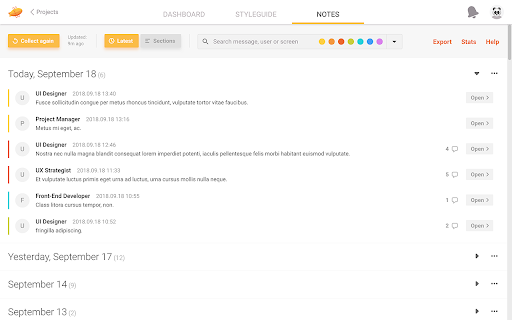
This extension collects all the notes within a Zeplin project and displays them in a filterable list.
As of May 2026, Notes – Organize your Zeplin Comments has 1,000 users and a 4.75/5 rating from 20 reviews in the Workflow & Planning category.
Usersno change0%
1.0K
1,000
Ratingno change0%
4.75
20 reviews
Reviewsno change0%
20
Version
1.4.18
Manifest V3
History
1 snapshotsTracking since Apr 28, 2026.
View as table
| Date | Users | Rating | Reviews | Version |
|---|---|---|---|---|
| Apr 28, 2026 | 1.0K | 4.75 | 20 | 1.4.18 |
| Now | 1.0K | 4.75 | 20 | 1.4.18 |
Permissions & access
- Permissions
- storageunlimitedStorage
- Host access
- http://app.zeplin.io/*, https://app.zeplin.io/*
Screenshots

About
The note list can be exported if you want to reuse it in Google Sheets, and you can also export a screen list if you need a complete catalog of the different screens in the project. Although it can sometimes take a long time to collect all the notes (depending on the project size), it’s still much faster than checking the screens one-by-one, which is a painfully time-consuming task at the moment. Hopefully, this plugin will save you some time and help you to focus on more important tasks!

You can follow me on Twitter for future updates:
https://twitter.com/ptrgal

Check this article on medium if you would like to know the story behind the extension:
https://link.medium.com/y24t4Op4fR

-----

Here's a quick guide to lead you in the right direction:

1. Go to app.zeplin.io
2. Enter a project and click on the "Notes" tab at the top
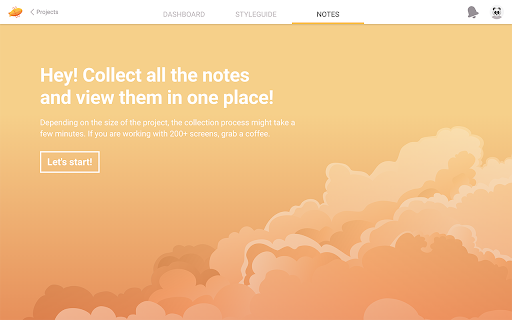
3. Use the "Start" button and wait for the download to finish

That's all. Enjoy!

-----

If you find a bug, drop me an email: [email protected] – Thanks!

-----

Changelog:
# [ 1.4.15 ] – 2022.10.17
– Fixed some navigation issues
– Other smaller fixes

# [ 1.4.14 ] – 2022.06.08
– Removed unused permission from the manifest file
– Exported file now shows the correct colors for each note (blue and purple was missing)

# [ 1.4.13 ] – 2022.06.03
– I kinda abandoned this project earlier, sorry for everyone who expected it to work...
– Fixed navigation that didn't work because of Zeplin code updates
– Updated manifest v2 to manifest v3 (Chrome extension requirement)
– Updated functions to be compatible with manifest v3

# [ 1.4.12 ] – 2020.08.26
– Fixed some navigation related issues caused by Zeplin updates

# [ 1.4.11 ] – 2019.12.27
– Fixed some navigation related issues again
– A bit of code cleanup before the new year (it's still a mess, but it works! :D)

# [ 1.4.10 ] – 2019.09.30
– Fixed some navigation related issues

# [ 1.4.8 and 1.4.9 ] – 2019.06.21
– Fixed: Broken navigation caused by Zeplin update

# [ 1.4.7 ] – 2019.06.13
– "Export Notes" feature now exports all the answers of a note (it only exported the last one previously)

# [ 1.4.5 ] – 2019.05.03
– Fixed: The transparent app icon is now *really* transparent... :D
– The download (collect) process got a better error handling

# [ 1.4.4 ] – 2019.04.09
– Fixed: Modals cannot be scrolled because of a Chrome update

# [ 1.4.3 ] – 2018.12.26
– Minor bugfix of the previous bugfix... yeah, I know. :D

# [ 1.4.2 ] – 2018.12.24
– Minor bugfix related to resolved notes

# [ 1.4.1 ] – 2018.12.11
– Minor bugfix

# [ 1.4.0 ] – 2018.12.10
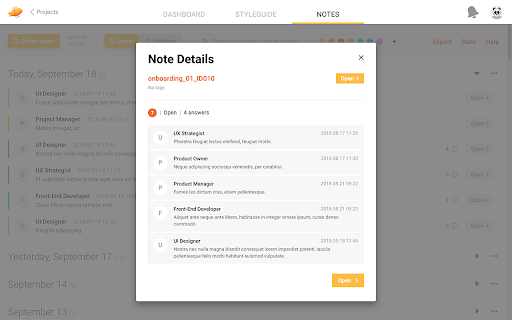
– Note Details modal redesigned
– Added screen preview to Note Details
– Added "Close all / Open all sections" feature to the main Dashboard as well

-----

# [ 1.3.8 ] – 2018.10.08
– New keyboard shortcut: [ ALT + N  ] or [ ⌥N  ] for opening the "Notes" tab

-----

# [ 1.3.7 ] – 2018.10.07
– New Statistics overview

-----

# [ 1.3.4 ] – 2018.09.29
– Added "Last updated" date to Screen Export

-----

# [ 1.3.3 ] – 2018.09.24
– Minor typo changes

-----

# [ 1.3.2 ] – 2018.09.23
– Extension's popup window has been redesigned (extension popups appear when you click on the little icons at the top-right of the window)
– Added "Title" tags to various elements

-----

# [ 1.3.1 ] – 2018.09.17
– UI tweaks for cleaner look
– Added basic search functionality for Messages, Users and Screens
– Filters have been reworked and integrated into the search box
– New keyboard shortcut: [ ESC ] for closing modals
– New keyboard shortcut: [ Ctrl + F ] or [ ⌘F ] for searching
Technical
- Version
- 1.4.18
- Manifest
- V3
- Size
- 218KiB
- Min Chrome
- 88
- Languages
- 1
- Featured
- Yes
Metadata
- ID
- ieimmggcldhfhpanbajijeehhnfhcodl
- Developer ID
- u5fa40bf85c8553275b146bdd1b3d5c33
- Developer Email
- [email protected]
- Created
- Jun 25, 2018
- Last Updated (Store)
- Aug 14, 2024
- Last Scraped
- May 25, 2026
- Website
- —
- Support URL
- —
- Privacy Policy
- https://galpeter.webflow.io/zeplin-notes-privacy-policy
Similar extensions
Alternatives to Notes – Organize your Zeplin Comments, ranked by description similarity.

NoteTab.app
NoteTab.app is a Privacy-First NotePad for Google Chrome with robust context search, themes, and export features.
35

My Canned Notes
A Chrome extension for managing notes and canned responses with advanced customization.
136
★ 5.0

Leaf: Simple Notes
A simple way to create and manage individual notes quickly and efficiently.
30.0K
★ 4.5

Zoho Books Easier Time Tracking
Time tracking for Zoho Books, made easier and more efficient!
216
★ 3.5

Focus Page - Your All-in-One Link Workspace for Work & Life
Your All-in-One Link, Tab, and Bookmark Manager - one place for everything you care about online | Extension & Web App available
31
★ 4.0

Google Keep - Full Screen Edit
Makes note editing take up the full browser window
20.0K
★ 4.6

TaskDrift
TaskDrift — A beautifully simple task manager with smart capture, reminders, themes, history and backup support.
218
★ 5.0

Obsidian Web
Connect your browser with your notes in Obsidian. Obsidian Web is a customizable web clipper for Obsidian with advanced features.
20.0K
★ 4.1
Data sourced from the Chrome Web Store · last verified May 25, 2026.