
InkLayer
Annotate any webpage with a full-page ink canvas. Draw, highlight, and capture with one click.
As of June 2026, InkLayer has 11 users and a 5.00/5 rating from 3 reviews in the Productivity category.
Usersup 22.2 percent+22.2%
11
11
Ratingno change0%
5.00
3 reviews
Reviewsup 200.0 percent+200.0%
3
Version
1.0.0
Manifest V3
History
7 snapshotsTracking since Apr 17, 2026.
View as table
| Date | Users | Rating | Reviews | Version |
|---|---|---|---|---|
| Apr 17, 2026 | 9 | 5.00 | 1 | 1.0.0 |
| May 1, 2026 | 10 | 5.00 | 3 | 1.0.0 |
| May 8, 2026 | 9 | 5.00 | 3 | 1.0.0 |
| May 18, 2026 | 8 | 5.00 | 3 | 1.0.0 |
| May 25, 2026 | — | 5.00 | 3 | 1.0.0 |
| May 31, 2026 | 8 | 5.00 | 3 | 1.0.0 |
| Jun 9, 2026 | 9 | 5.00 | 3 | 1.0.0 |
| Now | 11 | 5.00 | 3 | 1.0.0 |
Permissions & access
- Permissions
- activeTabtabsscriptingclipboardWrite
- Host access
- <all_urls>
Screenshots
About
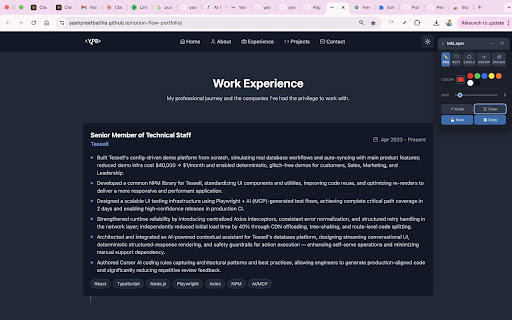
InkLayer overlays a full-page transparent canvas on any website so you can draw, annotate, and capture exactly what you see.

  ✏️  DRAWING TOOLS
  • Freehand pen with smooth bezier strokes
  • Rectangle and circle with live preview
  • Arrow tool with auto-sized arrowhead
  • Eraser

  🎨 STYLING
  • Full color picker + 7 quick-access color presets
  • Brush size 1–30px

  📸 CAPTURE
  • Save — composites the page screenshot with your annotations and downloads a PNG
  • Copy — same composite goes straight to your clipboard

  ↩️  WORKFLOW
  • 30-step undo (Ctrl+Z)
  • Draggable, minimizable floating toolbar
  • Full keyboard shortcuts: F, R, C, A, E for tools

  KEYBOARD SHORTCUTS
  Alt+Shift+A — Toggle on/off
  Ctrl+Z — Undo
  Esc — Close
  F/R/C/A/E — Switch tools
Technical
- Version
- 1.0.0
- Manifest
- V3
- Size
- 29.79KiB
- Min Chrome
- 88
- Languages
- 1
- Featured
- No
Metadata
- ID
- kofehgegddlhbfnkigbegnagfelkcgba
- Developer ID
- ubb77a8a237660ec27573fafc3e738ce7
- Developer Email
- [email protected]
- Created
- Feb 24, 2026
- Last Updated (Store)
- Mar 2, 2026
- Last Scraped
- Jun 9, 2026
- Website
- —
- Support URL
- —
Similar extensions
Alternatives to InkLayer, ranked by description similarity.

Draw on Screen
Draw, highlight, and annotate on any webpage with Draw on Screen — the simplest way to comment as you browse!
3.0K
★ 4.6

QuickPaint - Draw on Any Webpage
Draw freely on any webpage, capture and share your annotated screenshots.
48
★ 1.0

Drawr - Draw and Annotate on Any Webpage
Draw, highlight, add shapes and text to any webpage. Take annotated screenshots with pen, highlighter, arrows, and more.
32
★ 5.0

ScreenDraw Pro
Draw, highlight, blur, and annotate on any webpage with keyboard shortcuts
4

Web Paint Tool - Page Marker & Editor to Draw on web
Draw, annotate, and mark up any web page with a versatile set of drawing tools. Add text, shapes, and highlights to web content.
295
★ 5.0

Draw on Web
Draw and highlight on any website live. Add text, shapes, and lines. Move, undo, or redo your drawings.
50
★ 5.0

DrawOnPage
Draw directly on any webpage to annotate content or doodle for fun.
5

MarkUp - Draw on your website
Draw, highlight, add shapes & more on any webpage in real time!
109
★ 5.0
Data sourced from the Chrome Web Store · last verified Jun 9, 2026.