
Baxter - Email Organizer & Unsubscriber
Unsubscribe, delete, and organize your email in one click. Simple & powerful Gmail add-on
As of June 2026, Baxter - Email Organizer & Unsubscriber has 10,000 users and a 3.84/5 rating from 37 reviews in the Workflow & Planning category.
Usersno change0%
10.0K
10,000
Ratingno change0%
3.84
37 reviews
Reviewsno change0%
37
Version
1.20.4
Manifest V3
90-day change · In the last 90 days this extension 1 version update.
History
2 snapshotsTracking since May 24, 2026.
View as table
| Date | Users | Rating | Reviews | Version |
|---|---|---|---|---|
| May 24, 2026 | 10.0K | 3.84 | 37 | 1.20.1 |
| Jun 7, 2026 | 9.0K | 3.84 | 37 | 1.20.4 |
| Now | 10.0K | 3.84 | 37 | 1.20.4 |
Permissions & access
- Permissions
- storagetabsnotificationsalarmscookies
- Host access
- https://mail.google.com/*, https://usebaxter.com/*, https://chrome.google.com/webstore/*, https://*.usebaxter.com/*, https://*.openai.com/
Screenshots



About
Need to organize your inbox? Baxter, your AI email assistant, is at your service!

As an AI assistant in your Gmail, Baxter helps you clean your Gmail more efficiently than ever before, bringing ChatGPT to your Gmail inbox so you can get through your inbox and respond to the important stuff with ease.

Useful for both personal and professional Gmail accounts!

WHAT BAXTER DOES:

* Gives you a super-powered Unsubscribe button

Baxter adds a foolproof Unsubscribe button to Gmail, so you can unsubscribe from & clean out marketing emails you don't want anymore. Select multiple emails and unsubscribe from them all at the same time!

* Brings ChatGPT to your inbox!

Now, tap into the power of AI and ChatGPT right within Gmail! Need to ask ChatGPT questions about a collection of emails? Just select them from your inbox and Baxter AI lets you ask your preferred AI model about them. No need to copy or paste. You can also summarize those emails with one click, helping you get context on the latest inbox activity and be more productive!

* Adds an AI-powered Dictate Draft button to Gmail!

Easily reply to lengthy emails with Baxter's Dictate Draft feature in Gmail. Just click the 'Dictate Draft' button, conveniently located at the bottom of email threads, and tell Baxter AI how to respond; Baxter's context-aware AI drafts accurate, grammatically correct replies, saving you time and effort!

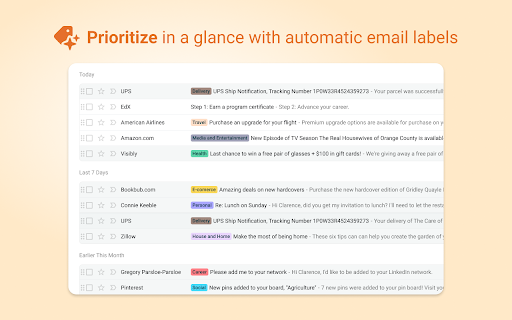
* Automatically organizes your inbox with Labels

Gmail's Labels are great for organization, but it's a pain to label every email manually. That's why Baxter has the ability to label emails automatically for you! :)

If you're using Baxter with a personal email account, your emails can get tagged with useful labels, such as Taxes, Travel, Health, Career, and more, so you can scan your inbox more quickly to read what's important.

And if you're using Baxter to organize a professional Gmail account, you can set up your own custom labels in seconds. Labels help you stay on top of important emails from clients, for certain projects, or any other source of email you can think of.

* Adds a Bulk Remove button to the Gmail interface

If you come across email senders that you want to purge from your inbox, the Bulk Remove button allows you to select and delete ALL emails from them in one click. If you're up against Gmail's storage limits, Bulk Remove is a lifesaver!

And that's not all!

Install Baxter to Google Chrome and connect to your Gmail to experience all of the little ways Baxter makes your inbox cleaner and less stressful.

WHY CHOOSE BAXTER?

No other Chrome Extension and Gmail Plugin offers the powerful simplicity of Baxter. With Baxter, you can Unsubscribe, Delete, and Filter emails from Senders, or entire Domains, right within the Gmail interface. And Baxter's AI tools give you the power of ChatGPT from OpenAI or other LLMs right in your inbox, allowing you to draft emails with your voice, create summaries of multiple emails, and chat with email threads to get insights from AI without opening and scrolling through endless messages.

Have you always wanted to be better at using Folders or Labels? Baxter's powerful labeling engine helps you scan your inbox more quickly. Don't get blinded by the mass of marketing emails in your inbox every morning; color-coded labels and folders, automatically applied by Baxter, act as visual cues so you can pay attention to what matters most.

When it comes to Unsubscribing, Deleting marketing emails, Organizing your inbox, or Automatically Labeling and categorizing, Baxter is a convenient and simple solution that elevates your Gmail experience.

Baxter has been officially verified by Google's 3rd party security partners. No data is kept or sold by Baxter.
Technical
- Version
- 1.20.4
- Manifest
- V3
- Size
- 6.11MiB
- Min Chrome
- 88
- Languages
- 1
- Featured
- No
Metadata
- ID
- kofcedljghienfpkfmdaadpafepbhifl
- Developer ID
- u6eea8681b477a82a8898d5ee4c58adad
- Developer Email
- [email protected]
- Created
- Jun 30, 2022
- Last Updated (Store)
- May 8, 2026
- Last Scraped
- Jun 12, 2026
- Website
- usebaxter.com
- Support URL
- https://www.usebaxter.com/faq
- Privacy Policy
- https://usebaxter.com/privacy-policy
Similar extensions
Alternatives to Baxter - Email Organizer & Unsubscriber, ranked by description similarity.

Gmail Unsubscribe - bulk email unsubscription
Unsubscribe from all unwanted emails in bulk with one click. Take back control of your inbox! From the makers of Baxter.
20.0K
★ 2.9

Gmail Unsubscribe Tool by Trimbox
Unsubscribe from email lists in just 1 click with Trimbox for Gmail. The fastest way to stop spam emails and clean your inbox.
60.0K
★ 4.5

Gmail Label & Filter Manager
Manage Gmail labels and filters in a sidebar. Create, edit, delete labels; manage filters; store keywords with tags for reuse.
186
★ 3.6

Gmelius: Shared Inboxes & AI Email Assistants for Gmail
Save 1 hour daily: AI Assistants sort your emails, draft replies & shared inboxes let your team take over conversations for you.
50.0K
★ 4.6

ActiveInbox: Organize Gmail™ tasks
Overwhelmed by too many to-dos in your inbox? Turn Gmail into an effortless task manager to never forget anything.
10.0K
★ 4.7

RightInbox: Email Reminders, Tracking, Notes
Send emails later, recurring emails, notes, follow up emails, templates, signatures, CRM & more
100.0K
★ 4.7

Mass Unsubscribe Gmail
Clean email instantly with Mass Unsubscribe for Gmail. Manage subscriptions, unsubscribe mass emails & cleanup your inbox fast.
319
★ 5.0

Gmail-GPT
Automate Professional Email Reply Creation with Gmail-GPT's voice-powered email technology
1.0K
★ 4.6
Data sourced from the Chrome Web Store · last verified Jun 12, 2026.