
Quick Book AutoFill
One-click ultra-fast IRCTC form autofill — station autocomplete, multiple journey & passenger profiles
As of June 2026, Quick Book AutoFill has 812 users and a 4.78/5 rating from 9 reviews in the Productivity category.
Usersup 93.8 percent+93.8%
812
812
Ratingup 1.5 percent+1.5%
4.78
9 reviews
Reviewsup 28.6 percent+28.6%
9
Version
2.1.0
Manifest V3
90-day change · In the last 90 days this extension 1 version update.
History
11 snapshotsTracking since Apr 1, 2026.
View as table
| Date | Users | Rating | Reviews | Version |
|---|---|---|---|---|
| Apr 1, 2026 | 419 | 4.71 | 7 | 2.0.1 |
| Apr 17, 2026 | 420 | 4.71 | 7 | 2.0.1 |
| Apr 22, 2026 | 436 | 4.75 | 8 | 2.0.1 |
| Apr 27, 2026 | 498 | 4.75 | 8 | 2.0.1 |
| May 4, 2026 | 570 | 4.75 | 8 | 2.0.1 |
| May 10, 2026 | 609 | 4.78 | 9 | 2.0.1 |
| May 15, 2026 | 630 | 4.78 | 9 | 2.0.1 |
| May 21, 2026 | 665 | 4.78 | 9 | 2.1.0 |
| May 28, 2026 | 717 | 4.78 | 9 | 2.1.0 |
| Jun 4, 2026 | 738 | 4.78 | 9 | 2.1.0 |
| Jun 10, 2026 | 773 | 4.78 | 9 | 2.1.0 |
| Now | 812 | 4.78 | 9 | 2.1.0 |
Changelog
- May 15, 2026short_description
One-click ultra-fast IRCTC form autofill — multiple journey & passenger profiles
One-click ultra-fast IRCTC form autofill — station autocomplete, multiple journey & passenger profiles
Permissions & access
- Permissions
- storageactiveTabscriptingtabs
- Host access
- https://www.irctc.co.in/*
Screenshots



About
⚡ Quick Book AutoFill automates your entire IRCTC train booking in one click.

✅ WHAT IT DOES
- Fills the Search Form (From, To, Date, Class, Quota)
- Finds your train on the Train List and clicks Book Now
- Fills all Passenger details, Contact and Payment
- Clicks Continue for you — all 3 steps, automatically

🗺 MULTIPLE JOURNEY PROFILES
Save as many journeys as you want — each with station names, travel date, train number, class and quota. Switch between them from a dropdown.

👥 MULTIPLE PASSENGER PROFILES
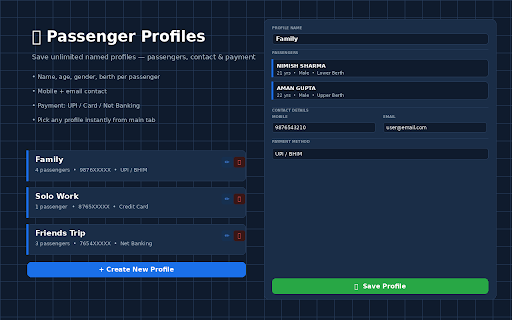
Save multiple named profiles — each stores all passengers (name, age, gender, berth), your mobile, email, and preferred payment method (UPI, Card, Net Banking).

🚀 SMART FILL
One button detects which IRCTC page you are on and fills it correctly — Search, Train List or Passenger Form.

⚡ AUTO MODE
Turn on Auto Mode before clicking Smart Fill. The extension will automatically continue to the next page — Train List → Passenger Form — without you doing anything more.

Important: Auto Mode only fires after YOU click Smart Fill. It never triggers on its own when you browse IRCTC normally.

🔒 PRIVACY
All your data is stored locally on your device using Chrome storage. Nothing is sent to any server.
Technical
- Version
- 2.1.0
- Manifest
- V3
- Size
- 37.07KiB
- Min Chrome
- 88
- Languages
- 1
- Featured
- No
Metadata
- ID
- knndcegmilobcbdhgibafbnlaolgekhn
- Developer ID
- u95aa6546c2054a4dded52e362f74c000
- Developer Email
- [email protected]
- Created
- Jan 15, 2026
- Last Updated (Store)
- May 11, 2026
- Last Scraped
- Jun 10, 2026
- Website
- —
- Support URL
- —
Similar extensions
Alternatives to Quick Book AutoFill, ranked by description similarity.

IRCTC Fast Ticket Booker
Auto-fills IRCTC passenger details for General and Tatkal ticket booking using saved data
4.0K
★ 4.1

Jhatkal - Tatkal helper for IRCTC
Legally speed up IRCTC Tatkal booking by managing passenger profiles and manual autofill.
1.0K
★ 4.3

IRCTC Ticket Now
IRCTC fast ticketing extension
3.0K
★ 2.8

QuickForm - Autofill & Form Filler
Record any form once, autofill it forever in one click. Works on React & complex web apps. Free, private, no account needed.
50.0K
★ 4.4

Easy AutoFill Forms With 1 Click - Any Website
Save form data and autofill it when needed.
130

SmartFill Pro
AI-powered form autofill with profile management
13
★ 5.0

Auto Fill Input Form
Smart form filler with auto-suggestions and context menu integration.
26
★ 5.0

ApplyBuddy Smart Form Autofiller
Intelligent Google Forms autofill extension that learns from your data. AI-powered field detection for forms and surveys.
105
★ 5.0
Data sourced from the Chrome Web Store · last verified Jun 10, 2026.