
SparkVault NextGEN Extensions Manager
Next-generation themed dashboard to search, favorite, and manage your browser extensions.
As of June 2026, SparkVault NextGEN Extensions Manager has — users in the Workflow & Planning category.
Usersno change0%
—
—
Ratingno change0%
—
— reviews
Reviewsno change0%
—
Version
1.0.1
Manifest V3
History
7 snapshotsTracking since Apr 20, 2026.
View as table
| Date | Users | Rating | Reviews | Version |
|---|---|---|---|---|
| Apr 20, 2026 | 2 | — | — | 1.0.1 |
| Apr 25, 2026 | 2 | — | — | 1.0.1 |
| May 3, 2026 | 2 | — | — | 1.0.1 |
| May 9, 2026 | — | — | — | 1.0.1 |
| May 14, 2026 | 2 | — | — | 1.0.1 |
| May 23, 2026 | 1 | — | — | 1.0.1 |
| Jun 2, 2026 | 2 | — | — | 1.0.1 |
| Now | — | — | — | 1.0.1 |
Permissions & access
- Permissions
- management
- Host access
- None declared
Screenshots




About
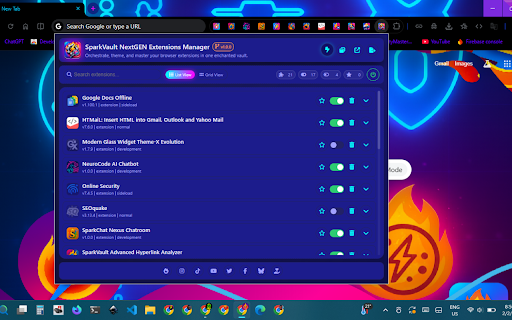
SparkVault NextGEN Extensions Manager is an advanced browser extension designed to transform how users manage and interact with their browser extensions. It offers a vibrant, themed dashboard that consolidates all installed extensions into a single, dynamic interface, making it easy and enjoyable to search, organize, activate, and customize extensions. By leveraging the browser’s management API, SparkVault dynamically lists every extension and enables users to toggle, favorite, and control them individually, while also customizing the dashboard’s appearance with a variety of visually striking themes.

The design reflects modern desktop environments by presenting extensions with clear iconography, detailed descriptions, and interactive controls. Whether you have dozens of extensions to manage or prefer a cleaner, more organized toolkit, SparkVault combines utility and aesthetics seamlessly. Users can access the dashboard either in a full browser tab or a maximized popup window, both equipped with smart search and filtering capabilities to quickly locate any extension.

SparkVault’s interface showcases context-aware icons and instant enable/disable switches, distinguishing between installed and development extensions, and displaying permission information for each. The “starred” feature allows users to mark essential extensions for quick access and prioritization. A unique aspect of SparkVault is its highly customizable theme palette, offering options such as “Neon Arcane Glow,” “Aurora Veil,” and “Magic Frost,” enabling users to tailor the dashboard’s mood and ambiance according to preference.

The extension is styled with modern CSS and enhanced by FontAwesome icons to create a visually rich and responsive user experience. It operates entirely on the user’s device without collecting personal browsing data, relying solely on official browser APIs for privacy and security while providing extensive user-centric controls. Preferences—including starred extensions and chosen themes—are stored locally, ensuring a personalized and consistent experience every time you use it.

SparkVault NextGEN Extensions Manager is ideal for both power users managing extensive extension collections and casual users seeking a more refined extension management solution. It delivers next-level clarity, control, and style, making your browser extension ecosystem more accessible and visually appealing.

Key Features:
- Unified Dashboard: Consolidates all extensions into one interactive dashboard featuring icons, descriptions, and toggle controls.
- Dynamic Themes: Offers over a dozen visually rich themes, such as Neon, Aurora, Forest, and Lava, allowing users to personalize the dashboard’s look.
- Rapid Extension Search: Provides live search and filtering for instant location of any installed extension.
- Starred/Favorite Extensions: Allows starring of key extensions to facilitate quick access and organization.
- Enable/Disable Controls: Lets users instantly activate, deactivate, or uninstall extensions within the dashboard.
- Deep Integration: Utilizes Chrome’s management API for accurate, real-time extension management.
- Launch Options: Supports opening the dashboard in a browser tab or a maximized popup window for flexible workflow.
- Install Type Awareness: Differentiates between regular and development extensions, displaying detailed permission information.

How It Works:
1. Install SparkVault NextGEN Extensions Manager from the browser’s extension store.
2. Click the SparkVault icon in the browser toolbar to launch the dashboard interface.
3. View all installed extensions displayed with their icons, names, descriptions, and status toggles.
4. Use the search bar to quickly find specific extensions by name or keyword.
5. Star your favorite or most-used extensions for easier identification and access.
6. Enable, disable, or uninstall extensions instantly with one-click controls.
7. Switch between an array of stunning dashboard themes with a single click to customize your workspace.

Privacy: - No personal data collected. SparkVault only interacts with extension data through browser APIs and stores user preferences locally to provide a customized experience.
Technical
- Version
- 1.0.1
- Manifest
- V3
- Size
- 10.33MiB
- Min Chrome
- 88
- Languages
- 1
- Featured
- No
Metadata
- ID
- kmnlgbohnacfkjgclfikkkiggdnebkme
- Developer ID
- uda631cef5ddd3689b035602c9b38fe3c
- Developer Email
- [email protected]
- Created
- Feb 5, 2026
- Last Updated (Store)
- Feb 12, 2026
- Last Scraped
- Jun 10, 2026
- Support URL
- —
- Privacy Policy
- —
Similar extensions
Alternatives to SparkVault NextGEN Extensions Manager, ranked by description similarity.

SparkVault NextGEN Elite Extensions Manager
Elite-level extension control with fast enable/disable, permission visibility, and smart management tools.
1
★ 5.0

SparkVault NextGEN Downloads Manager
Intelligent, theme-powered control for every download in your vault.
1

SparkVault NextGEN Elite Downloads Manager
Elite downloads control with fast filtering, sorting, statuses, and file-type icons — directly in your browser.
1

SparkVault NextGEN Elite Tab Group Manager
Elite-level control for browser tab groups with smart layouts, themes, and auto-launch magic.
3

SparkVault NextGEN Elite Tab Manager
Elite tab control with bookmarking, fast actions, and live SEO insights for every open site.
1

SparkVault Extension Manager
Manage your Browser Extensions efficiently.
4
★ 4.9

SparkVault NextGEN Bookmarks Manager
Hyper-organized, theme-powered bookmarking for power users, with direct Chrome bookmarks management.
2

SparkVault NextGEN Advanced To-Do List
An advanced category-based to-do list manager with priorities, progress tracking, and theme switching.
—
Data sourced from the Chrome Web Store · last verified Jun 10, 2026.