
Tab manager
Take control over your tabs
As of May 2026, Tab manager has — users in the Workflow & Planning category.
Usersno change0%
—
—
Ratingno change0%
—
— reviews
Reviewsno change0%
—
Version
1.0
Manifest V3
Permissions & access
- Permissions
- tabsactiveTab
- Host access
- None declared
Screenshots
About
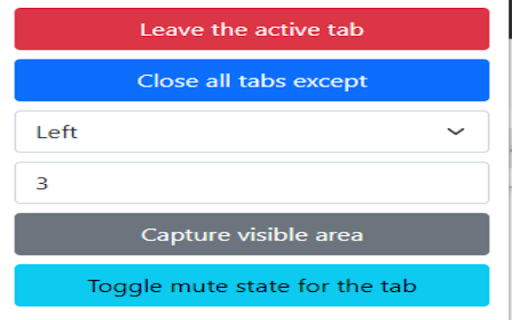
Following functionalities are available:
- closing all tabs, and leaving only an active one. This can be useful if you have nearly 20 tabs, but want to close them all
- closing all tabs, except a few from left or right. The difference between the previous one is that this option allows to specify amount of remaining tabs from right or left side.
- capturing visible area. By clicking this button you would get a screenshot of the visible part that can be saved (right click > save image).
- muting a tab. An active tab where you click this button will be muted, and you won't hear any voice. One may say: Chrome has the built in functionality for this (Mute site). True, although if you have 2 tabs with the same URL both of them will be muted; the extension allows to escape it.
Technical
- Version
- 1.0
- Manifest
- V3
- Size
- 35.05KiB
- Min Chrome
- 88
- Languages
- 1
- Featured
- No
Metadata
- ID
- kjoeeikfkfeheocpljboecpekjdolfjh
- Developer ID
- u9cb3009eed1ba0873cd3b642b0ce0f2c
- Developer Email
- [email protected]
- Created
- May 17, 2022
- Last Updated (Store)
- May 17, 2022
- Last Scraped
- May 29, 2026
- Website
- —
- Support URL
- —
- Privacy Policy
- —
Similar extensions
Alternatives to Tab manager, ranked by description similarity.

Mute all Tabs (M3)
Mute tabs by default and create a whitelist. This Version is ready for Manifest 3.
45
★ 5.0

Klaffer
Google Chrome extension for manage tabs
4

Mute Tab
Convenient and fast to 'Mute Tab'
1.0K
★ 5.0

Close All Tabs
Find out how to close all tabs in chrome with one click. Delete, remove, clear, and close all tabs at once in google easily!
1.0K
★ 4.9

Minimalist Tab Closer
Closes all tabs except the current one with Option+W
10

Lazy Chrome
Toggle pin tab, duplicate tab, mute tab and more in your custom keyboard shortcuts
346
★ 4.3

Lockin
Stay locked in to a particular tab, set limits on how many tabs you can have open, ban sites.
5
★ 5.0

Tablyt
Quickly access tabs, bookmarks, history, and context-aware actions through a command-palette.
47
★ 5.0
Data sourced from the Chrome Web Store · last verified May 29, 2026.