
Zero(formerly ID Guard Offline)
Fill passwords safely in browsers with the most secure password manager extension Zero(formerly ID Guard Offline).
As of June 2026, Zero(formerly ID Guard Offline) has 299 users and a 5.00/5 rating from 5 reviews in the Workflow & Planning category.
Usersup 0.3 percent+0.3%
299
299
Ratingno change0%
5.00
5 reviews
Reviewsno change0%
5
Version
2025.06
Manifest V3
History
5 snapshotsTracking since Apr 20, 2026.
View as table
| Date | Users | Rating | Reviews | Version |
|---|---|---|---|---|
| Apr 20, 2026 | 298 | 5.00 | 5 | 2025.06 |
| May 5, 2026 | 293 | 5.00 | 5 | 2025.06 |
| May 15, 2026 | 284 | 5.00 | 5 | 2025.06 |
| May 29, 2026 | 314 | 5.00 | 5 | 2025.06 |
| Jun 9, 2026 | 297 | 5.00 | 5 | 2025.06 |
| Now | 299 | 5.00 | 5 | 2025.06 |
Permissions & access
- Permissions
- contextMenusstorage
- Host access
- wss://link.bluespace-apps.com:21081/, wss://link.bluespace-labs.com/
Screenshots

About
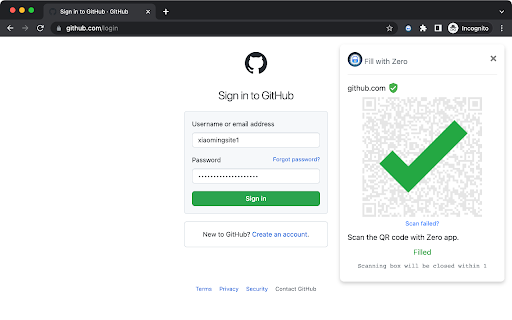
Autofill your password in browser by scanning QR code with Zero(formerly ID Guard Offline) app on your phone.

How does it work?

1. A QR code will show up when you open a web page with a login form.
2. Open Zero app(not this extension) on your phone and scan the QR code.
3. Choose the account.
4. Your login form on the web page will be filled automatically.

How secure is it?

When filling password from your phone to the web page, your password is encrypted with a one time encryption key known only by this extension and the app on your phone. It can never be decrypted during the transmission on Internet.

Unlike most password manager extensions, this extension does not save any passwords. Your passwords are stored on your smartphone with security chip and sandbox protection. No password can be sent to the browser automatically unless you scan the QR code with the app on your smartphone. That means, no malicious desktop program or website can steal your passwords without your awareness.
Technical
- Version
- 2025.06
- Manifest
- V3
- Size
- 261KiB
- Min Chrome
- 88
- Languages
- 2
- Featured
- No
Metadata
- ID
- kimpaankoiokddpaghgclckecbeogifh
- Developer ID
- u1f005b429ad421280f41dceebc26332b
- Developer Email
- [email protected]
- Created
- Aug 4, 2020
- Last Updated (Store)
- Jun 21, 2025
- Last Scraped
- Jun 9, 2026
- Website
- —
- Support URL
- https://www.bluespace.tech/
- Privacy Policy
- https://www.bluespace.tech/index.html
Similar extensions
Alternatives to Zero(formerly ID Guard Offline), ranked by description similarity.

Freemindtronic Extension
For data encryption and auto login to websites. Compatible with NFC products using Freemindtronic® technology.
220
★ 3.7

TapSafe Extension
Manager your password easily
4

Autofill Vault - Password Manager
Store login credentials locally and autofill login forms on supported websites.
5
★ 5.0

2! Authenticator
The private, offline 2FA Authenticator. Import accounts from mobile apps and generate TOTP codes securely
10.0K
★ 3.9
mSecure
Companion browser extension for mSecure that provides auto-login features in your web browser.
3.0K
★ 2.1
NoMorePass : Forget your passwords
Use your mobile phone to log into your websites.
227
★ 4.7

Auto Login - UM Sites
Login Automatically
2

Autofillr Copilot: Autofill Job & other Forms
Autofillr is an autofill extension aiming to save you time doing repetitive work
1.0K
★ 3.5
Data sourced from the Chrome Web Store · last verified Jun 9, 2026.