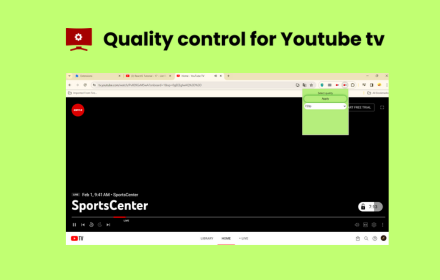
Quality control for Youtube tv
Enhance viewing in a single click!Effortlessly control video quality and elevate YouTube TV experience.
As of June 2026, Quality control for Youtube tv has 129 users in the Productivity category.
Usersup 19.4 percent+19.4%
129
129
Ratingno change0%
—
— reviews
Reviewsno change0%
—
Version
1.0.1
Manifest V3
History
3 snapshotsTracking since Apr 23, 2026.
View as table
| Date | Users | Rating | Reviews | Version |
|---|---|---|---|---|
| Apr 23, 2026 | 108 | — | — | 1.0.1 |
| May 12, 2026 | 105 | — | — | 1.0.1 |
| Jun 7, 2026 | 97 | — | — | 1.0.1 |
| Now | 129 | — | — | 1.0.1 |
Permissions & access
- Permissions
- storageactiveTabtabs
- Host access
- None declared
Screenshots

About
Tired of constantly adjusting video settings on YouTube TV? Install our 'Quality Control for YouTube TV' Chrome extension 🛠️ for easily adjusting video quality settings 🎚️ to enjoy enhanced viewing 👀 of any YouTube content. Whether you're catching up on your favorite series 📺, exploring new content 🔍, or streaming live events 🎉, our extension makes it seamless and enjoyable. 🚀

Key Features of Quality control for youtube tv chrome extension

1. Easy Activation: A simple click or shortcut to enable PiP mode directly from YouTube TV.
 2. Resizable Window: Allow users to adjust the size of the PiP window to their preference.
 3. Customizable Positioning: Enable users to drag and place the PiP window anywhere on the screen.
 4. Playback Controls: Integrate basic controls like play, pause, and skip within the PiP window.
 5. Auto-Adjustment: The PiP window could automatically move or resize during tasks like opening new tabs or applications to avoid obstruction..
 6. Multi-Screen Support: Compatibility with multiple monitors for users working with extended displays.
 8. Auto-Pause on Tab Change: Automatically pause the video when the user switches tabs or windows.
 9. Quality Adjustment: Ability to change the video quality within the PiP mode.
 10. Favorites and Playlist Integration: Quick access to favorite channels or playlists directly from the PiP interface.

How to use:-

Open your Google Chrome browser and navigate to the Chrome Web Store.
In the Chrome Web Store, use the search bar to find the "Quality Control for YouTube TV" extension.
Click on the extension in the search results. Then, press the "Add to Chrome" button to initiate the installation.
Once installed, the "Quality Control for YouTube TV" extension icon will appear in the top right corner of your Chrome browser.
If you are an Indian user, you need to install VPN extension also and select the country USA . (https://chromewebstore.google.com/detail/free-vpn-for-chrome-vpn-p/majdfhpaihoncoakbjgbdhglocklcgno)
Open YouTube and select any video of your choice to play.
While your chosen video is playing, click on the extension icon in your browser.
A menu will appear, providing various quality options for your video. Select your desired video quality.
With your preferred quality selected, you can now enjoy an enhanced, high-definition streaming experience on YouTube.
Technical
- Version
- 1.0.1
- Manifest
- V3
- Size
- 13.59KiB
- Min Chrome
- 88
- Languages
- 1
- Featured
- No
Metadata
- ID
- khpbggnohkbinboodkfipackaacdefcn
- Developer ID
- u42ad88a582d3bccb3c81eb74db0ffb66
- Developer Email
- [email protected]
- Created
- Feb 2, 2024
- Last Updated (Store)
- Feb 2, 2024
- Last Scraped
- Jun 7, 2026
- Website
- —
- Support URL
- —
Similar extensions
Alternatives to Quality control for Youtube tv, ranked by description similarity.

PiP for YouTube TV
Watch YouTube TV in a floating Picture-in-Picture window. Auto-pops on tab switch, keyboard shortcut supported.
807
★ 1.0
Default Quality Adjuster for YouTube™
Easily set your preferred default video quality for YouTube™
6.0K
★ 4.2

YouTube Auto HD - Automatic HD for YouTube
YouTube Auto HD: YouTube automatically adjusts video quality, manages subtitles and audio settings.
447
★ 1.0

YTResSet
Set custom video resolutions for YouTube channels. Control your viewing experience and avoid buffering issues.
7
★ 5.0

YT Enhancer
YouTube power tools: speed, volume boost, quality, filters, cinema mode, and more.
474
★ 3.0

YouTube Enhancer
YouTube Enhancer is a simple extension that adds some useful features to YouTube.
2.0K
★ 4.5

Auto Max Quality Pro
Automatically switches YouTube & Other videos to the highest/selected available quality.
1.0K
★ 4.9

Youtube Pip Picture in Picture & Floating Video Player
Youtube Pip Picture in Picture & Floating Video Player. Open active video in Picture-in-Picture
149
Data sourced from the Chrome Web Store · last verified Jun 7, 2026.