
YouTube Auto HD - Automatic HD for YouTube
YouTube Auto HD: YouTube automatically adjusts video quality, manages subtitles and audio settings.
As of May 2026, YouTube Auto HD - Automatic HD for YouTube has 447 users and a 1.00/5 rating from 4 reviews in the Productivity category.
Usersdown 1.3 percent−1.3%
447
447
Ratingno change0%
1.00
4 reviews
Reviewsno change0%
4
Version
2.0
Manifest V3
History
3 snapshotsTracking since Apr 1, 2026.
View as table
| Date | Users | Rating | Reviews | Version |
|---|---|---|---|---|
| Apr 1, 2026 | 453 | 1.00 | 4 | 2.0 |
| May 1, 2026 | 474 | 1.00 | 4 | 2.0 |
| May 31, 2026 | 464 | 1.00 | 4 | 2.0 |
| Now | 447 | 1.00 | 4 | 2.0 |
Permissions & access
- Permissions
- storageactiveTab
- Host access
- https://www.youtube.com/*, https://chrome-extesions.com/*
Screenshots

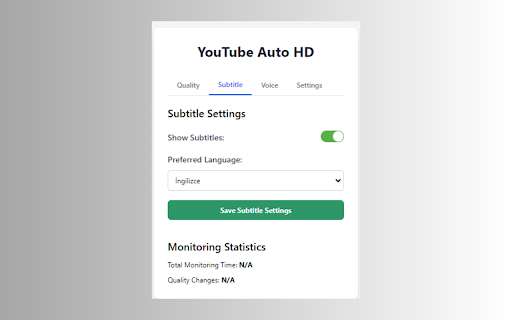


About
YouTube Auto HD is a powerful Chrome extension that automatically optimizes your YouTube experience.

YouTube Auto HD here are its key features:

🎥 Auto Quality Adjustment: Selects the optimal video quality based on your internet speed.
🔧 Manual Quality Control: Set your preferred quality manually if desired.
📊 Adaptive Performance: Automatically adjusts video quality as your internet speed changes.
🌐 Subtitle Management: Automatically enables subtitles in your preferred language.
🔊 Audio Control: Offers automatic volume adjustment and mute mode features.
📈 Viewing Statistics: Tracks your total watch time and quality changes.

YouTube Auto HD is designed to maximize every video watching experience. Whether you have a fast or slow internet connection, this extension picks the best quality for you, so you can focus solely on the content.

With its user-friendly interface, you can customize your settings, enable manual quality selection, or switch to fully automatic mode. Set your subtitle and audio preferences once, and let the extension handle the rest!

Try Auto YouTube HD now for a smoother, higher quality, and personalized viewing experience on YouTube!

----------------------------------------------------------------------------------------------

How It Works:

🔌 1. Install the YouTube Auto HD extension from the Chrome Web Store.
🎥 2. Navigate to any YouTube video page.
🚀 3. The extension automatically detects your internet speed and sets the optimal video quality.
🎛️ 4. Use the extension popup to manually select quality or adjust settings if you prefer.
🍿 5. Sit back and enjoy your videos in the best possible quality!

Advanced Features:

🔄 Automatic quality adjustment every 30 seconds
🌍 Subtitle language preferences applied automatically
🔊 Seamless audio settings management
📊 View your watching statistics in the extension popup
🏆 YouTube Auto HD works silently in the background, ensuring you always get the best viewing experience without any hassle. Whether you're a casual viewer or a Auto YouTube HD enthusiast, this extension is designed to enhance your viewing experience effortlessly.

⬇️ Download YouTube Auto HD now and transform your YouTube watching experience!
Technical
- Version
- 2.0
- Manifest
- V3
- Size
- 347KiB
- Min Chrome
- 88
- Languages
- 19
- Featured
- Yes
Metadata
- ID
- bcdpampngmloakedpagolicejhdflkhb
- Developer ID
- ub53a1ddbe801d894c76b5a0a96b5fc33
- Developer Email
- [email protected]
- Created
- Oct 17, 2024
- Last Updated (Store)
- Oct 17, 2024
- Last Scraped
- May 31, 2026
- Privacy Policy
- https://chrome-extesions.com/privacy-policy.html
Similar extensions
Alternatives to YouTube Auto HD - Automatic HD for YouTube, ranked by description similarity.

Auto 4K
Automatic YouTube video quality & resolution selector: Auto 4K, 8K, HD playback settings.
10.0K
★ 4.7
Default Quality Adjuster for YouTube™
Easily set your preferred default video quality for YouTube™
6.0K
★ 4.2

Auto Max Quality Pro
Automatically switches YouTube & Other videos to the highest/selected available quality.
1.0K
★ 4.9
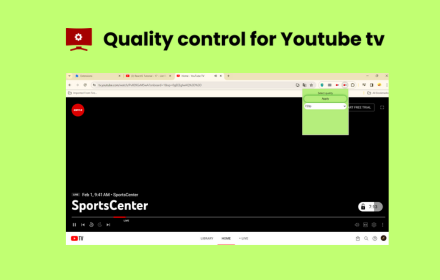
Quality control for Youtube tv
Enhance viewing in a single click!Effortlessly control video quality and elevate YouTube TV experience.
129

YTResSet
Set custom video resolutions for YouTube channels. Control your viewing experience and avoid buffering issues.
7
★ 5.0

YT Enhancer
YouTube power tools: speed, volume boost, quality, filters, cinema mode, and more.
474
★ 3.0

YouTube Ad Auto Skipper
Auto-skips and mutes YouTube ads with customizable timing for different channels. No ad blocking.
106
★ 3.0

Enhancer for YouTube™
Take control of YouTube and boost your user experience!
1.0M
★ 4.7
Data sourced from the Chrome Web Store · last verified May 31, 2026.