
QwkAsk Tab Manager
Re-uses any existing AI chat or search tab and pastes the QwkAsk prompt for you.
As of June 2026, QwkAsk Tab Manager has 2 users in the Productivity category.
Usersdown 50.0 percent−50.0%
2
2
Ratingno change0%
—
— reviews
Reviewsno change0%
—
Version
0.3.1
Manifest V3
History
4 snapshotsTracking since Apr 18, 2026.
View as table
| Date | Users | Rating | Reviews | Version |
|---|---|---|---|---|
| Apr 18, 2026 | 4 | — | — | 0.3.1 |
| May 2, 2026 | 3 | — | — | 0.3.1 |
| May 24, 2026 | 2 | — | — | 0.3.1 |
| Jun 5, 2026 | — | — | — | 0.3.1 |
| Now | 2 | — | — | 0.3.1 |
Permissions & access
- Permissions
- tabsscriptingclipboardWriteactiveTab
- Host access
- https://chat.openai.com/*, https://chatgpt.com/*, https://claude.ai/*, https://gemini.google.com/*, https://chat.mistral.ai/*, https://*.perplexity.ai/*, https://www.google.com/*, https://www.bing.com/*, https://pi.ai/*, https://andisearch.com/*, https://www.meta.ai/*, https://you.com/*, https://komo.ai/*, https://app.reka.ai/*, https://poe.com/*, https://www.phind.com/*, https://qwkask.ai/*
Screenshots

About
QwkAsk Tab Manager — reuse provider tabs & paste prompts

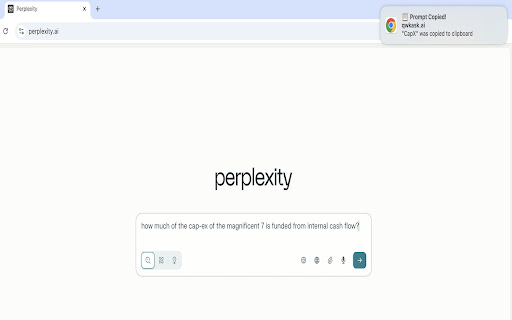
Speed up your AI workflow. When you click a QwkAsk prompt link, this extension:
- Reuses an existing tab for the target provider (no more duplicate tabs)
- Pastes the prompt into the provider's composer/search box
- Keeps your current chat when possible (no forced "new chat")
- Falls back to the clipboard if pasting isn't possible, so you can just ⌘/Ctrl‑V
- Closes the intermediate /c tab quickly so you stay focused

Works automatically with popular AI assistants and search engines when you open QwkAsk embeddings. If the extension isn't installed, your normal clipboard redirect still works.

How it works:
1. You click a QwkAsk embedding
2. QwkAsk copies the prompt and hands off to this extension
3. The extension finds (or opens) the right provider tab, focuses it, and injects/pastes the prompt
4. If injection isn't possible on that page, the prompt stays on your clipboard as a safe fallback

Why you'll like it:
- No tab clutter: reuse the tab you already have open
- No lost context: we avoid starting a new conversation when a site allows it
- Fast: closes the temporary redirect tab automatically

Permissions we request (and why):
- tabs – find and focus an existing provider tab, or open one when needed
- scripting – run a small script to paste text into the site's composer box
- clipboardWrite – keep the prompt on your clipboard as a fallback
- activeTab – standard MV3 needs

Privacy:
- No data leaves your device
- The extension does not send analytics, logs, or prompts to our servers
- QwkAsk (the website) may record that you clicked a prompt link (for routing/reliability). That's separate from this extension

Troubleshooting:
- Make sure you're signed in to each provider
- If another extension also modifies the composer, disable it and try again
- If you see the prompt on your clipboard but not in the box, just paste manually (⌘/Ctrl‑V) — that's the designed fallback

Support: [email protected]

This extension is not affiliated with any third-party AI service providers.
Technical
- Version
- 0.3.1
- Manifest
- V3
- Size
- 71.77KiB
- Min Chrome
- 88
- Languages
- 1
- Featured
- No
Metadata
- ID
- kgohjkobcneifkgefeghofjdlmdbmcoa
- Developer ID
- u4e587484d7c49887fa066d6a208519aa
- Developer Email
- [email protected]
- Created
- Aug 2, 2025
- Last Updated (Store)
- Oct 6, 2025
- Last Scraped
- Jun 5, 2026
- Website
- qwkask.ai
- Support URL
- https://qwkask.ai/about
- Privacy Policy
- —
Similar extensions
Alternatives to QwkAsk Tab Manager, ranked by description similarity.

Highlight2Prompt
Highlight any text → choose a prompt (Explain, Expand, Fact Check, or custom) → send it to your favorite AI
6

Quick Ask AI
Select text and ask with AI assistants
18

PromptMaktaba
Instant access to your prompt library from any AI platform
—

AI Prompt Injector
Manage and insert prompts into AI chat interfaces
52
★ 5.0

AI Chat Prompt Navigator
Navigate, search, and export your prompts in AI chat applications (Claude, ChatGPT and Gemini)
7
★ 5.0

PromptEditor: Markdown Sidebar for AI Prompts
Stop copy-pasting. Edit AI responses in a Markdown sidebar, fill placeholders, set variables, and send to ChatGPT, Claude & Gemini.
65
★ 4.3

Aurenix.ai Prompt Builder
Redefine prompts and auto-paste into chat models.
29
★ 5.0

Prompt Archer - AI Prompt Manager & System Prompt Injector
1 click prompt injection and management for LLM Chat apps.
99
★ 5.0
Data sourced from the Chrome Web Store · last verified Jun 5, 2026.