
mCoffee
Launch bookmarks based on rules.
As of May 2026, mCoffee has 622 users and a 4.80/5 rating from 10 reviews in the Workflow & Planning category.
Usersdown 4.7 percent−4.7%
622
622
Ratingno change0%
4.80
10 reviews
Reviewsno change0%
10
Version
1.5.5
Manifest V3
History
2 snapshotsTracking since Apr 24, 2026.
View as table
| Date | Users | Rating | Reviews | Version |
|---|---|---|---|---|
| Apr 24, 2026 | 653 | 4.80 | 10 | 1.5.5 |
| May 21, 2026 | 638 | 4.80 | 10 | 1.5.5 |
| Now | 622 | 4.80 | 10 | 1.5.5 |
Permissions & access
- Permissions
- bookmarkstabstabGroups
- Host access
- None declared
Screenshots


About
mCoffee
=======
This is my take on the extension Morning Coffee from Firefox, which allows you to launch bookmarks based on the day of the week. I wrote this extension for my own use, and am sharing it in case anyone finds it useful.

Instructions
==========
1) create a folder named "mCoffee". If you have multiple folders with the same name, It will only process the first one found. If the bookmark folder "mCoffee" is not found, the icon will turn red. Clicking on the extension will then launch a new tab to https://sites.google.com/view/extension-mcoffee/home.

2) Under the "mCoffee" folder, you can create the following subfolders (create only folders that you use, i.e. you don't need to create "Tue" if you don't have Tuesday specific items to launch)
   i) Daily
   ii) Mon / Tue / Wed / Thu / Fri / Sat / Sun
   iii) 1 - 31
      - place items for a specific day of the month here. For example, items in the folder "1" will be launched on the first day of the month (e.g. you want to check your bank statement every 1st day of the month).
   iv) Weekday
      - items that you want to launch from Mon - Fri
   v) Weekend
      - items that you want to launch on Sat, Sun
   vi) Autostart
        - items here will be launched when the extension is loaded
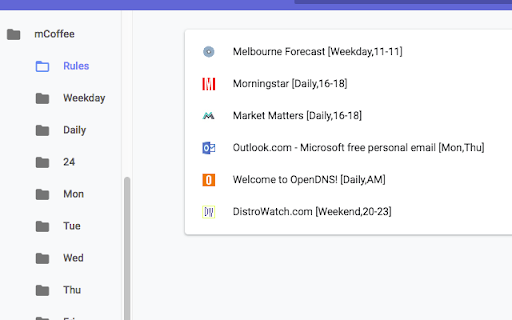
   vii) Rules
      - set conditions for launching items
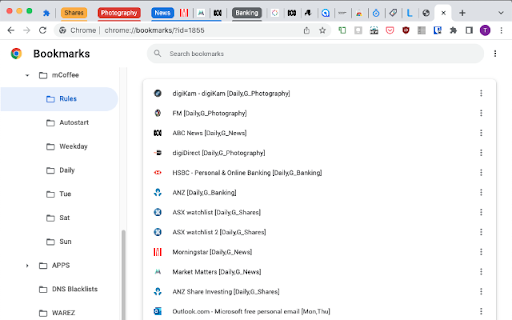
      - more advanced options can be set for bookmarks in the Rules folder, for example time blocks, tabGroups
      - add the conditions as a comma separated list inside square brackets in the item's title, e.g. "Testing [2,Mon,Wed]" to launch the item "Testing" on the 2nd of the month, Mondays and Wednesdays

Please refer to https://sites.google.com/view/extension-mcoffee/home for more examples on how to configure and use this extension.

Notes
=====
This is a very basic extension, everything is managed using the bookmark manager.

The extension checks if the URL is already opened in an existing tab, if so it won't launch a duplicate tab. Note that some sites automatically expands / redirect the base url. For example, if you launched https://mail.google.com the opened url will be https://mail.google.com/mail/. If you click on the extension icon again, it will open another tab for Gmail because "https://mail.google.com" doesn't match "https://mail.google.com/mail/".

Disclaimer
==========
THIS EXTENSION IS PROVIDED IN GOOD FAITH, HOWEVER I MAKE NO REPRESENTATION OR WARRANTY OF ANY KIND, EXPRESS OR IMPLIED, REGARDING THE ACCURACY, ADEQUACY, VALIDITY, RELIABILITY, AVAILABILITY, FUNCTIONALITY
OR COMPLETENESS OF ANY INFORMATION ON THE EXTENSION.

UNDER NO CIRCUMSTANCE SHALL I HAVE ANY LIABILITY TO YOU FOR ANY LOSS OR DAMAGE OF ANY KIND INCURRED AS A RESULT OF THE USE OF THIS EXTENSION.

YOUR USE OF THE EXTENSION IS SOLELY AT YOUR OWN RISK.

Privacy notice
==============
This extension does not collect any data.

History
=======
2023-05-13: version 1.5.5
    - tweaked extension icon to have more contrast for darker themes
    - at least 3 seconds between each execution to ignore accidental double clicks
2022-08-16: version 1.5.4.1
    - TabGroups should now reliably move to start of tab bar
2022-06-30: version 1.5.4
      - TabGroup support. New tag “G_GroupName” for Rules. For example [Daily,G_News] will launch
         the website in the tab group “News”
2022-04-27: version 1.5.2.1
      - code changes to adapt to service worker behaviour in manifest 3
      - removed 1 second delay in opening tabs
2022-04-23: version 1.5.1
      - remove limit of 3 concurrent tabs, counter isn't right in some situations
2022-04-16: version 1.5.0
      - manifest v3
      - restrict to 3 concurrent running tabs
2021-08-06: version 1.4.1
      - changed icon
      - not setting badges anymore, status reflected in icon colour
      - open release history page when extension is updated
2021-06-11: v1.4.0
      1) rules support month condition
      2) if the folder "mCoffee" isn't found, launch the website https://sites.google.com/view/extension-mcoffee/
2021-05-25: v1.3.3
      1) new tag "Autostart"
      2) tweaked badge background colours, badge icon shows the time of when the extension was last clicked.
2018-12-05: v1.2.5
        1) code clean up
2018-11-26: v1.2.0
        1) Rules - parse time range in 24h format, for example 19-21 to launch items between 7PM and 9PM inclusive.
        2) Support for "Weekday", "Weekend"
2018-11-21: v1.1.0
        1) New subfolder, "Rules"

Permissions
===========
bookmarks 	- needed to search for the mCoffee and associated folders
tabs 		- needed to check that the url is not already opened, and to launch a new tab
tabGroups       - group tabs into groups

Credits
=======
Icon for versions < 1.4.1 is from http://icongal.com/gallery/icon/34007/128/coffee_cup_breakfast_mocca.
Icons from version 1.4.1 and above are my own.

Legal Disclaimer adapted from https://termly.io/resources/templates/sample-disclaimer-template-guide/
Technical
- Version
- 1.5.5
- Manifest
- V3
- Size
- 25.76KiB
- Min Chrome
- 88
- Languages
- 1
- Featured
- No
Metadata
- ID
- kgmogjgiagjjdmeilcakimafnpndpggk
- Developer ID
- u0b48f32e1e02abd90ecbfae39292ebff
- Developer Email
- [email protected]
- Created
- Nov 18, 2018
- Last Updated (Store)
- May 13, 2023
- Last Scraped
- May 21, 2026
- Website
- —
- Support URL
- —
- Privacy Policy
- —
Similar extensions
Alternatives to mCoffee, ranked by description similarity.

mCoffee brew
Launch bookmarks based on rules.
33

Tab-Snap
Get open tab URLs for window, or load a list of URLs into new tabs on this window.
30.0K
★ 4.5

Tab Groups to Bookmarks
Manage and Save Your Tab Groups
1.0K
★ 4.7

Bookmarks clean up
Quickly clean up your bookmarks: remove duplicates, dead links, and empty folders, merge similar bookmark folders.
200.0K
★ 4.5

online / offline Bookmark Manager
Bookmark Viewer/Editor: no uploads reqd.(offline), full tab view.
2.0K
★ 4.5

BruteBookmarks Quick Save
Save pages to BruteBookmarks from any tab, with or without an account.
—
OnLoad Unload Tabs
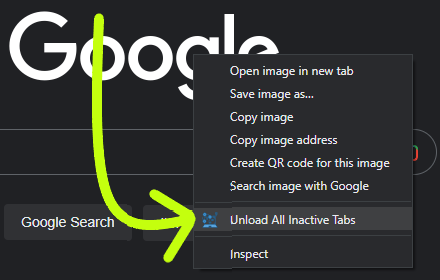
When you open chrome, and it restores all your tabs, this extension unloads all tabs except the active tab
452
★ 5.0

Recent Bookmarks
A list of recent bookmarks in descending order, grouped by the day they were added.
196
★ 5.0
Data sourced from the Chrome Web Store · last verified May 21, 2026.