OnLoad Unload Tabs
When you open chrome, and it restores all your tabs, this extension unloads all tabs except the active tab
As of May 2026, OnLoad Unload Tabs has 452 users and a 5.00/5 rating from 4 reviews in the Workflow & Planning category.
Usersdown 54.8 percent−54.8%
452
452
Ratingno change0%
5.00
4 reviews
Reviewsno change0%
4
Version
0.0.3
Manifest V3
History
2 snapshotsTracking since May 1, 2026.
View as table
| Date | Users | Rating | Reviews | Version |
|---|---|---|---|---|
| May 1, 2026 | 1.0K | 5.00 | 4 | 0.0.3 |
| May 29, 2026 | 502 | 5.00 | 4 | 0.0.3 |
| Now | 452 | 5.00 | 4 | 0.0.3 |
Permissions & access
- Permissions
- contextMenustabsstorage
- Host access
- None declared
Screenshots


About
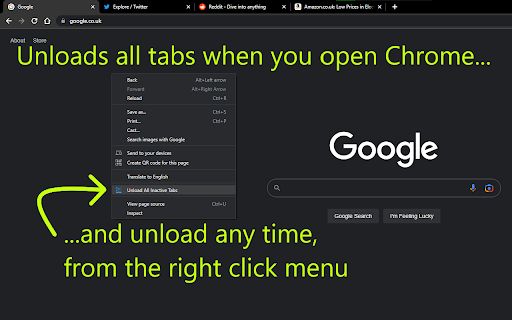
When you open Chrome, start up Chrome... Chrome might restore all your tabs from your last session. This extension will unload all those tabs, so you aren't wasting computer resources loading those webpages.

As soon as you click on an unloaded tab, it will load the webpage as normal.

Firefox browser does this by default, and now, with this extension, you can have this feature in Chrome too.

It was also pointed out to me, that you might want certain websites to never be unloaded. For example, your email. So, there is a settings page where you can add websites that you NEVER want this extension to unload.

Why did I make this?

I didn't like that I would open Chrome and all my tabs would start loading. I don't need all of them to load, I might not even click on most of them. I liked that in Firefox, I didn't need to worry about how many tabs I had open, since I knew when I restarted the browser, none of those tabs would load until I clicked on them (but the tabs were still there, ready to be clicked if I wanted them).

After some research, I found that Chrome does have this feature, but it's only available to extensions. So, I created this extension for myself, so I can once again use Chrome with tonnes of tabs open, and not worry about wasting my computer's resources on those tabs.

Additional Features

Besides unloading all tabs when you open Chrome...
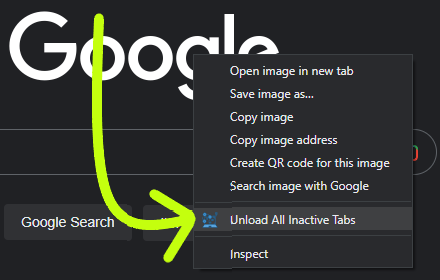
1) Added a right click menu option: you can click this option and it will unload all your inactive tabs immediately.
2) There is a settings page where you can add websites to never be unloaded. For instance, you might want your email to stay loaded.

That's it. This is a very lightweight extension. Enjoy :)

Note:
This extension only unloads tabs:
a) when you open Chrome, or
b) when you click the menu item.
It doesn't unload tabs at any other time.

Permissions Explained:
"Read your browsing history" - this is used for the exceptions list, the extension checks if the tab's web url matches the url you want to be ignored. This extension doesn't look at or use your browsing history.

Credits:
The extension icon, the computer with 3 gears, was created by phatplus on freeicons.io (https://freeicons.io/profile/51091).
Technical
- Version
- 0.0.3
- Manifest
- V3
- Size
- 24.8KiB
- Min Chrome
- 89
- Languages
- 1
- Featured
- No
Metadata
- ID
- gnnecemmbmmndkehiaakohldifipncah
- Developer ID
- u98e73a1190aa43d81fc10386ddc77099
- Developer Email
- [email protected]
- Created
- Jan 26, 2023
- Last Updated (Store)
- Feb 7, 2025
- Last Scraped
- May 29, 2026
- Website
- garyc.dev
- Support URL
- —
- Privacy Policy
- —
Similar extensions
Alternatives to OnLoad Unload Tabs, ranked by description similarity.

Tab-Snap
Get open tab URLs for window, or load a list of URLs into new tabs on this window.
30.0K
★ 4.5

Clear Tabs
This extension clears all but the active tab in your browser.
1.0K
★ 4.8

Recover Closed Tab
🚀 Recover closed tabs with one click! Works in incognito mode. Right-click icon or webpage to show history.
10.0K
★ 4.5

Cache Cleaner
Clear cache with one click and browse fast. Trusted by millions. This extension uses affiliate links for certain websites.
1.0K
★ 3.9
Close & Clean
Close all tabs and windows and clean up Chrome in one single click
10.0K
★ 4.3

Tab Resize - split screen layouts
The ORIGINAL Tab Resize. Split Screen made easy. Resize the CURRENT tab and tabs to the RIGHT into layouts on separate windows.
1.0M
★ 4.3

tabtrim
Free your browsing space in a snap! Close empty tabs, search result page tabs and launch Zoom tabs with just a single click!
—

Bulk URL Opener
Browser addon to open multiple urls with one click. With many more tools to help you manage urls.
90.0K
★ 4.5
Data sourced from the Chrome Web Store · last verified May 29, 2026.