
Copy Folder
Copy a Google Drive Folder, including all sub-folders and contents
As of May 2026, Copy Folder has 100,000 users and a 4.68/5 rating from 1,145 reviews.
Usersno change0%
100.0K
100,000
Ratingno change0%
4.68
1.1K reviews
Reviewsdown 0.1 percent−0.1%
1.1K
Version
63
Manifest V2
History
1 snapshotsTracking since Apr 24, 2026.
View as table
| Date | Users | Rating | Reviews | Version |
|---|---|---|---|---|
| Apr 24, 2026 | 100.0K | 4.68 | 1.1K | 63 |
| Now | 100.0K | 4.68 | 1.1K | 63 |
Permissions & access
- Permissions
- None declared
- Host access
- None declared
Screenshots
About
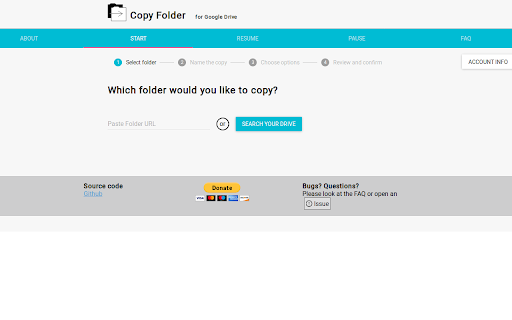
This app will copy all contents and sub-folders within a Google Drive folder, all while preserving the original folder structure.  As long as you have viewing rights on a folder, you can copy the entire folder to your own Google Drive.  The folder will be placed in the top-level of your Google Drive, and you can move it from there.

To launch app: click "Visit Website" button at top of window.


Usage
=====

1. Select your folder with the Google Picker, or paste a folder URL with Ctrl-C
2. Choose a name for the new folder
3. Click "Copy Folder".  When the copy begins, you will be alerted that you can close the window.

In addition, the app user will become the owner of the new folder and all sub-folders and contents.  This makes it especially handy for making a new copy of shared information when someone leaves an organization.


Privacy
=======

Please see the Privacy Policy at https://github.com/ericyd/gdrive-copy/blob/master/PRIVACY_POLICY.md.

This app does not store any data relating to your account or Google Drive


Notes
=====

* This app performs best in Google Chrome or Chromium.
* This app requires several permissions to run.  The app needs to run offline so that you can close the window while the copying completes.  You can view the source code on the Github page, listed below, to review the app and launch your own copy of the app if security is a concern.
* Selecting "Yes" on Copy Permissions will make the app run *much* slower than normal.
* By default the folder will copy to the same location as the original folder.  You can copy it to the root directory by selecting "Root directory" under "Copy folder to"


Disclaimer: The new copy will **not** retain any original information regarding creation date and revision history.

Check out the Github project at https://github.com/ericyd/gdrive-copy
Technical
- Version
- 63
- Manifest
- V2
- Size
- 7.18KiB
- Min Chrome
- —
- Languages
- 1
- Featured
- No
Metadata
- ID
- kfbicpdhiofpicipfggljdhjokjblnhl
- Developer ID
- u99dcd6309089729daed18321bfe63131
- Developer Email
- —
- Created
- Oct 6, 2015
- Last Updated (Store)
- Sep 1, 2019
- Last Scraped
- May 21, 2026
- Website
- http://ericyd.com/
- Support URL
- —
- Privacy Policy
- —
Similar extensions
Alternatives to Copy Folder, ranked by description similarity.

Transfer Ownership
Transfer ownership of a Google Drive Folder, including all sub-folders and contents
2.0K
★ 3.7
Folder Copy for Google Drive™
Copy all the files and subfolders of a specific Google Drive Folder, **PAID APP**.
3.0K
★ 2.9

Drive Migrator
Use this app to transfer your Google Drive files / documents from one account to another or to make a copy of a Drive folder.…
10.0K
★ 4.1

gfolderCopy
gfolderCopy can copy Google Drive folders. Team drives are supported.
—
★ 4.0

Copy with comments
Make copies of Google Drive files that include their comments.
FEATURES
Google Drive currently offers no option to make copies of…
—

Google Drive Link Getter
Extract Drive links, names & folder structures. Customize output, manage history, copy as tree.
1.0K
★ 4.2

Google Drive Download Link Extractor
Ekstrak link download dari folder Google Drive
208
★ 3.0

Multi-Drive Smart Copy
Arrange your files on multiple Google Drives efficiently
42
Data sourced from the Chrome Web Store · last verified May 21, 2026.