
Copy on Select
Select some text and it will be instantly copied to the clipboard! Paste it with one click!
As of June 2026, Copy on Select has 10,000 users and a 4.68/5 rating from 53 reviews in the Workflow & Planning category.
Usersno change0%
10.0K
10,000
Ratingno change0%
4.68
53 reviews
Reviewsup 6.0 percent+6.0%
53
Version
3.2
Manifest V3
History
3 snapshotsTracking since Apr 18, 2026.
View as table
| Date | Users | Rating | Reviews | Version |
|---|---|---|---|---|
| Apr 18, 2026 | 10.0K | 4.68 | 50 | 3.2 |
| Apr 27, 2026 | 10.0K | 4.69 | 51 | 3.2 |
| May 7, 2026 | 10.0K | 4.69 | 52 | 3.2 |
| Now | 10.0K | 4.68 | 53 | 3.2 |
Permissions & access
- Permissions
- clipboardReadclipboardWritestoragecontextMenus
- Host access
- None declared
Screenshots



About
🟢Select any text in a web page and it will be automatically copied to the clipboard (hold Ctrl to bypass, ⌘ on Mac).

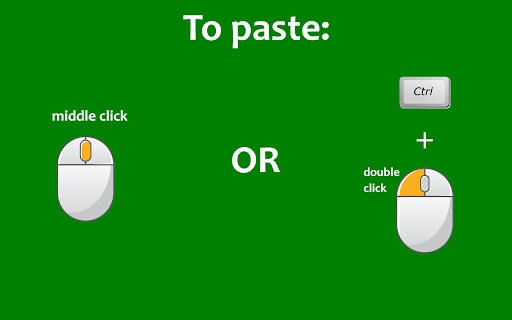
🟢You can also quickly paste the copied text by clicking on the mouse wheel, or by double clicking the left mouse button while keeping the Ctrl key pressed (⌘ on Mac).

🟢If you keep the Shift key ⬆ pressed while pasting, the field into which you are pasting will be emptied of all already existing text before pasting.

🟢Bypass the auto copy functionality in input fields (needs to be activated in the options page)

🟢Automatically add text before or after the copied text (needs to be activated in the options page)

🟢Automatically add the webpage URL to the copied text (needs to be activated in the options page)

✂-------------------------

🚨IMPORTANT🚨: please reload Chrome after installing the extension, in order to activate it.

- Click on the extension button to turn the extension on/off.
- Right click on the button to open the options page or the user guide.

🔎NOTE:
- The extension does not work on the New Tab page (the page that opens when you click on the + sign in Chrome). This is standard behaviour for all extensions.
- The extension does not work on pages whose URL starts with the word "chrome", for example chrome://extensions/ or chrome://settings/.
Technical
- Version
- 3.2
- Manifest
- V3
- Size
- 519KiB
- Min Chrome
- 88
- Languages
- 7
- Featured
- Yes
Metadata
- ID
- kdfngfkkopeoejecmfejlcpblohnbael
- Developer ID
- u0a6590cf4eb7045510d355c2fc764890
- Developer Email
- [email protected]
- Created
- Oct 4, 2021
- Last Updated (Store)
- Dec 26, 2025
- Last Scraped
- Jun 2, 2026
- Website
- —
- Support URL
- —
- Privacy Policy
- —
Similar extensions
Alternatives to Copy on Select, ranked by description similarity.

Auto Copy
Automatically copy selected text from any website to your clipboard!
3.0K
★ 3.1

Auto Copy
Automatically copy selected text to the clipboard. Has many configurable options for controlling the behavior.
30.0K
★ 3.6

Copy To Clipboard
This extension allows you to automatically copy selected text to the clipboard.
6.0K
★ 2.2

Copy Text Easily
Extension that lets you view and reuse clipboard history with drag and drop, and copy text with one click
30.0K
★ 3.9

.lazyPaste: Copy/Paste made easy
Easy COPY/PASTE for social network and personalized fields to store your favorite texts. Alt + C opens the extension pop-up.
22
★ 5.0

Quick Copy
Quickly copy configured text to clipboard with two clicks. Sync configured text across devices.
784
★ 5.0

Enable Copy Anywhere
Activate the ability to select/copy from restricted sites.
6.0K
★ 3.9

QuickPaste
Save text clips from websites as Notes in a Collection
53
★ 3.0
Data sourced from the Chrome Web Store · last verified Jun 2, 2026.