
Daily Log
A simple daily logging extension with tagging and filtering
As of June 2026, Daily Log has 7 users in the Workflow & Planning category.
Usersno change0%
7
7
Ratingno change0%
—
— reviews
Reviewsno change0%
—
Version
1.26
Manifest V3
History
5 snapshotsTracking since Apr 18, 2026.
View as table
| Date | Users | Rating | Reviews | Version |
|---|---|---|---|---|
| Apr 18, 2026 | 7 | — | — | 1.26 |
| Apr 28, 2026 | 6 | — | — | 1.26 |
| May 8, 2026 | 6 | — | — | 1.26 |
| May 15, 2026 | 7 | — | — | 1.26 |
| Jun 6, 2026 | 6 | — | — | 1.26 |
| Now | 7 | — | — | 1.26 |
Permissions & access
- Permissions
- storagetabsactiveTabnotificationsdownloadsalarms
- Host access
- None declared
Screenshots



About
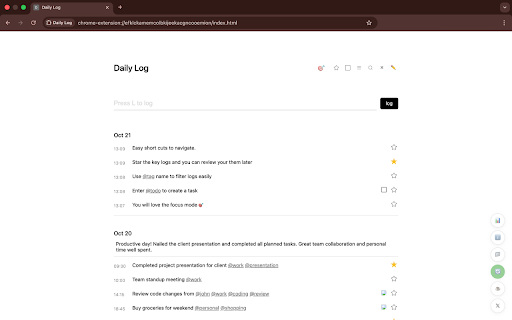
Daily Log is a simple new-tab extension to capture what you do, as you do it—so your day doesn’t blur together.

If you’ve ever ended a day thinking “What did I even do?”, this helps you remember—and keep moving.

What it does:
- Log quick entries with tags, todos, and “star” key moments.
- You can also tag things using @tagname. Think projects, people, or anything you might refer to often. You can filter by tags as well.
- Clean Focus mode for just today.
- Keyboard shortcuts: Log (L), Todos (T), Search (S), Focus (F), Star (W).
- Optional reminder chime (hourly or a custom interval).
- Floating quick-access button across sites.
- Dark mode.

Why install:
New tabs are underused. Daily Log turns that space into a lightweight tracker so you stay focused and see real progress—without fiddly setups or cloud lock-in.

Your data:
- Stored locally on your device.
- Export CSV anytime.
- Automatic JSON backups (weekly or every 50 logs).
- Import past data.
- Option to disable auto new-tab; open via the extension button instead.

If you’ve ever ended a day thinking “What did I even do?”, this helps you remember—and keep moving.Daily Log is a simple new-tab extension to capture what you do, as you do it—so your day doesn’t blur together.

What it does:
- Log quick entries with tags, todos, and “star” key moments.
- Clean Focus mode for just today.
- Keyboard shortcuts: Log (L), Todos (T), Search (S), Focus (F), Star (W).
- Optional reminder chime (hourly or a custom interval).
- Floating quick-access button across sites.
- Dark mode.

Why install:
New tabs are underused. Daily Log turns that space into a lightweight tracker so you stay focused and see real progress—without fiddly setups or cloud lock-in.

Your data:
- Stored locally on your device.
- Export CSV anytime.
- Automatic JSON backups (weekly or every 50 logs).
- Import past data.
- Option to disable auto new-tab; open via the extension button instead.
Technical
- Version
- 1.26
- Manifest
- V3
- Size
- 75.13KiB
- Min Chrome
- 88
- Languages
- 1
- Featured
- No
Metadata
- ID
- kcmlkkkgiikpmnafgcnoopgkpdomecih
- Developer ID
- u4c696eeab704530f8cd46ae20715dfb4
- Developer Email
- [email protected]
- Created
- Oct 24, 2025
- Last Updated (Store)
- Nov 18, 2025
- Last Scraped
- Jun 6, 2026
- Website
- —
- Support URL
- —
- Privacy Policy
- —
Similar extensions
Alternatives to Daily Log, ranked by description similarity.

Daily Log
A keyboard-first mental offloading tool that lives in your new tab
7

Attention Log
Track time spent on websites with daily charts
4
★ 5.0

Daily Time Logger
Log your daily time entries with a clean, modern Chrome extension. Track work, study, or any activity with ease.
3

Tablog - Your Smart Time Tracker
Track your web time intelligently with focus mode and detailed analytics. All data stored locally.
7
★ 5.0

Daily Reminder - Life Calendar
A visual reminder showing how many days are left in the year
7

Quick Note Tab - Notepad, Planner and Habits Tracker
Transform your new tab into a focused space to write notes, plan tasks, and build better habits
539
★ 4.5

Daily Moment - Focus & Plan
Daily Moment - Focus, Deep Work & Pomodoro Timer
64
★ 5.0

My Checklist New Tab
Turn your new tab into a powerful daily, weekly, and monthly checklist dashboard with cloud sync.
58
★ 5.0
Data sourced from the Chrome Web Store · last verified Jun 6, 2026.