
Skeletro
Extract backgrounds, themes, HTML elements and schemas from Power BI reports.
As of June 2026, Skeletro has 44 users and a 5.00/5 rating from 1 reviews in the Developer Tools category.
Usersdown 6.4 percent−6.4%
44
44
Ratingno change0%
5.00
1 reviews
Reviewsno change0%
1
Version
1.1.0
Manifest V3
History
9 snapshotsTracking since Apr 6, 2026.
View as table
| Date | Users | Rating | Reviews | Version |
|---|---|---|---|---|
| Apr 6, 2026 | 47 | 5.00 | 1 | 1.1.0 |
| Apr 18, 2026 | 42 | 5.00 | 1 | 1.1.0 |
| Apr 24, 2026 | 43 | 5.00 | 1 | 1.1.0 |
| May 1, 2026 | 44 | 5.00 | 1 | 1.1.0 |
| May 7, 2026 | 43 | 5.00 | 1 | 1.1.0 |
| May 12, 2026 | 46 | 5.00 | 1 | 1.1.0 |
| May 17, 2026 | 45 | 5.00 | 1 | 1.1.0 |
| May 24, 2026 | 42 | 5.00 | 1 | 1.1.0 |
| May 31, 2026 | 41 | 5.00 | 1 | 1.1.0 |
| Now | 44 | 5.00 | 1 | 1.1.0 |
Permissions & access
- Permissions
- activeTabscriptingdownloadsstoragetabs
- Host access
- <all_urls>
Screenshots



About
Skeletro is the ultimate productivity and reverse-engineering tool for Power BI developers, UI/UX designers, and data analysts.
Go beyond simple image extraction: Skeletro acts as a complete "X-Ray" for public Power BI reports, allowing you to extract backgrounds, layout blueprints, custom color palettes, and data schemas with a single click.

Key Features:

🖼️ Background Extraction: Instantly download the original wallpapers and background images (SVG/PNG/JPG) from all navigated pages.

🎨 Theme & Color Studio: Extract the report's native JSON theme and data palette. Use the new built-in Floating Color Picker to continuously grab custom HEX colors directly from the dashboard screen.

📐 Layout Blueprint (Screen Elements): Stop guessing sizes! Get the exact X/Y coordinates, dimensions, static texts, DAX measure names, shape types, and transparencies of visuals. Export a clean HTML reconstruction guide.

🗄️ Data Schema Mapping: Instantly view and download the underlying data model structure, including tables, columns, data types, and DAX measure formats.

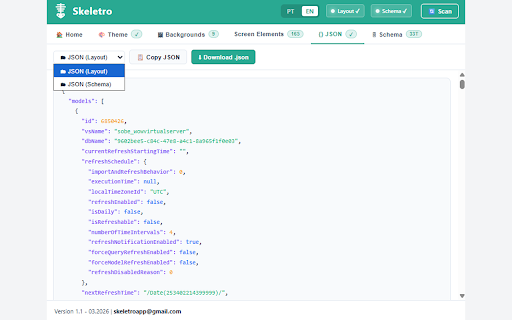
⚙️ Advanced JSON Export: Access and download raw layout configurations and report filters for advanced studying.

🌍 Bilingual Support: Available in English and Portuguese.

🔒 100% Secure & Local: Runs entirely on your browser. No data is collected, stored, or sent to external servers.

Perfect for studying advanced dashboard layouts, recovering design assets from your own published reports, or creating pixel-perfect mockups based on existing inspirations.

Note: This extension is intended for educational purposes, layout study, and productivity enhancement.
Technical
- Version
- 1.1.0
- Manifest
- V3
- Size
- 144KiB
- Min Chrome
- 88
- Languages
- 1
- Featured
- No
Metadata
- ID
- kccidbkkfbnhhlhnlfkheenfiaknaogf
- Developer ID
- u51c0f2e6e02616d57eb8897eb65bb824
- Developer Email
- [email protected]
- Created
- Dec 11, 2025
- Last Updated (Store)
- Mar 16, 2026
- Last Scraped
- Jun 6, 2026
- Website
- —
- Support URL
- —
- Privacy Policy
- —
Similar extensions
Alternatives to Skeletro, ranked by description similarity.

MiroMiro
Inspect any website's design: extract colors, fonts, spacing, SVGs, Lottie animations, and export to code. No DevTools needed.
10.0K
★ 5.0

Blue Prints SEO
Extract Images,Semantic Words and Jpeg Images downloader
10

SEO Snapshot
Analyze on-page SEO with modal popups showing detailed metrics for each category without scrolling
3

Show Data Variables
Powerful side panel browser extension that discovers, organizes, and helps inspect hidden or non-obvious page data across the DOM,…
11

INSPEKT
Debug faster: visualize outlines, measure elements, inspect text styles, audit SEO, and check heading hierarchy.
13

Optic | Capture & Extract
Capture screen regions and extract data to JSON/CSV using AI.
1

VibeStyles
Extract skeleton layouts and styles from web pages to inspire your own UI implementations
2

WebExtract Pro
Select any element on a page and copy its HTML, CSS, Tailwind or React code instantly.
29
★ 5.0
Data sourced from the Chrome Web Store · last verified Jun 6, 2026.