
StarScreen
Screenshot tool for personal and enterprise sharing and annotation
As of June 2026, StarScreen has 33 users in the Productivity category.
Usersup 50.0 percent+50.0%
33
33
Ratingno change0%
—
— reviews
Reviewsno change0%
—
Version
1.02
Manifest V3
History
7 snapshotsTracking since Apr 18, 2026.
View as table
| Date | Users | Rating | Reviews | Version |
|---|---|---|---|---|
| Apr 18, 2026 | 22 | — | — | 1.02 |
| Apr 25, 2026 | 33 | — | — | 1.02 |
| May 3, 2026 | 32 | — | — | 1.02 |
| May 9, 2026 | 33 | — | — | 1.02 |
| May 23, 2026 | 34 | — | — | 1.02 |
| Jun 2, 2026 | 33 | — | — | 1.02 |
| Jun 10, 2026 | 32 | — | — | 1.02 |
| Now | 33 | — | — | 1.02 |
Permissions & access
- Permissions
- activeTabscriptingstoragecontextMenus
- Host access
- https://starscreen.org/*
Screenshots

About
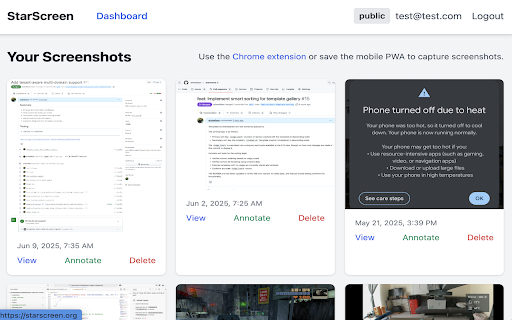
StarScreen is a simple yet powerful screenshot and annotation tool built for personal use and enterprise sharing.

Capture your screen with the Chrome extension, and your images are automatically uploaded to your personal StarScreen web dashboard. Log in with your Google account to access the dashboard where you can:

View all your captured screenshots.
Annotate images with arrows, shapes (rectangles, circles), and text.
Choose colors for your annotations.
Save your annotations.
Manage and delete your screenshots.
Technical
- Version
- 1.02
- Manifest
- V3
- Size
- 42.83KiB
- Min Chrome
- 88
- Languages
- 1
- Featured
- No
Metadata
- ID
- kbencmfpgmiipfeagfopobncgpdhfnha
- Developer ID
- ueb5ac5c989746935b77de6759cd0815f
- Developer Email
- [email protected]
- Created
- Jun 21, 2025
- Last Updated (Store)
- Feb 12, 2026
- Last Scraped
- Jun 10, 2026
- Website
- starscreen.org
- Support URL
- https://starscreen.org/customer-support
- Privacy Policy
- https://starscreen.org/privacy-policy
Similar extensions
Alternatives to StarScreen, ranked by description similarity.
ScreenClip - Screenshot, Comment & Annotate
Take screenshots, add annotations & comments
70.0K
★ 3.7

Screenshot Extension
Take a screenshot and save it to a location of your choice.
89

MyScreenClick - Screen Capture & Editor
Capture, annotate and edit screenshots. Powered by multiple tools like crop, blur, arrows, text and more with a smooth workflow.
25

Free Screenshot Tool
Professional screenshot tool with full page, selection, and scrolling capture capabilities
6

Screenie — Screenshot & Annotate
Take a Screenie. Draw on it. Done. Capture, annotate with arrows & text, save as PNG.
—

Grabit - Screenshot,Annotation,AI Search,Share via Link
Capture, draw, and share! Our intuitive screen cut tool combines simple screen capture with flexible pencil drawing feature.
1.0K
★ 5.0

ScreenStitcher
Capture screenshots continuously and convert them to PDF
49
★ 5.0

Screen Recorder
Screen Recorder: Effortless screen recording
246
★ 5.0
Data sourced from the Chrome Web Store · last verified Jun 10, 2026.