MagicShot - Screenshots made Beautiful
Capture a screenshot of your page or of a selected area and turn it into a beautiful image for your social media
As of May 2026, MagicShot - Screenshots made Beautiful has 195 users in the art category.
Usersno change0%
195
195
Ratingno change0%
—
— reviews
Reviewsno change0%
—
Version
1.0.0
Manifest V3
History
2 snapshotsTracking since Apr 25, 2026.
View as table
| Date | Users | Rating | Reviews | Version |
|---|---|---|---|---|
| Apr 25, 2026 | 195 | — | — | 1.0.0 |
| May 22, 2026 | 197 | — | — | 1.0.0 |
| Now | 195 | — | — | 1.0.0 |
Permissions & access
- Permissions
- activeTabtabsscripting
- Host access
- https://magicshot.app/editor
Screenshots

About
== How to use ==

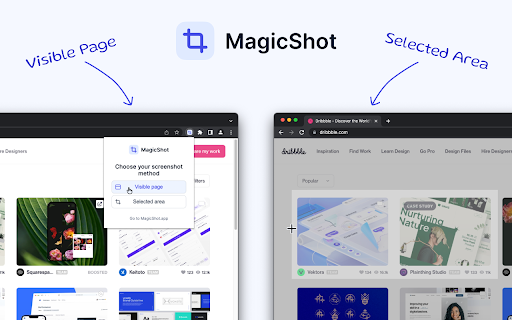
To take a screenshot of your current browser tab, simply open MagicShot extension and choose your screenshot method:
1. Visible Page (will capture the entire visible page)
2. Selected area (click and drag over the area you want to screenshot)

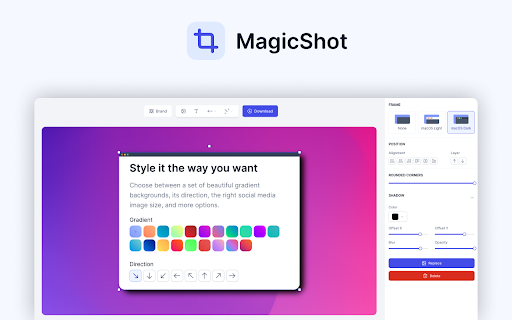
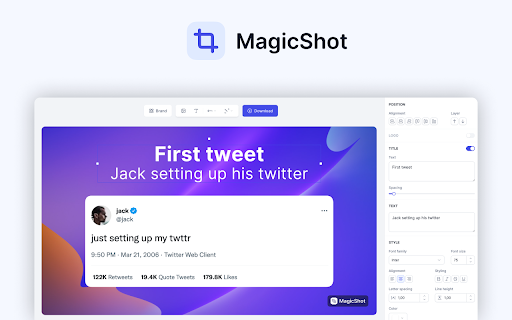
Then, the image will automatically be imported into MagicShot, and you will be able to edit your screenshot with the following features:
✓ Change the background (gradient, solid color or image)
✓ Add text and style it
✓ Add other images
✓ Add a browser frame to your screenshot
✓ Add annotation elements (arrows, circles, emoji, etc...)
✓ Add your watermark (pro feature)
✓ Select the correct social media dimension for the exported image

MagicShot is completely free to use. Only a few features require you to upgrade to our Pro plan.


== Stay in touch ==

To stay up to date and don't miss any update, follow MagicShot on Twitter: https://twitter.com/MagicShotApp


== Support ==

If you have any questions or feedback, please send us an email at [email protected]
Technical
- Version
- 1.0.0
- Manifest
- V3
- Size
- 1.93MiB
- Min Chrome
- 88
- Languages
- 1
- Featured
- No
Metadata
- ID
- kaokjlniinfbndjidkcgkhiakdfjgnif
- Developer ID
- u5b936d44f55f92fad09755dd813d4081
- Developer Email
- [email protected]
- Created
- Sep 27, 2022
- Last Updated (Store)
- Oct 3, 2022
- Last Scraped
- May 22, 2026
- Website
- magicshot.app
- Support URL
- —
- Privacy Policy
- https://magicshot.app/privacy
Similar extensions
Alternatives to MagicShot - Screenshots made Beautiful, ranked by description similarity.

PostSpark - Beautiful Screenshots & Mockups
Create beautiful screenshots and mockups for social media and marketing needs.
2.0K
★ 4.7

Screenshot Editor Pro
Capture & edit screenshots with visible page, select area, and full page modes
13

PerfectSnap - Transform Your Screenshot into a Masterpiece
Capture, Edit, and Share Stunning Screenshots with Ease.
How It Works
1. Capture: Use the extension to take a screenshot…
20
★ 5.0

TakeAscreen | Record & Capture Screenshots
Take Screenshots | Screen Record & Capture Screenshots
381
★ 4.7

Oolet
Buffering shoot and collect to it
2

SnapForge - Screenshot Editor and Design Tool
Capture anything, forge it to perfection, then ship in seconds.
130
★ 5.0

BrandBird ✦ Beautiful Screenshots By Default✦
Create beautiful social media posts & sharable images by screenshotting your current tab!
2.0K
★ 4.6

Download Images from Any Webpage – Magic Image Picker (MIP)
Click-select with Magic Wand or scan all. Includes CSS background images. Export to ZIP with optional size-based filenames.
445
★ 5.0
Data sourced from the Chrome Web Store · last verified May 22, 2026.