
Designshots
Browser Extension to collect Design Inspirations
As of June 2026, Designshots has 9 users and a 5.00/5 rating from 1 reviews in the Productivity category.
Usersdown 25.0 percent−25.0%
9
9
Ratingno change0%
5.00
1 reviews
Reviewsno change0%
1
Version
1.6
Manifest V3
History
4 snapshotsTracking since Apr 1, 2026.
View as table
| Date | Users | Rating | Reviews | Version |
|---|---|---|---|---|
| Apr 1, 2026 | 12 | 5.00 | 1 | 1.6 |
| Apr 21, 2026 | 13 | 5.00 | 1 | 1.6 |
| May 11, 2026 | 10 | 5.00 | 1 | 1.6 |
| Jun 7, 2026 | 10 | 5.00 | 1 | 1.6 |
| Now | 9 | 5.00 | 1 | 1.6 |
Permissions & access
- Permissions
- activeTabcookies
- Host access
- http://localhost:3000/*, <all_urls>
Screenshots


About
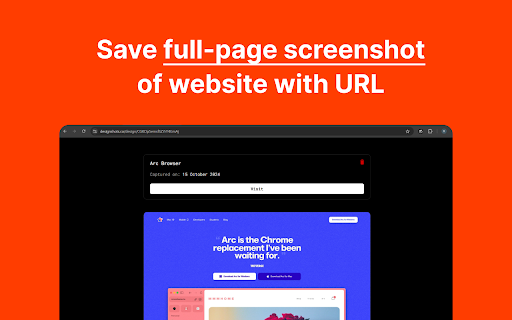
DesignShots allows you to capture full-page screenshots of websites and organize them in one clean, accessible platform. With DesignShots, you can easily gather design inspiration from across the web and store it all neatly in one place.
Technical
- Version
- 1.6
- Manifest
- V3
- Size
- 86.02KiB
- Min Chrome
- 88
- Languages
- 1
- Featured
- No
Metadata
- ID
- kaodbedpmiliedehgehaionoobincpin
- Developer ID
- u5b71c0ab8c38b42947936875365a834a
- Developer Email
- [email protected]
- Created
- Oct 16, 2024
- Last Updated (Store)
- Apr 3, 2025
- Last Scraped
- Jun 7, 2026
- Website
- designshots.co
- Support URL
- https://designshots.co/feedback
- Privacy Policy
- https://www.designshots.co/privacy-policy
Similar extensions
Alternatives to Designshots, ranked by description similarity.

ShotSnap
Clean portfolio screenshots in one click
2
★ 5.0

EasyShot – Screenshot & Screen Capture
Capture full page, visible area or selection. The easiest screen capture tool. Save high-quality PNG/JPEG images instantly.
135
★ 4.0

LinkShot
Capture screenshots, track video views with OCR, create short links, and manage your content creator workflow.
—
★ 5.0

SnapShot Pro
Capture webpage screenshots with ease. Instantly save viewport or full-page screenshots with just one click.
38
★ 5.0

SiteSnap: Full Website Screenshots
Capture perfect full-page screenshots with cloud sync.
180
★ 5.0

QuickShot: Full Page Screenshot & Annotate
Capture full page screenshots and annotate with arrows, boxes, text & blur. One click. Free: 5/day. Pro: unlimited.
11
★ 5.0

ShotEasy - Light and easy-to-use screenshot tool
Easily capture area, or scroll page to get a long screenshot of the full page, with Beautifier and editing tools.
2.0K
★ 4.4
BeanShot: Capture Stunning Screenshots Effortlessly
Taking Beautiful Screenshots Has Never Bean That Easy!
380
★ 4.6
Data sourced from the Chrome Web Store · last verified Jun 7, 2026.