
Bookmarks Exporter
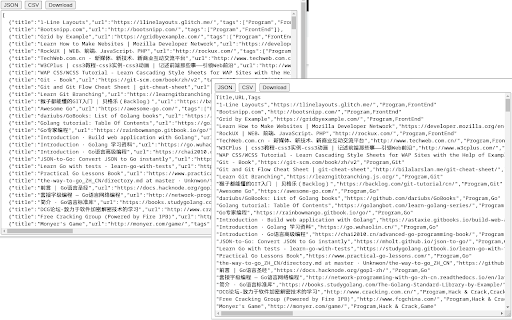
Export bookmarks as flat JSON/CSV, folders as tags.
As of May 2026, Bookmarks Exporter has 3,000 users and a 5.00/5 rating from 7 reviews in the Workflow & Planning category.
Usersup 50.0 percent+50.0%
3.0K
3,000
Ratingno change0%
5.00
7 reviews
Reviewsno change0%
7
Version
0.0.1
Manifest V3
90-day change · In the last 90 days this extension gained 1.0K users.
History
2 snapshotsTracking since Apr 25, 2026.
View as table
| Date | Users | Rating | Reviews | Version |
|---|---|---|---|---|
| Apr 25, 2026 | 2.0K | 5.00 | 7 | 0.0.1 |
| May 22, 2026 | 2.0K | 5.00 | 7 | 0.0.1 |
| Now | 3.0K | 5.00 | 7 | 0.0.1 |
Permissions & access
- Permissions
- bookmarksdownloads
- Host access
- None declared
Screenshots
About
Browser can export bookmarks as HTML file and there are extensions that can export bookmarks as JSON file, but their export files keep folder structure/hierarchy.

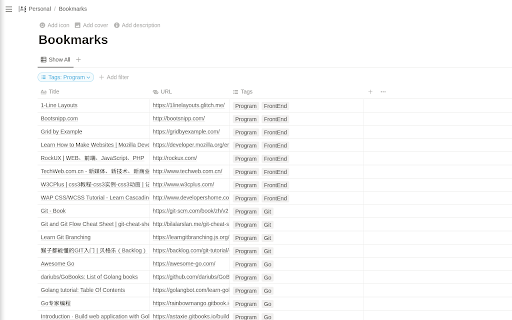
Sometimes, the flat file structure (without folder hierarchy) is easier to read and import into other program. For instance, flat JSON and CSV files can be easily imported into database or tools like Notion, Excel.

To keep folder structure info, this extension exports folder(s) as tags, it's easy to tell what folder(s) a particular bookmark item was in by looking at tags.
Technical
- Version
- 0.0.1
- Manifest
- V3
- Size
- 13.71KiB
- Min Chrome
- 88
- Languages
- 1
- Featured
- Yes
Metadata
- ID
- kagpmnfgpdecdkbhongbgkgppnpimime
- Developer ID
- u9f3b68bc297eaf2cc6e37527edf97e2a
- Developer Email
- [email protected]
- Created
- Aug 22, 2022
- Last Updated (Store)
- Aug 22, 2022
- Last Scraped
- May 22, 2026
- Website
- —
- Support URL
- —
- Privacy Policy
- —
Similar extensions
Alternatives to Bookmarks Exporter, ranked by description similarity.

Bookmarks to Notion
Export bookmarks directly to CSV for Notion.
8

BM Share BETA
THIS EXTENSION IS FOR BETA TESTING
4

Marquer - Bookmark Sharer
Export and import bookmark collections to share with friends
30
★ 5.0

Advanced Bookmark Manager
A feature-rich bookmark manager for Chrome
1

Improved Potato
Chrome extension to manage bookmarks sanely
391
★ 5.0

Bookmark Downloader
Bookmark Downloader
129

Super Tab Exporter
Export your open browser tabs to PDF, CSV, or XLSX in one click. No sign-up. No servers. Fully private.
75
★ 5.0

Export Tabs
Export all open tabs in the current window to a .txt text file.
650
★ 4.0
Data sourced from the Chrome Web Store · last verified May 22, 2026.