
AWS Extend Switch Roles
Extend your AWS IAM switching roles. You can set the configuration like aws config format
As of June 2026, AWS Extend Switch Roles has 100,000 users and a 4.89/5 rating from 89 reviews in the Developer Tools category.
Usersno change0%
100.0K
100,000
Ratingno change0%
4.89
89 reviews
Reviewsno change0%
89
Version
6.1.0
Manifest V3
History
2 snapshotsTracking since Apr 18, 2026.
View as table
| Date | Users | Rating | Reviews | Version |
|---|---|---|---|---|
| Apr 18, 2026 | 100.0K | 4.89 | 89 | 6.1.0 |
| Apr 28, 2026 | 100.0K | 4.89 | 89 | 6.1.0 |
| Now | 100.0K | 4.89 | 89 | 6.1.0 |
Permissions & access
- Permissions
- activeTabstorage
- Host access
- None declared
Screenshots

About
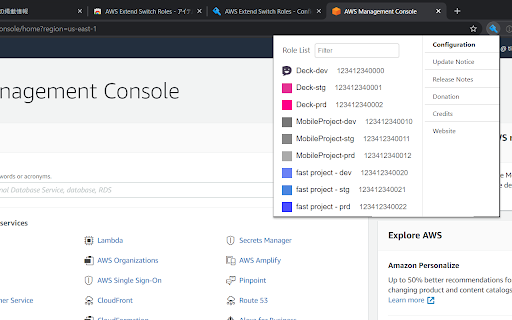
Switch role history does not remain only five maximum on the AWS Management Console. This extension gives you show all of switch roles from a browse menu by loading your aws configuration.

## Configuration

### Simple Configuration
The simplest configuration is for multiple **target roles** when you always intend to show the whole list.  **Target roles** can be expressed with a `role_arn` or with both `aws_account_id` and `role_name`.

#### Optional parameters

* `color` - The RGB hex value (without the prefix '#') for the color of the header bottom border and around the current profile.
* `region` - Changing the region whenever switching the role if this parameter is specified.
* `image` - The uri of an image to use on top of any color attribute supplied. The color and image are not mutually exclusive.

```
[profile marketingadmin]
role_arn = arn:aws:iam::123456789012:role/marketingadmin
color = ffaaee

[anotheraccount]
aws_account_id = 987654321987
role_name = anotherrole
region=ap-northeast-1
```

### Complex Configuration
More complex configurations involve multiple AWS accounts and/or organizations.

- A profile that has only `aws_account_id` (without a `role_name`) is defined as **base account**.

- If your account is aliased, you specify `aws_account_alias` in **base account**.

- A **target role** is associated with a **base account** by the **target role** specifying a `source_profile`.

- As above, **target roles** can be expressed with a `role_arn` or with both `aws_account_id` and `role_name` and can optionally pass the optional parameters.

- If `target_role_name` is set in **base account**, the value is provided as the default role name for each **target roles**.

```
[organization1]
aws_account_id = your-account-alias

[Org1-Account1-Role1]
role_arn = arn:aws:iam::123456789012:role/Role1
source_profile = organization1

[Org1-Account1-Role2]
aws_account_id = 123456789012
role_name = Role2
source_profile = organization1

[Org1-Account2-Role1]
aws_account_id = 210987654321
role_name = Role1
source_profile = organization1

[baseaccount2]
aws_account_id = 000000000000

[Base2-Role1]
role_arn = arn:aws:iam::234567890123:role/Role1
source_profile = baseaccount2

[AnotherRole]
role_name = SomeOtherRole
aws_account_id = account-3-alias
```

If you sign-in a base account, target roles of the other base accounts are excluded.

For more information, please visit the homepage.
Technical
- Version
- 6.1.0
- Manifest
- V3
- Size
- 97.95KiB
- Min Chrome
- 89.0
- Languages
- 1
- Featured
- No
Metadata
- ID
- jpmkfafbacpgapdghgdpembnojdlgkdl
- Developer ID
- u46004b7a6fc79569c9f36fca33cc06fe
- Developer Email
- [email protected]
- Created
- Aug 4, 2016
- Last Updated (Store)
- Dec 15, 2025
- Last Scraped
- Jun 3, 2026
- Website
- —
- Privacy Policy
- —
Similar extensions
Alternatives to AWS Extend Switch Roles, ranked by description similarity.

AWS Colorize
Color codes your AWS header based on what account you are logged into.
292
★ 5.0

AWS SSO Session Display
Displays the current AWS SSO account name on the AWS Console with configurable colours.
19
★ 5.0

AWS Power Tools
Bring more power to the AWS Console. Unlimited switch role list and more.
5

AWS Role Switcher
Easily switch between AWS roles based on predefined profiles.
14
★ 5.0
AWS SSO Colourise
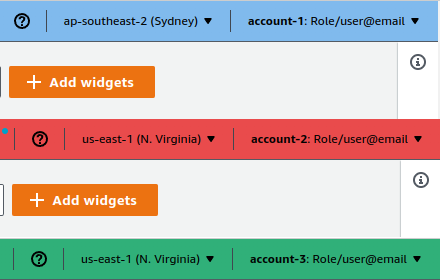
Change the AWS navbar colour based on account (and a few other little niceties)
26
★ 5.0

AWS Peacock Management Console
Browser Extension to change color of AWS Management Console, by Account ID
2.0K
★ 4.6

config-sender
config sender
2

AWS RolEx
A handy extension that adds a search bar to the AWS role selection page. Log in without leaving the keyboard!
57
Data sourced from the Chrome Web Store · last verified Jun 3, 2026.