
Bookmarks
A shortcut to Chrome bookmarks
As of June 2026, Bookmarks has 921 users and a 4.27/5 rating from 26 reviews.
Usersdown 7.9 percent−7.9%
921
921
Ratingno change0%
4.27
26 reviews
Reviewsno change0%
26
Version
1.1.0.0
Manifest V2
History
3 snapshotsTracking since Apr 23, 2026.
View as table
| Date | Users | Rating | Reviews | Version |
|---|---|---|---|---|
| Apr 23, 2026 | 1.0K | 4.27 | 26 | 1.1.0.0 |
| May 12, 2026 | 995 | 4.27 | 26 | 1.1.0.0 |
| Jun 7, 2026 | 937 | 4.27 | 26 | 1.1.0.0 |
| Now | 921 | 4.27 | 26 | 1.1.0.0 |
Permissions & access
- Permissions
- None declared
- Host access
- None declared
Screenshots
About
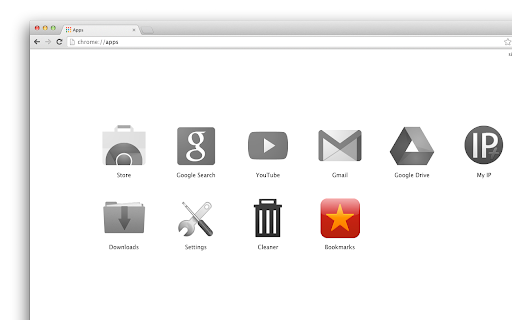
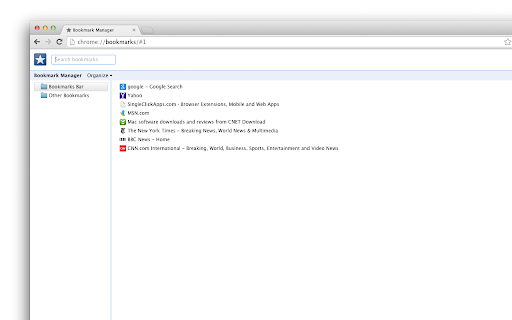
This is just a shortcut to Chrome bookmarks page.

When installed, it will add "Bookmarks" button to your apps list (on the "New Tab" page and in the Chrome App Launcher).

Click the icon and you'll open the bookmarks page. That's all this "app" does...

** Permissions **

The bookmarks app doesn't need any permissions.

** Questions & Answers **

Why adding separate app to access bookmarks when it’s accessible with two clicks from the menu?
-- You don’t need to, but for some of us accessing the bookmarks page right from the apps tab / crome app launcher is convenient option. Besides, there is beautiful big icon ;-)

But chrome apps and extensions eat system memory, why wasting resources just for quick shortcut to the bookmarks?
-- The bookmarks button doesn’t “eat” memory. In technical terms, it uses non-persistent background page, which means chrome doesn’t need to reserve memory for the bookmarks app (check the Chrome Task Manager if you don’t trust us -- when you click on the bookmarks icon it will start the extension, open the bookmarks page and release the memory right after that)

If I install the bookmarks button, is it easy to remove the app later?
-- Yes, you can remove it with literally two clicks (just goo to the apps page, right-click on the bookmarks button and select “Remove from Chrome”)

How to add the bookmarks button to the main toolbar?
-- To get the bookmarks shortcut added to the toolbar you’ll need to install the bookmarks extension:
https://chrome.google.com/webstore/detail/bookmarks/ogpfecfneobbmjefimpeomoeloahjmcm


**More from the bookmarks button author**

• History On/Off – disable history on the fly:
https://chrome.google.com/webstore/detail/history-onoff/ljbpakpmiimdmblcjjhhbfabbkmcgmdp

• SingleClick Cleaner – cleanup Chrome in one single click:
https://chrome.google.com/webstore/detail/singleclick-cleaner/cknijndocnnlkpenngcdcpleddlmckkm

More about the Bookmarks Button:
https://singleclickapps.com/bookmarks-app/
Technical
- Version
- 1.1.0.0
- Manifest
- V2
- Size
- 20.04KiB
- Min Chrome
- —
- Languages
- 1
- Featured
- No
Metadata
- ID
- jplkngkapeddgiikfniiladdganlikof
- Developer ID
- uacba69a502d35cf0d566422b1296c5bd
- Developer Email
- [email protected]
- Created
- Oct 22, 2013
- Last Updated (Store)
- Nov 1, 2017
- Last Scraped
- Jun 7, 2026
- Website
- http://singleclickapps.com/
- Support URL
- —
- Privacy Policy
- —
Similar extensions
Alternatives to Bookmarks, ranked by description similarity.

History
A shortcut to Chrome history
694
★ 4.1

Bookmarks Button
Opens Bookmarks tab in single click from toolbar and context menu. Options available to change icon, use custom icon, etc
6.0K
★ 4.5

Bookmarks
Opens Bookmarks tab in single click from new tab and context menu. Options available to remove it from context menu
8.0K
★ 3.9

Beautiful Bookmarks
A beautiful way to save and manage your favorite URLs with Google Tasks sync
24
★ 5.0

Better Chrome Bookmarks Page
Replaces Chrome's built-in bookmarks page with a better, feature-rich interface
4

FavURL - Bookmark Manager
A Chrome extension for bookmark management with local sync
4
★ 5.0

Bookmarks Bar Switcher
Switch between different bookmark bar states (Personal, Work, Development, etc.) with automatic saving
50
★ 3.0

Bookmarks Central
Bookmarks Central - App
16
★ 2.3
Data sourced from the Chrome Web Store · last verified Jun 7, 2026.