
History
A shortcut to Chrome history
As of June 2026, History has 694 users and a 4.06/5 rating from 16 reviews.
Usersdown 9.0 percent−9.0%
694
694
Ratingno change0%
4.06
16 reviews
Reviewsno change0%
16
Version
1.0.0.3
Manifest V2
History
2 snapshotsTracking since May 12, 2026.
View as table
| Date | Users | Rating | Reviews | Version |
|---|---|---|---|---|
| May 12, 2026 | 763 | 4.06 | 16 | 1.0.0.3 |
| Jun 7, 2026 | 732 | 4.06 | 16 | 1.0.0.3 |
| Now | 694 | 4.06 | 16 | 1.0.0.3 |
Permissions & access
- Permissions
- None declared
- Host access
- None declared
Screenshots

About
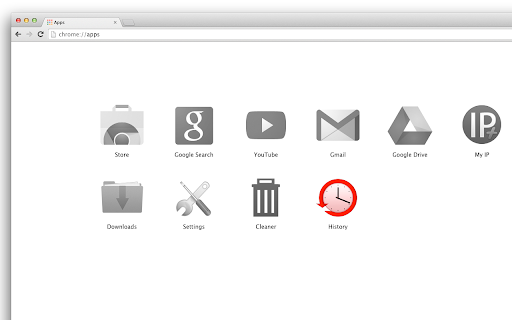
This is just a shortcut to Chrome history.

When installed, it will add "History" button to your apps list (on the "New Tab" page and in the Chrome App Launcher).

Click the icon and you'll open the history page. That's all this "app" does...

** Questions & Answers **

Why adding separate app to access history when it’s accessible with two clicks from the menu?
-- You don’t need to, but for some of us accessing the history page right from the apps tab / crome app launcher is convenient option. Besides, there is beautiful big icon ;-)

But chrome apps and extensions eat system memory, why wasting resources just for quick shortcut to the history?
-- The history app doesn’t “eat” memory. In technical terms, it uses non-persistent background page, which means chrome doesn’t need to reserve memory for the history button (check the Chrome Task Manager if you don’t trust us -- when you click on the history icon it will start the app, open the history page and release the memory right after that)

If I install the history button, is it easy to remove the app later?
-- Yes, you can remove it with few clicks (just go to the apps page, find the history icon, right-click on it and select “Remove from Chrome”)

How to add the history button to the main toolbar?
-- To get the history shortcut added to the toolbar you’ll need to install our history button extension:
https://chrome.google.com/webstore/detail/history-button/kakmedkloohedkbmmgchndgichbdndng

**More from the history button author**

• History On/Off – disable/enable history tracking with one click:
https://chrome.google.com/webstore/detail/history-onoff/ljbpakpmiimdmblcjjhhbfabbkmcgmdp

• SingleClick Cleaner – cleanup Chrome in one single click:
https://chrome.google.com/webstore/detail/singleclick-cleaner/cknijndocnnlkpenngcdcpleddlmckkm

More about the History Button:
https://singleclickapps.com/history-app/
Technical
- Version
- 1.0.0.3
- Manifest
- V2
- Size
- 23.03KiB
- Min Chrome
- —
- Languages
- 1
- Featured
- No
Metadata
- ID
- eedcpoiofipkhnjpekepcnknhhiocmnh
- Developer ID
- uacba69a502d35cf0d566422b1296c5bd
- Developer Email
- [email protected]
- Created
- Oct 15, 2013
- Last Updated (Store)
- Oct 31, 2017
- Last Scraped
- Jun 7, 2026
- Website
- http://singleclickapps.com/
- Support URL
- —
- Privacy Policy
- —
Similar extensions
Alternatives to History, ranked by description similarity.

Bookmarks
A shortcut to Chrome bookmarks
921
★ 4.3

History Shortcut - Fast History Button
History Shortcut - One-click toolbar button to instantly open your browsing history page. Fast, lightweight, and private
70.0K
★ 5.0

History
Opens History tab in single click from toolbar and context menu. Options available to change icon, open history2, remove menu item
3.0K
★ 4.4

历史记录快速查看
快速查看、搜索和管理 Chrome 浏览历史记录
167
★ 5.0

History Cleaner by SelfCode
Clean your browser history with advanced scheduling and customization options
—

Thematic History
Thematic History with no deletion.
1

Quick History Cleaner - Chrome Browsing History Cleaner
Easily clean your Chrome history with Quick History Cleaner. One-click is all it takes to clean your entire browsing history.
77
★ 5.0

Quick History Cleaner
Instantly clear browsing history with one-click!
10
Data sourced from the Chrome Web Store · last verified Jun 7, 2026.