
Pocket to Notion & Obsidian
Seamlessly migrate your Pocket articles to Notion & Obsidian. Export and backup your reading list with ease.
As of June 2026, Pocket to Notion & Obsidian has 111 users and a 5.00/5 rating from 2 reviews in the Productivity category.
Usersup 3.7 percent+3.7%
111
111
Ratingno change0%
5.00
2 reviews
Reviewsno change0%
2
Version
1.3.0
Manifest V3
History
4 snapshotsTracking since Apr 20, 2026.
View as table
| Date | Users | Rating | Reviews | Version |
|---|---|---|---|---|
| Apr 20, 2026 | 107 | 5.00 | 2 | 1.3.0 |
| May 16, 2026 | 97 | 5.00 | 2 | 1.3.0 |
| May 29, 2026 | 103 | 5.00 | 2 | 1.3.0 |
| Jun 9, 2026 | 110 | 5.00 | 2 | 1.3.0 |
| Now | 111 | 5.00 | 2 | 1.3.0 |
Permissions & access
- Permissions
- storageidentitydownloads
- Host access
- https://*.chatgpt2notion.com/*, https://api.notion.com/*, https://getpocket.com/*
Screenshots



About
📚 Bulk Export & Backup Your Pocket Articles to Notion or Markdown Files

🔒 IMPORTANT: With Pocket's upcoming service changes, now is the perfect time to backup your saved articles!

Update Log:
20250612: Added Markdown export feature for better compatibility with other tools like Obsidian.
20250603: Fixed the abnormal issue, added success and failure records, and added the function of skipping if already synced.


❓ What is Pocket to Notion?
Pocket to Notion is a powerful Chrome extension that helps you bulk export and backup your Pocket articles to Notion or Markdown files. It's the perfect solution for Pocket users who want to preserve their reading history and migrate to Notion or other Markdown-compatible tools.

❓ Why do I need this extension?
• Pocket is changing its service, and you need to backup your articles
• You want to centralize your reading list in Notion or other tools
• You need a reliable way to export all your Pocket articles
• You want to preserve your article metadata and formatting
• You need flexibility to use your content in different tools

❓ What features does it offer?
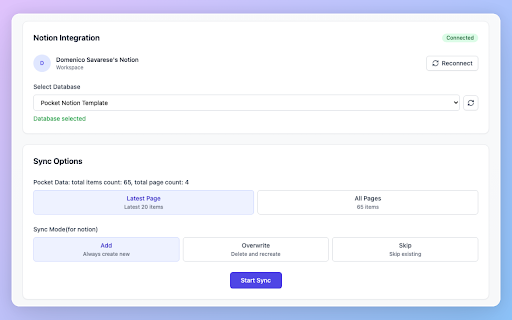
• One-click bulk export of all your Pocket articles
• Multiple export formats (Notion/Markdown)
• Seamless integration with Notion
• Multiple sync modes (Add/Overwrite/Skip)
• Preserves article metadata, tags, and content
• Beautiful and intuitive interface
• Real-time sync progress tracking
• Markdown export for maximum compatibility

❓ How does the sync process work?
• Choose between exporting latest articles or your entire library
• Select your preferred export format (Notion/Markdown)
• For Notion: Select your preferred database
• Customize how to handle existing articles
• Track the sync progress in real-time
• View detailed success/failure status for each article
• Get organized Markdown files ready for any tool

❓ Is it easy to use?
Yes! The extension features:
• Simple one-click export process
• Clear progress indicators
• Intuitive interface
• Detailed documentation
• Active community support
• Flexible export options

❓ What makes it different from other tools?
• Fast and reliable bulk export
• Multiple export formats (Notion/Markdown)
• Maintains article formatting and metadata
• User-friendly interface
• Regular updates and improvements
• Active community support
• Maximum compatibility with other tools

❓ What can I do with this extension?
• Backup your Pocket articles before service changes
• Export your entire Pocket library to Notion
• Export articles as Markdown files
• Import to any Markdown-compatible tool (Obsidian, Logseq, etc.)
• Sync your reading list with Notion
• Migrate from Pocket to Notion or other tools
• Import Pocket articles to Notion databases
• Transfer Pocket data to Notion
• Create a backup of your Pocket reader
• Integrate Pocket with Notion
• Find a Pocket alternative
• Use as a Pocket backup tool
• Sync Pocket articles with Notion
• Manage Pocket database in Notion
• Export to Markdown for maximum flexibility

🔗 Important Links:
• Documentation: https://chatgptsave.notion.site/How-to-use-pocket-to-notion-1ff10052f0c881b9be6cf4ae79217b38
• Support: https://github.com/joysey/pocket-to-notion/issues
• Contact: [email protected]

⚠️ Don't wait until it's too late - backup your Pocket articles today!

Update Log:
2025-05-27: Fixed the Notion connect issue.
Technical
- Version
- 1.3.0
- Manifest
- V3
- Size
- 340KiB
- Min Chrome
- 88
- Languages
- 6
- Featured
- No
Metadata
- ID
- jpbdgankeaohbackdjbnbicfiijaemod
- Developer ID
- u173c5bed9d6a3a6820bda30b163620fb
- Developer Email
- [email protected]
- Created
- May 27, 2025
- Last Updated (Store)
- Jun 14, 2025
- Last Scraped
- Jun 9, 2026
- Website
- chatgpt2notion.com
Similar extensions
Alternatives to Pocket to Notion & Obsidian, ranked by description similarity.

Medium to Notion - Bulk Sync
Easily sync, backup, and export your Medium articles to Notion. Sync all your Medium articles with one click.
24
★ 5.0

Perplexity to Notion - Batch Export
Bulk Export all your PerlexityAI conversations to Notion with one click
6.0K
★ 4.4
ChatGPT to Notion - Batch Export
Batch Save ChatGPT conversations to Notion with one click. Export ChatGPT conversations
755
★ 4.4

豆瓣Notion同步助手
将豆瓣书籍、影视、音乐信息同步到Notion数据库
233
★ 3.6

Notionizer
Convert markdown (tables, lists, etc.) to Notion-compatible format with one click
4
ClaudeAI to Notion
batch export claude ai to notion with one-click
488
★ 4.7

Quick Note to Notion
Save any webpage and notes in one click. Grouped by date. Sync to Notion as clean markdown. Simple, private, and fast.
13

Save ChatGPT to Notion
Save ChatGPT conversations to Notion with one click. Bulk Export ChatGPT conversations
8.0K
★ 4.5
Data sourced from the Chrome Web Store · last verified Jun 9, 2026.