
Perplexity to Notion - Batch Export
Bulk Export all your PerlexityAI conversations to Notion with one click
As of June 2026, Perplexity to Notion - Batch Export has 6,000 users and a 4.36/5 rating from 42 reviews in the Productivity category.
Usersup 200.0 percent+200.0%
6.0K
6,000
Ratingdown 3.5 percent−3.5%
4.36
42 reviews
Reviewsup 82.6 percent+82.6%
42
Version
3.1.0
Manifest V3
90-day change · In the last 90 days this extension gained 4.0K users, 2 version updates.
History
13 snapshotsTracking since Apr 1, 2026.
View as table
| Date | Users | Rating | Reviews | Version |
|---|---|---|---|---|
| Apr 1, 2026 | 2.0K | 4.52 | 23 | 2.9.3 |
| Apr 5, 2026 | 2.0K | 4.40 | 25 | 2.9.3 |
| Apr 16, 2026 | 2.0K | 4.24 | 25 | 2.9.3 |
| Apr 22, 2026 | 2.0K | 4.24 | 25 | 2.9.3 |
| Apr 26, 2026 | 2.0K | 4.30 | 27 | 2.9.3 |
| May 2, 2026 | 2.0K | 4.27 | 26 | 2.9.3 |
| May 7, 2026 | 2.0K | 4.30 | 27 | 2.9.3 |
| May 13, 2026 | 3.0K | 4.32 | 28 | 2.9.3 |
| May 22, 2026 | 4.0K | 4.23 | 30 | 2.9.3 |
| May 27, 2026 | 4.0K | 4.23 | 35 | 3.0.0 |
| Jun 1, 2026 | 5.0K | 4.27 | 37 | 3.1.0 |
| Jun 5, 2026 | 5.0K | 4.31 | 39 | 3.1.0 |
| Jun 19, 2026 | 5.0K | 4.36 | 42 | 3.1.0 |
| Now | 6.0K | 4.36 | 42 | 3.1.0 |
Changelog
- May 27, 2026description
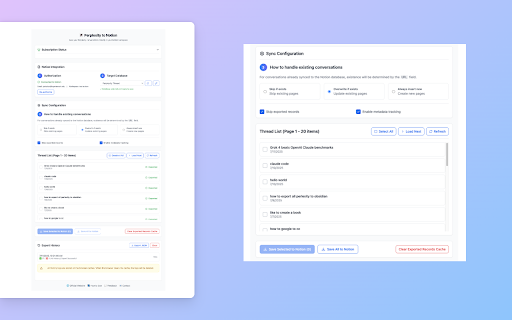
Perplexity to Notion – Batch Export is a simple yet powerful Chrome extension that lets you effortlessly export, back up, and download your PerplexityAI conversations and computer task threads. With one click, you can bulk export your chat history and task data to Notion, or save it as clean Markdown files for offline storage, research archives, or integration into your personal knowledge base.

✨ Key Features
• 📦 Bulk Export: Export all PerplexityAI chats in one operation—no more copy & paste.
• 📥 Download as Markdown: Keep your conversations well-formatted for Notion, offline backup, or Obsidian import.
• 🔄 One-Click Sync: Automatically sync PerplexityAI history into Notion to build your second brain.
• 🖥️ Computer Task Export: Export PerplexityAI computer task threads to Notion and Markdown, including task outputs for structured archiving.
• 🏢 Spaces Support: Export entire PerplexityAI Spaces threads for research, collaboration, and team knowledge sharing.
• ⏱️ Scheduled Auto Sync: Set a schedule once and the extension will sync at regular intervals—ideal for hands-off backups or ongoing Perplexity workflows.
• ⚙️ Customizable Export: Choose whether to include Sources and Related Questions sections in your exported conversations for more flexible content management.
• 🔒 Privacy First: All data is processed locally in your browser, ensuring secure and private backups.

💡 Use Cases
• Researchers: Archive AI-assisted discussions as structured, searchable notes.
• Students & self-learners: Save study Q&As and explanations into Notion or Markdown for easy review.
• Knowledge workers: Organize Perplexity content into your productivity workflow with offline sync.
• Power users: Preserve long-form computer task threads and task outputs in Notion for reuse, auditing, and documentation.
• Teams: Back up Spaces discussions to Notion for collaboration and project documentation.
• Automated workflows: Pair Perplexity automations with scheduled sync so new answers are captured in Notion without manual intervention.

Take full control of your PerplexityAI conversations—whether you need to bulk export, sync with Notion, save offline, or migrate into Markdown, everything is done securely with one click.


🔄 Change Log
📅 2026-05-19: Added support for exporting PerplexityAI computer task thread data to Notion and Markdown, including single-page export and bulk export workflows.
📅 2026-02-02: Fixed minor issues raised by users and optimized user experience.
📅 2025-12-04: Fixed the issue where some users could still only export 5 pieces of data after activation.
📅 2025-12-09: Fixed the issue where some Perplexity content could not be saved successfully due to some invalid link problems.
📅 2025-12-08: Improved connection guidance when Perplexity.ai is unreachable (both single and bulk save), fixed exporting all threads for a chosen Perplexity space, and added bulk export support for selecting multiple Perplexity.ai spaces at once.
📅 2025-11-12: Fixed the issue where some Perplexity content could not be saved successfully under certain circumstances.
📅 2025-11-02: Added customizable export options to include or exclude Sources and Related Questions sections.
📅 2025-09-26: Added support for exporting and syncing thread data from PerplexityAI Spaces to Notion.
📅 2025-09-25: Fixed the issue where part of the Perplexity list data was missing during syncing.


🌐 Related Links & Contact
• 📘 Product Home & Docs: https://chatgpt2notion.com/products/perplexity-to-notion/
• ❓ FAQ: https://chatgptsave.notion.site/FAQ-27910052f0c88062a659d0fb589e76a8
• 📖 How to Use Guide: https://chatgpt2notion.com/docs/perplexity-to-notion/overview/
• 🛠️ Feedback & Issues: https://github.com/joysey/chatgpt-to-notion/issues
• ✉️ Contact: [email protected]
Perplexity to Notion – Batch Export is a simple yet powerful Chrome extension that lets you effortlessly export, back up, and download your PerplexityAI conversations and computer task threads. With one click, you can bulk export your chat history and task data to Notion, or save it as clean Markdown files for offline storage, research archives, or integration into your personal knowledge base.

✨ Key Features
• 📦 Bulk Export: Export all PerplexityAI chats in one operation—no more copy & paste.
• 📥 Download as Markdown: Keep your conversations well-formatted for Notion, offline backup, or Obsidian import.
• 🔄 One-Click Sync: Automatically sync PerplexityAI history into Notion to build your second brain.
• 🖥️ Computer Task Export: Export PerplexityAI computer task threads to Notion and Markdown, including task outputs for structured archiving.
• 🏢 Spaces Support: Export entire PerplexityAI Spaces threads for research, collaboration, and team knowledge sharing.
• 📄 Perplexity Document Export: Export embedded Perplexity document files along with the main answer. Document content can be saved into Notion child pages and kept in the correct position inside the conversation.
• ⏱️ Scheduled Auto Sync: Set a schedule once and the extension will sync at regular intervals—ideal for hands-off backups or ongoing Perplexity workflows.
• ⚙️ Customizable Export: Choose whether to include Sources and Related Questions sections in your exported conversations for more flexible content management.
• 🔒 Privacy First: All data is processed locally in your browser, ensuring secure and private backups.

💡 Use Cases
• Researchers: Archive AI-assisted discussions as structured, searchable notes.
• Students & self-learners: Save study Q&As and explanations into Notion or Markdown for easy review.
• Knowledge workers: Organize Perplexity content into your productivity workflow with offline sync.
• Power users: Preserve long-form computer task threads and task outputs in Notion for reuse, auditing, and documentation.
• Teams: Back up Spaces discussions to Notion for collaboration and project documentation.
• Heavy document workflows: Capture Perplexity answers that include attached document-style outputs, SOP drafts, or long Markdown files without losing structure.
• Automated workflows: Pair Perplexity automations with scheduled sync so new answers are captured in Notion without manual intervention.

Take full control of your PerplexityAI conversations—whether you need to bulk export, sync with Notion, save offline, or migrate into Markdown, everything is done securely with one click.


🔄 Change Log
📅 2026-05-25: Added support for exporting Perplexity embedded document files to Notion. Attached document content can now be saved as child pages at the matching position in the conversation, and Notion export is more reliable for complex nested Markdown content.
📅 2026-05-19: Added support for exporting PerplexityAI computer task thread data to Notion and Markdown, including single-page export and bulk export workflows.
📅 2026-02-02: Fixed minor issues raised by users and optimized user experience.
📅 2025-12-04: Fixed the issue where some users could still only export 5 pieces of data after activation.
📅 2025-12-09: Fixed the issue where some Perplexity content could not be saved successfully due to some invalid link problems.
📅 2025-12-08: Improved connection guidance when Perplexity.ai is unreachable (both single and bulk save), fixed exporting all threads for a chosen Perplexity space, and added bulk export support for selecting multiple Perplexity.ai spaces at once.
📅 2025-11-12: Fixed the issue where some Perplexity content could not be saved successfully under certain circumstances.
📅 2025-11-02: Added customizable export options to include or exclude Sources and Related Questions sections.
📅 2025-09-26: Added support for exporting and syncing thread data from PerplexityAI Spaces to Notion.
📅 2025-09-25: Fixed the issue where part of the Perplexity list data was missing during syncing.


🌐 Related Links & Contact
• 📘 Product Home & Docs: https://chatgpt2notion.com/products/perplexity-to-notion/
• ❓ FAQ: https://chatgptsave.notion.site/FAQ-27910052f0c88062a659d0fb589e76a8
• 📖 How to Use Guide: https://chatgpt2notion.com/docs/perplexity-to-notion/overview/
• 🛠️ Feedback & Issues: https://github.com/joysey/chatgpt-to-notion/issues
• ✉️ Contact: [email protected]
- May 22, 2026description
Perplexity to Notion – Batch Export is a simple yet powerful Chrome extension that lets you effortlessly export, back up, and download all your PerplexityAI conversations. With one click, you can bulk export your entire chat history to Notion, or save it as clean Markdown files for offline storage, research archives, or integration into your personal knowledge base.

✨ Key Features
• 📦 Bulk Export: Export all PerplexityAI chats in one operation—no more copy & paste.
• 📥 Download as Markdown: Keep your conversations well-formatted for Notion, offline backup, or Obsidian import.
• 🔄 One-Click Sync: Automatically sync PerplexityAI history into Notion to build your second brain.
• 🏢 Spaces Support: Export entire PerplexityAI Spaces threads for research, collaboration, and team knowledge sharing.
• ⏱️ Scheduled Auto Sync: Set a schedule once and the extension will sync at regular intervals—ideal for hands-off backups or ongoing Perplexity workflows.
• ⚙️ Customizable Export: Choose whether to include Sources and Related Questions sections in your exported conversations for more flexible content management.
• 🔒 Privacy First: All data is processed locally in your browser, ensuring secure and private backups.

💡 Use Cases
• Researchers: Archive AI-assisted discussions as structured, searchable notes.
• Students & self-learners: Save study Q&As and explanations into Notion or Markdown for easy review.
• Knowledge workers: Organize Perplexity content into your productivity workflow with offline sync.
• Teams: Back up Spaces discussions to Notion for collaboration and project documentation.
• Automated workflows: Pair Perplexity automations with scheduled sync so new answers are captured in Notion without manual intervention.

Take full control of your PerplexityAI conversations—whether you need to bulk export, sync with Notion, save offline, or migrate into Markdown, everything is done securely with one click.


🔄 Change Log
📅 2026-02-02: Fixed minor issues raised by users and optimized user experience.
📅 2025-12-04: Fixed the issue where some users could still only export 5 pieces of data after activation.
📅 2025-12-09: Fixed the issue where some Perplexity content could not be saved successfully due to some invalid link problems.
📅 2025-12-08: Improved connection guidance when Perplexity.ai is unreachable (both single and bulk save), fixed exporting all threads for a chosen Perplexity space, and added bulk export support for selecting multiple Perplexity.ai spaces at once.
📅 2025-11-12: Fixed the issue where some Perplexity content could not be saved successfully under certain circumstances.
📅 2025-11-02: Added customizable export options to include or exclude Sources and Related Questions sections.
📅 2025-09-26: Added support for exporting and syncing thread data from PerplexityAI Spaces to Notion.
📅 2025-09-25: Fixed the issue where part of the Perplexity list data was missing during syncing.


🌐 Related Links & Contact
• 📘 Product Home & Docs: https://chatgpt2notion.com/products/perplexity-to-notion/
• ❓ FAQ: https://chatgptsave.notion.site/FAQ-27910052f0c88062a659d0fb589e76a8
• 📖 How to Use Guide: https://chatgpt2notion.com/docs/perplexity-to-notion/overview/
• 🛠️ Feedback & Issues: https://github.com/joysey/chatgpt-to-notion/issues
• ✉️ Contact: [email protected]
Perplexity to Notion – Batch Export is a simple yet powerful Chrome extension that lets you effortlessly export, back up, and download your PerplexityAI conversations and computer task threads. With one click, you can bulk export your chat history and task data to Notion, or save it as clean Markdown files for offline storage, research archives, or integration into your personal knowledge base.

✨ Key Features
• 📦 Bulk Export: Export all PerplexityAI chats in one operation—no more copy & paste.
• 📥 Download as Markdown: Keep your conversations well-formatted for Notion, offline backup, or Obsidian import.
• 🔄 One-Click Sync: Automatically sync PerplexityAI history into Notion to build your second brain.
• 🖥️ Computer Task Export: Export PerplexityAI computer task threads to Notion and Markdown, including task outputs for structured archiving.
• 🏢 Spaces Support: Export entire PerplexityAI Spaces threads for research, collaboration, and team knowledge sharing.
• ⏱️ Scheduled Auto Sync: Set a schedule once and the extension will sync at regular intervals—ideal for hands-off backups or ongoing Perplexity workflows.
• ⚙️ Customizable Export: Choose whether to include Sources and Related Questions sections in your exported conversations for more flexible content management.
• 🔒 Privacy First: All data is processed locally in your browser, ensuring secure and private backups.

💡 Use Cases
• Researchers: Archive AI-assisted discussions as structured, searchable notes.
• Students & self-learners: Save study Q&As and explanations into Notion or Markdown for easy review.
• Knowledge workers: Organize Perplexity content into your productivity workflow with offline sync.
• Power users: Preserve long-form computer task threads and task outputs in Notion for reuse, auditing, and documentation.
• Teams: Back up Spaces discussions to Notion for collaboration and project documentation.
• Automated workflows: Pair Perplexity automations with scheduled sync so new answers are captured in Notion without manual intervention.

Take full control of your PerplexityAI conversations—whether you need to bulk export, sync with Notion, save offline, or migrate into Markdown, everything is done securely with one click.


🔄 Change Log
📅 2026-05-19: Added support for exporting PerplexityAI computer task thread data to Notion and Markdown, including single-page export and bulk export workflows.
📅 2026-02-02: Fixed minor issues raised by users and optimized user experience.
📅 2025-12-04: Fixed the issue where some users could still only export 5 pieces of data after activation.
📅 2025-12-09: Fixed the issue where some Perplexity content could not be saved successfully due to some invalid link problems.
📅 2025-12-08: Improved connection guidance when Perplexity.ai is unreachable (both single and bulk save), fixed exporting all threads for a chosen Perplexity space, and added bulk export support for selecting multiple Perplexity.ai spaces at once.
📅 2025-11-12: Fixed the issue where some Perplexity content could not be saved successfully under certain circumstances.
📅 2025-11-02: Added customizable export options to include or exclude Sources and Related Questions sections.
📅 2025-09-26: Added support for exporting and syncing thread data from PerplexityAI Spaces to Notion.
📅 2025-09-25: Fixed the issue where part of the Perplexity list data was missing during syncing.


🌐 Related Links & Contact
• 📘 Product Home & Docs: https://chatgpt2notion.com/products/perplexity-to-notion/
• ❓ FAQ: https://chatgptsave.notion.site/FAQ-27910052f0c88062a659d0fb589e76a8
• 📖 How to Use Guide: https://chatgpt2notion.com/docs/perplexity-to-notion/overview/
• 🛠️ Feedback & Issues: https://github.com/joysey/chatgpt-to-notion/issues
• ✉️ Contact: [email protected]
Permissions & access
- Permissions
- storagetabs
- Host access
- https://*.aluo.app/*, https://api.notion.com/*, https://*.chatgpt2notion.com/*, https://*.perplexity.ai/*, https://perplexity.ai/*
Screenshots


About
Perplexity to Notion – Batch Export is a simple yet powerful Chrome extension that lets you effortlessly export, back up, and download your PerplexityAI conversations and computer task threads. With one click, you can bulk export your chat history and task data to Notion, or save it as clean Markdown files for offline storage, research archives, or integration into your personal knowledge base.

✨ Key Features
• 📦 Bulk Export: Export all PerplexityAI chats in one operation—no more copy & paste.
• 📥 Download as Markdown: Keep your conversations well-formatted for Notion, offline backup, or Obsidian import.
• 🔄 One-Click Sync: Automatically sync PerplexityAI history into Notion to build your second brain.
• 🖥️ Computer Task Export: Export PerplexityAI computer task threads to Notion and Markdown, including task outputs for structured archiving.
• 🏢 Spaces Support: Export entire PerplexityAI Spaces threads for research, collaboration, and team knowledge sharing.
• 📄 Perplexity Document Export: Export embedded Perplexity document files along with the main answer. Document content can be saved into Notion child pages and kept in the correct position inside the conversation.
• ⏱️ Scheduled Auto Sync: Set a schedule once and the extension will sync at regular intervals—ideal for hands-off backups or ongoing Perplexity workflows.
• ⚙️ Customizable Export: Choose whether to include Sources and Related Questions sections in your exported conversations for more flexible content management.
• 🔒 Privacy First: All data is processed locally in your browser, ensuring secure and private backups.

💡 Use Cases
• Researchers: Archive AI-assisted discussions as structured, searchable notes.
• Students & self-learners: Save study Q&As and explanations into Notion or Markdown for easy review.
• Knowledge workers: Organize Perplexity content into your productivity workflow with offline sync.
• Power users: Preserve long-form computer task threads and task outputs in Notion for reuse, auditing, and documentation.
• Teams: Back up Spaces discussions to Notion for collaboration and project documentation.
• Heavy document workflows: Capture Perplexity answers that include attached document-style outputs, SOP drafts, or long Markdown files without losing structure.
• Automated workflows: Pair Perplexity automations with scheduled sync so new answers are captured in Notion without manual intervention.

Take full control of your PerplexityAI conversations—whether you need to bulk export, sync with Notion, save offline, or migrate into Markdown, everything is done securely with one click.


🔄 Change Log
📅 2026-05-25: Added support for exporting Perplexity embedded document files to Notion. Attached document content can now be saved as child pages at the matching position in the conversation, and Notion export is more reliable for complex nested Markdown content.
📅 2026-05-19: Added support for exporting PerplexityAI computer task thread data to Notion and Markdown, including single-page export and bulk export workflows.
📅 2026-02-02: Fixed minor issues raised by users and optimized user experience.
📅 2025-12-04: Fixed the issue where some users could still only export 5 pieces of data after activation.
📅 2025-12-09: Fixed the issue where some Perplexity content could not be saved successfully due to some invalid link problems.
📅 2025-12-08: Improved connection guidance when Perplexity.ai is unreachable (both single and bulk save), fixed exporting all threads for a chosen Perplexity space, and added bulk export support for selecting multiple Perplexity.ai spaces at once.
📅 2025-11-12: Fixed the issue where some Perplexity content could not be saved successfully under certain circumstances.
📅 2025-11-02: Added customizable export options to include or exclude Sources and Related Questions sections.
📅 2025-09-26: Added support for exporting and syncing thread data from PerplexityAI Spaces to Notion.
📅 2025-09-25: Fixed the issue where part of the Perplexity list data was missing during syncing.


🌐 Related Links & Contact
• 📘 Product Home & Docs: https://chatgpt2notion.com/products/perplexity-to-notion/
• ❓ FAQ: https://chatgptsave.notion.site/FAQ-27910052f0c88062a659d0fb589e76a8
• 📖 How to Use Guide: https://chatgpt2notion.com/docs/perplexity-to-notion/overview/
• 🛠️ Feedback & Issues: https://github.com/joysey/chatgpt-to-notion/issues
• ✉️ Contact: [email protected]
Technical
- Version
- 3.1.0
- Manifest
- V3
- Size
- 449KiB
- Min Chrome
- 88
- Languages
- 6
- Featured
- No
Metadata
- ID
- gfmjaemghnjokjhafjiiijhllkkfcjpk
- Developer ID
- u4f151ec8366d785fce95e3e8c92defe6
- Developer Email
- [email protected]
- Created
- Oct 25, 2024
- Last Updated (Store)
- May 25, 2026
- Last Scraped
- Jun 19, 2026
- Website
- https://chatgpt2notion.com/
Similar extensions
Alternatives to Perplexity to Notion - Batch Export, ranked by description similarity.

Perplexity to obsidian - Batch Export
Bulk Export all your PerlexityAI conversations to markdown files with one click
—
★ 4.4

Perplexity to Airtable - Batch Export
Bulk export all your PerplexityAI conversations to Airtable with one click
57
★ 5.0

AI Chats Exporter - Bulk save all chats for memory
Bulk export conversations from ChatGPT, Claude, Gemini & Perplexity to Notion, Obsidian, Markdown and PDF in one click.
1.0K
★ 4.7
ChatGPT to Notion - Batch Export
Batch Save ChatGPT conversations to Notion with one click. Export ChatGPT conversations
755
★ 4.4

Genspark to Obsidian markdown file
Save Genspark conversations to Obsidian markdown file with one click. Batch export Genspark conversations
889
★ 5.0
ClaudeAI to Notion
batch export claude ai to notion with one-click
488
★ 4.7

GPT2Notes – Export & Backup ChatGPT to Notion (Batch & Auto Sync)
ChatGPT history downloader & Notion integration – save & back up your conversations to Markdown, HTML & more.
82
Save ChatGPT to Obsidian markdown file
Save ChatGPT conversations to Obsidian with one click. Export ChatGPT conversations
4.0K
★ 4.3
Data sourced from the Chrome Web Store · last verified Jun 19, 2026.