
Text Counter
Your Ultimate Text Analysis Tool
As of June 2026, Text Counter has 175 users and a 4.00/5 rating from 1 reviews in the Productivity category.
Usersup 15.9 percent+15.9%
175
175
Ratingno change0%
4.00
1 reviews
Reviewsno change0%
1
Version
1.0
Manifest V3
History
3 snapshotsTracking since Apr 23, 2026.
View as table
| Date | Users | Rating | Reviews | Version |
|---|---|---|---|---|
| Apr 23, 2026 | 151 | 4.00 | 1 | 1.0 |
| May 12, 2026 | 163 | 4.00 | 1 | 1.0 |
| Jun 7, 2026 | 169 | 4.00 | 1 | 1.0 |
| Now | 175 | 4.00 | 1 | 1.0 |
Permissions & access
- Permissions
- None declared
- Host access
- None declared
Screenshots
About
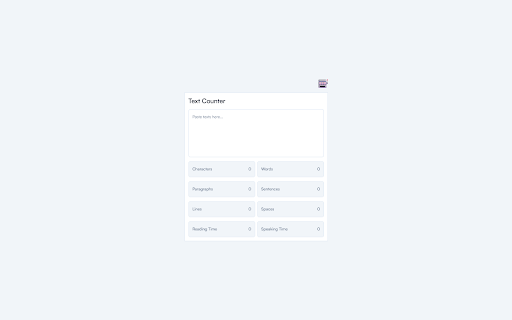
Transform the way you handle text with the Text Counter Chrome extension. Designed for writers, editors, students, and professionals, this powerful tool provides comprehensive text analysis directly within your browser.

Features:

a. Character Count: Instantly see the total number of characters in your text.

b. Word Count: Get an accurate count of all words to meet your writing requirements.

c. Paragraph Count: Easily identify the number of paragraphs for better text structure.

d. Sentence Count: Know the exact number of sentences to refine your writing style.

e. Line Count: Count the number of lines to ensure proper formatting.

f. Space Count: Track the number of spaces for precise text editing.

g. Reading Time: Estimate the reading time of your text to ensure it's reader-friendly.

h. Speaking Time: Calculate the speaking time for presentations and speeches.

How It Works:

a. Paste Your Text: Simply paste your text into the provided text area.

b. Instant Analysis: The extension immediately analyzes your text and displays the counts for characters, words, paragraphs, sentences, lines, spaces, reading time, and speaking time.

c. Detailed Insights: View the results in a clean, user-friendly interface with each metric clearly presented.

Privacy First:

Your privacy is our priority. Text Counter processes all data locally on your device. We do not collect, store, or share any personal data.

Ideal For:

a. Writers & Editors: Perfect for authors, bloggers, and editors who need precise text metrics.

b. Students & Academics: Helps students meet word limits and improve essay structure.

c. Professionals: Useful for preparing reports, social media posts, presentations, and speeches.

Enhance your text editing experience with Text Counter, your all-in-one text analysis tool.

Install now and take control of your writing!
Technical
- Version
- 1.0
- Manifest
- V3
- Size
- 31.43KiB
- Min Chrome
- 88
- Languages
- 1
- Featured
- No
Metadata
- ID
- jpbaacfdigejkphgholmodgpkbpfgkid
- Developer ID
- ua886fcc0829683b3e68c996a5f4912c1
- Developer Email
- [email protected]
- Created
- Jun 13, 2024
- Last Updated (Store)
- Jun 13, 2024
- Last Scraped
- Jun 7, 2026
- Website
- —
- Support URL
- —
Similar extensions
Alternatives to Text Counter, ranked by description similarity.

Character Count
Use Character Count to be accurate in your writing. It includes a reliable character counter, word and sentence counter, and more.
2.0K
★ 5.0

Character Count & Word Counter ✨
Easily count characters, words, sentences, and paragraphs on any website. Perfect for writers, SEO, students, and content creators.
41

Word Counter – Count Words Instantly
Count words, characters, sentences, and paragraphs instantly with a clean, fast, and privacy-friendly word counter.
—

Convertify Word Counter
Count words and characters
5

Word Counter - Quick Text Stats
Instantly count words, characters, sentences and estimate reading time for any selected text on any webpage.
—

Character Counter
Counts characters with and without spaces on the current webpage
49
★ 3.0
Online Word Count
Efficiently track your text's word count and character count with the Online Word Counter Chrome Extension.
616
★ 4.0

TextCounter Pro
A powerful tool with word and character counting, readability scores, keyword density, and real-time highlight features.
30
★ 5.0
Data sourced from the Chrome Web Store · last verified Jun 7, 2026.