Online Word Count
Efficiently track your text's word count and character count with the Online Word Counter Chrome Extension.
As of May 2026, Online Word Count has 616 users and a 4.00/5 rating from 4 reviews in the Productivity category.
Usersup 10.4 percent+10.4%
616
616
Ratingno change0%
4.00
4 reviews
Reviewsno change0%
4
Version
1.0.1
Manifest V3
History
3 snapshotsTracking since Apr 1, 2026.
View as table
| Date | Users | Rating | Reviews | Version |
|---|---|---|---|---|
| Apr 1, 2026 | 558 | 4.00 | 4 | 1.0.1 |
| May 2, 2026 | 554 | 4.00 | 4 | 1.0.1 |
| May 31, 2026 | 559 | 4.00 | 4 | 1.0.1 |
| Now | 616 | 4.00 | 4 | 1.0.1 |
Permissions & access
- Permissions
- contextMenusscripting
- Host access
- *://*/*
Screenshots
About
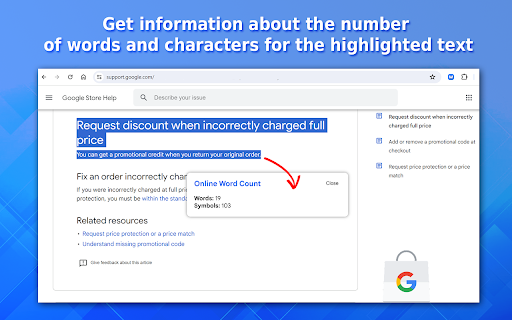
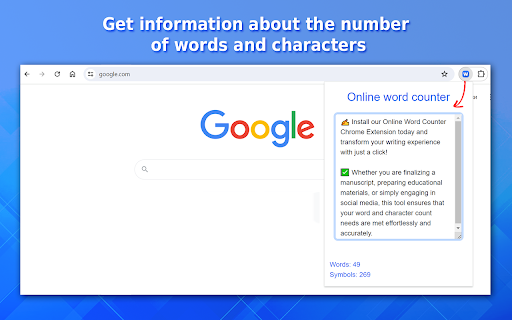
Optimize Your Writing with the Ultimate Online Word Counter Chrome Extension 📝 Unlock the Power of Precision in Writing Our Online Word Counter Chrome Extension is an essential tool that revolutionizes the way you interact with text on the web. 👨👨👦👦 Whether you are an author, student, blogger, or professional, this extension provides real-time insights into both word and character count directly within your Chrome browser. Here’s what makes our word counter tool indispensable: 1️⃣ Effortless Operation: Add it to Chrome and start using it without any complex setup. 2️⃣ Dual Functionality: Acts as both a word counter and a character counter. 3️⃣ Versatile Usability: Useful in various writing scenarios from academic to casual. Features at a Glance: 🔢 Real-Time Word Counting: Immediate display of word counts as you type or highlight text. ⌨ Character Count Insights: Know the exact number of characters with or without spaces. 🔓Ease of Access: Integrated seamlessly into Chrome, enhancing your workflow without interruption. 📝 Support for Multiple Text Entries: Works with both highlighted text and text entered into the input window. Why Use an Online Word Counter? Understanding the length of your document is crucial in many professional and academic contexts. Our tool is designed to assist you in maintaining the preciseness required in various documents. Here’s how you can benefit: ✍️ Editing and Proofreading: Perfect for manuscript preparation, ensuring you meet publishing standards. 📚 Academic Writing: From crafting essays to developing comprehensive lecture notes. 🌐 Social Media Management: Helps maintain character limits in platforms. 🎓 Exam Preparation: Essential for students to practice and adhere to word limits in exam answers. How Does It Work? ➤ Select words on a web page or insert content into the extension window for get check word count ➤ Instantly view the word and character count on our text counter. ➤ Adjust your text in real-time to meet specific requirements. Usage Scenarios: 🖋️ Bloggers: Keep track of post lengths to optimize reader engagement and SEO performance. 🎓 Students: Ensure your essays and assignments meet the word count requirements. 📰 Journalists: Quickly check the length of articles to fit editorial guidelines. 📈 Marketers: Craft perfectly sized promotional texts to capture audience attention. Why Choose Our Online Word Counter? 🎯 Accuracy: Provides precise word and character counts. 👌 Convenience: Accessible right in your browser. ⚡ Speed: Delivers real-time counting without delays. How to download and Install our online word count tool? 1️⃣ Install: Download the Online Word Counter extension from the Chrome Web Store. 2️⃣ Pin for Quick Access: Click the puzzle icon on Chrome, locate the extension, and pin it. 3️⃣ Launch: Click the pinned icon to start using the extension or use the tool options on the context menu. 4️⃣ Calculator words and characters: Enter text directly in the input box or right-click on highlighted text to get a count number of characters and word count check. 🏋️♂️ Don’t let the daunting task of counting words and characters slow down your productivity. ✍️ Install our Online Word Counter Chrome Extension today and transform your writing experience with just a click! 👉 This description of our extension highlights its ease of use and the broad range of applications, making it an invaluable tool for anyone dealing with text regularly. ✅ Whether you are finalizing a manuscript, preparing educational materials, or simply engaging in social media, this tool ensures that your word and character count needs are met effortlessly and accurately.
Technical
- Version
- 1.0.1
- Manifest
- V3
- Size
- 198KiB
- Min Chrome
- 88
- Languages
- 52
- Featured
- No
Metadata
- ID
- pdejaamajefadkacnpfdfpganhgkcoim
- Developer ID
- ue373d47831a314466ec5be62e7af3357
- Developer Email
- [email protected]
- Created
- May 15, 2024
- Last Updated (Store)
- May 16, 2024
- Last Scraped
- May 31, 2026
- Website
- —
- Support URL
- —
Similar extensions
Alternatives to Online Word Count, ranked by description similarity.

Count Words
Use Count Words app to find out how many words are in a paragraph. Make any writing task easier with the help of a words counter.
309
★ 4.5

Character Count
Use Character Count to be accurate in your writing. It includes a reliable character counter, word and sentence counter, and more.
2.0K
★ 5.0

Words Counter
Words Counter – a simple word counter for Chrome. Instantly view word count and character count without leaving your current tab.
163
★ 5.0

Word count in a page
Word count is a helpful tool for counting words on a page in your browser, allowing you to view statistics on selected text.
6
★ 5.0

Character Counter SEO Tool
Counts characters, words, and sentences on web pages.
12
★ 5.0

Letter Counter
With Letter Counter your character count becomes easy. This character counter gives char count and other essential metrics.
2.0K
★ 4.9

Character Count
Character Count Extension for Chrome - Word & Character Counter.
55

Word Counter
Count words and characters with the word counter tool. Get word and character count in any text.
5.0K
★ 3.9
Data sourced from the Chrome Web Store · last verified May 31, 2026.