
Receipt & Invoice Capture, Match, Categorize
Automate expense management by snapping receipts & invoices online, then auto-match with transactions on any card or bank account!
As of June 2026, Receipt & Invoice Capture, Match, Categorize has 176 users and a 5.00/5 rating from 5 reviews in the Productivity category.
Usersdown 13.3 percent−13.3%
176
176
Ratingno change0%
5.00
5 reviews
Reviewsno change0%
5
Version
1.2.6
Manifest V3
History
3 snapshotsTracking since Apr 23, 2026.
View as table
| Date | Users | Rating | Reviews | Version |
|---|---|---|---|---|
| Apr 23, 2026 | 203 | 5.00 | 5 | 1.2.6 |
| May 12, 2026 | 197 | 5.00 | 5 | 1.2.6 |
| Jun 7, 2026 | 188 | 5.00 | 5 | 1.2.6 |
| Now | 176 | 5.00 | 5 | 1.2.6 |
Permissions & access
- Permissions
- activeTabstorage
- Host access
- None declared
Screenshots


About
* Description *

Streamline your expense and spend management process like never before with Clyr's Receipt and Invoice Capture. This extension turns the tedious 6-8 step process of capturing, matching, and categorizing receipts & invoices into a swift, automated action that takes mere seconds.

* Key Features *

📸 Snap Receipts & Invoices

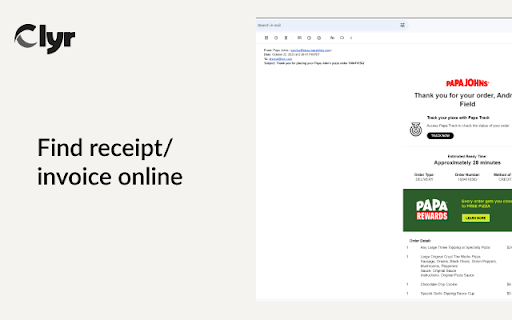
Easily capture images of receipts and invoices directly from websites and emails.

⚙️ Seamless Integration

Fully integrated with every major accounting platforms like Quickbooks, Xero, Sage, NetSuite as well as dozens of CRMs and work management platforms (Jobber, ServiceTitan, Buildium to name a few).

🔗 Card Agnostic

Connect your existing cards and checking accounts without migrating to a proprietary solution.

📊 Real-Time Notifications

Get real-time expense notifications, right when you make a transaction.

🔍 Automated Matching & Smart Categorization

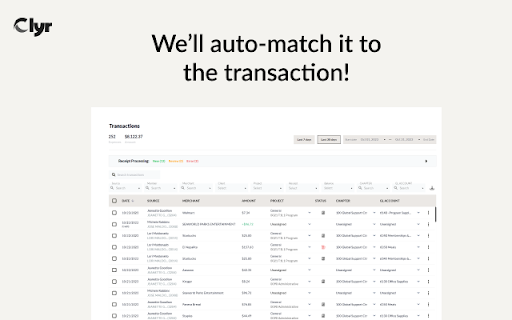
Snap a receipt and have it automatically matched to the corresponding transaction in your account. Our AI-powered algorithm categorizes your receipts, making it easier for you to keep track.

❓Why Clyr

* Efficient: Reduce dozens of hours spent weekly on expense management to just a few clicks.
* Accurate: Minimize errors that cause loss of revenue or reimbursable expenses.
* Simple: Prioritizing simplicity, Clyr has seen an ~80% uptick in receipts submitted and categorized by team members.

❓Usage Instructions

1. Install this extension.
2. Log in to your Clyr account or register for a new one
3. When you receive a receipt or invoice online, click the Clyr icon in your toolbar.
4. Snap the image and it will automatically be matched and categorized in your Clyr account.

Turn the tiresome task of expense management into a breeze!

Ratings & Reviews

⭐⭐⭐⭐⭐ "This extension has been a game-changer for our field service team."
⭐⭐⭐⭐⭐ "Saves me so much time and makes expense reports a breeze."

Support

Got questions? Visit our FAQ or reach out to our support team at [email protected].
Technical
- Version
- 1.2.6
- Manifest
- V3
- Size
- 942KiB
- Min Chrome
- 88
- Languages
- 1
- Featured
- No
Metadata
- ID
- jodphgcfdncpimhcpfnddnankbagmjjf
- Developer ID
- u82fbcb0265853f2818ee1f692c1b1915
- Developer Email
- [email protected]
- Created
- Oct 26, 2023
- Last Updated (Store)
- Oct 9, 2024
- Last Scraped
- Jun 7, 2026
- Website
- clyr.io
- Support URL
- https://clyr.io/contact-us
- Privacy Policy
- https://clyr.io/privacy-policy
Similar extensions
Alternatives to Receipt & Invoice Capture, Match, Categorize, ranked by description similarity.

Online Receipt Tracker - Receiptix
Track your expenses directly from your browser
111
★ 5.0

ReceiptFloW - Sync and sort your Gmail receipts
Automatically fetch & organize receipts from Gmail. AI-powered tracking for freelancers & businesses. Export to CSV, PDF.
14
★ 5.0

Espensivo - Capture and Convert Receipts to Expenses in Seconds
Capture and convert receipts and invoices to expenses by email or to Quickbooks/Xero in seconds.
4
★ 5.0

Receipt Uploader
Upload receipt PDFs to Google Drive for automatic processing
1

Invoice Generator for Chrome™
Create professional invoices instantly with multiple templates, PDF export, and smart calculations. No signup required!
31
★ 5.0

Daily Sales Register
Daily sales register calculator for restaurants. Track cash, UPI, card sales, orders & expenses. Free POS tool.
3

Expensator Lite
Download invoices from Uber, Uber Eats, Deliveroo and G7
14

Trip2Claim
Track customer rides, auto-calc fuel costs, and export month-end reimbursement reports.
—
Data sourced from the Chrome Web Store · last verified Jun 7, 2026.