
Online Receipt Tracker - Receiptix
Track your expenses directly from your browser
As of June 2026, Online Receipt Tracker - Receiptix has 111 users and a 5.00/5 rating from 1 reviews in the Productivity category.
Usersup 12.1 percent+12.1%
111
111
Ratingno change0%
5.00
1 reviews
Reviewsno change0%
1
Version
1.5.0
Manifest V3
90-day change · In the last 90 days this extension 1 version update.
History
8 snapshotsTracking since Apr 16, 2026.
View as table
| Date | Users | Rating | Reviews | Version |
|---|---|---|---|---|
| Apr 16, 2026 | 99 | 5.00 | 1 | 1.4.0 |
| Apr 22, 2026 | 105 | 5.00 | 1 | 1.5.0 |
| Apr 27, 2026 | 111 | 5.00 | 1 | 1.5.0 |
| May 4, 2026 | 102 | 5.00 | 1 | 1.5.0 |
| May 10, 2026 | 106 | 5.00 | 1 | 1.5.0 |
| May 15, 2026 | 109 | 5.00 | 1 | 1.5.0 |
| May 21, 2026 | 111 | 5.00 | 1 | 1.5.0 |
| Jun 3, 2026 | 110 | 5.00 | 1 | 1.5.0 |
| Now | 111 | 5.00 | 1 | 1.5.0 |
Permissions & access
- Permissions
- contextMenusstorageactiveTabidentityscriptingcommands
- Host access
- None declared
Screenshots



About
Receiptix — Receipt Scanner & Expense Tracker for Your Browser

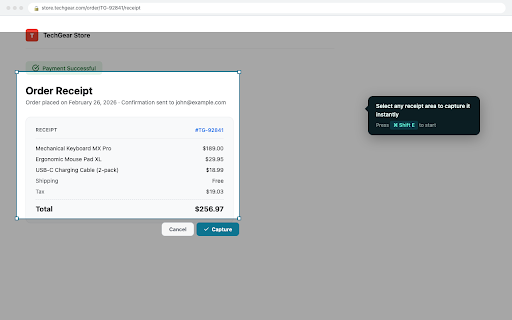
You just paid for something online. The confirmation page is right there. Hit ⌘+Shift+E (Mac) or Alt+Shift+E (Windows), drag over the receipt, and it's captured — amount, date, merchant, category, all extracted automatically.

No copying, no screenshots saved to random folders, no "I'll organize this later" that never happens.

HOW IT WORKS

1. Install the extension and sign in with Google
2. When you see a receipt on any website, press the shortcut or click the extension icon
3. Select the area to capture — Receiptix reads and categorizes the receipt automatically
4. Your receipts sync to the Receiptix mobile app for reports, analytics, and on-the-go access

You can also drag and drop receipt images or PDFs directly into the sidebar, or right-click selected text and choose "Save as Receipt."

ORGANIZE BY PROJECT

Group expenses into projects — useful for separating work trips, client billing, or shared household budgets. Select a project from the sidebar dropdown before capturing, and receipts go straight to the right place. Projects sync across the extension and mobile app, so everyone on a shared project sees the same data.

WHAT THE EXTENSION DOES

- Captures receipts from any webpage with a keyboard shortcut or screenshot tool
- Extracts receipt details (amount, date, merchant, category) using AI
- Categorizes expenses automatically for spending reports
- Supports JPEG, PNG, WEBP, and PDF uploads (up to 10MB)
- Works with Google sign-in — no separate account needed

THE FULL RECEIPTIX APP

The Chrome extension is one piece of a larger expense tracking system. The Receiptix mobile app (iOS and Android) gives you the complete picture:

- AI receipt scanning from your phone's camera — snap a photo of any paper or digital receipt and get merchant name, date, totals, and individual line items extracted automatically
- Voice mode for logging expenses hands-free — just say what you spent and Receiptix records and categorizes it
- Smart categorization that learns your spending patterns over time
- Charts and reports that break down your spending by category, time period, and project
- Shared projects with per-member breakdowns for group expenses — trips, renovations, team budgets
- Multi-currency support with automatic conversions for travelers
- Apple Watch app and Telegram bot for quick expense entry
- Cloud sync across all your devices

Whether the receipt is on a screen or in your hand, it ends up in the same place.

FREE VS. PREMIUM

The free tier includes manual expense entry, basic categorization, visual reports, multi-currency support, and cloud sync. Premium adds AI scanning, voice tracking, advanced analytics, and unlimited storage. Subscribe through the mobile app.

LINKS

- Mobile app: https://get.receiptix.io
- Website: https://receiptix.io
- Support: [email protected]
Technical
- Version
- 1.5.0
- Manifest
- V3
- Size
- 965KiB
- Min Chrome
- 88
- Languages
- 1
- Featured
- No
Metadata
- ID
- bbjkhniblichnpnmimjhdndofapbpmji
- Developer ID
- u6a0de1cfd7b775dbc63dcd7a651f1fc1
- Developer Email
- [email protected]
- Created
- Feb 16, 2025
- Last Updated (Store)
- Apr 8, 2026
- Last Scraped
- Jun 9, 2026
- Website
- receiptix.io
- Support URL
- https://receiptix.io/help
- Privacy Policy
- https://receiptix.io/privacy-policy.html
Similar extensions
Alternatives to Online Receipt Tracker - Receiptix, ranked by description similarity.

ReceiptOrg - Receipt Scanner
Scan receipts from any webpage with AI-powered data extraction. Track expenses, organize receipts, and export to PDF.
5
★ 5.0

Receipt Uploader
Upload receipt PDFs to Google Drive for automatic processing
1

Receipt & Invoice Capture, Match, Categorize
Automate expense management by snapping receipts & invoices online, then auto-match with transactions on any card or bank account!
176
★ 5.0

ReceiptFloW - Sync and sort your Gmail receipts
Automatically fetch & organize receipts from Gmail. AI-powered tracking for freelancers & businesses. Export to CSV, PDF.
14
★ 5.0

Rewiser
Add transactions from any tab. Capture prices, speak with AI, and manage your budget effortlessly.
10

Expense Manager - AI Assistant
AI-powered expense tracking with natural language. Manage your expenses effortlessly.
8
★ 5.0

Cart AI
Automatically detect transactions, get smart insights, spending forecasts, and personalized recommendations. No bank login required.
—

RECEIPTIFIED - Instant Receipt Generator
Generate receipts instantly from any supported store page. An extension from thereceiptified.com.
492
★ 3.0
Data sourced from the Chrome Web Store · last verified Jun 9, 2026.