
Kloser
Close all tabs and open default tab
As of June 2026, Kloser has 45 users and a 4.75/5 rating from 4 reviews in the Functionality & UI category.
Usersup 2.3 percent+2.3%
45
45
Ratingno change0%
4.75
4 reviews
Reviewsno change0%
4
Version
3.1
Manifest V3
History
3 snapshotsTracking since Apr 23, 2026.
View as table
| Date | Users | Rating | Reviews | Version |
|---|---|---|---|---|
| Apr 23, 2026 | 44 | 4.75 | 4 | 3.1 |
| May 12, 2026 | 44 | 4.75 | 4 | 3.1 |
| Jun 7, 2026 | 47 | 4.75 | 4 | 3.1 |
| Now | 45 | 4.75 | 4 | 3.1 |
Permissions & access
- Permissions
- storage
- Host access
- None declared
Screenshots
About
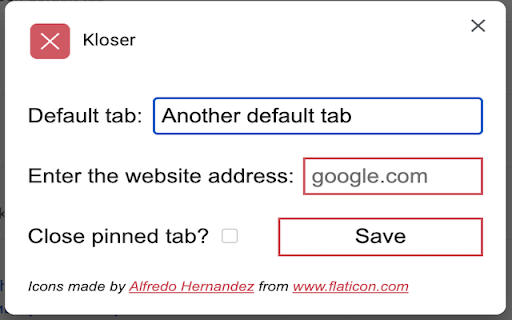
Simple extension for closing all tabs in active window and opening New Tab Page or your selected page.

You can edit settings of this extension, such as you can choose preferred tab which will be opened after using the extension and you can set will be extension close pinned tabs.

Use the shortcut: Ctrl + Q
Technical
- Version
- 3.1
- Manifest
- V3
- Size
- 11.04KiB
- Min Chrome
- 88
- Languages
- 1
- Featured
- Yes
Metadata
- ID
- joanfadldlkgclnmonllgcbnepcbfepk
- Developer ID
- u8be14470423fddad383b5ea017e11670
- Developer Email
- [email protected]
- Created
- Feb 2, 2017
- Last Updated (Store)
- Sep 26, 2024
- Last Scraped
- Jun 7, 2026
- Website
- —
- Support URL
- —
- Privacy Policy
- —
Similar extensions
Alternatives to Kloser, ranked by description similarity.

Tab Cleaner
Quickly view, switch, sort and close open tabs.
12
★ 5.0

Window Session
Save each window as a separate session, automatically.
261
★ 3.0

New Tab Positioner
Control where new tabs open — from regular tabs, pinned tabs, and tab groups.
444
★ 4.3

Close Tabs on the right
Close tabs to the right of the current active tab
51
★ 5.0

close_tab(s)
Easily close tabs with in-page elements.
2.0K
★ 4.6

Tabs+
Take control of your tabs
825
★ 4.1

Tab Close Gold
Tired of unwanted popups? Leftover launcher tabs got you down? Want a simple extension to auto close tabs? Then look no further!
8.0K
★ 4.7

Close Tabs on the left
Close tabs to the left of the current active tab
9
★ 5.0
Data sourced from the Chrome Web Store · last verified Jun 7, 2026.