
Neopets Alarm Clock Notebook
Customize the appearance and functionality of the Neopets clock.
As of June 2026, Neopets Alarm Clock Notebook has 16 users in the Games category.
Usersup 6.7 percent+6.7%
16
16
Ratingno change0%
—
— reviews
Reviewsno change0%
—
Version
1.0
Manifest V3
History
3 snapshotsTracking since Apr 23, 2026.
View as table
| Date | Users | Rating | Reviews | Version |
|---|---|---|---|---|
| Apr 23, 2026 | 15 | — | — | 1.0 |
| May 12, 2026 | 16 | — | — | 1.0 |
| Jun 7, 2026 | 15 | — | — | 1.0 |
| Now | 16 | — | — | 1.0 |
Permissions & access
- Permissions
- storage
- Host access
- None declared
Screenshots
About
Neopets-Alarmclock_Notebook

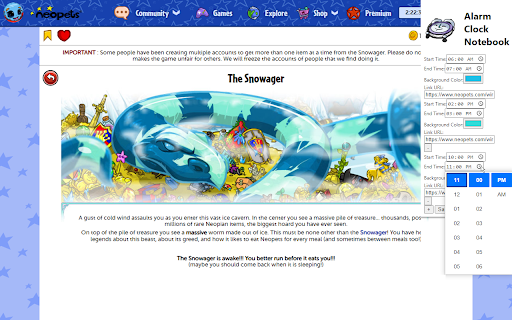
This is just a light chrome extension that allows you to create a little visual reminders and link to those. I use this for my worm missions, snowager, and other time specific events.

This Chrome extension allows users to customize the appearance of the Neopets clock based on specific time intervals. Users can set the start time, end time, background color, and a clickable link for the clock. This feature-rich extension is designed to enhance the user experience on Neopets by providing a personalized interface.

Credits

This extension is proudly designed and developed by GameDirection.net (https://gamedirection.net), an indie game studio and publishing company. GameDirection.net is committed to creating innovative solutions for game designers and gamers alike, with a portfolio that includes board games, role-playing systems, and digital game enhancements.

How to Use

After installation, you can customize the Neopets clock by following these steps:

1. Open the Extension: Click on the extension icon in the Chrome toolbar to open the settings popup.
2. Set Your Preferences: For each desired customization:
    - Specify the Start Time and End Time for when the customizations should apply.
    - Choose a Background Color using the color picker.
    - Enter a Link URL to make the clock clickable, directing to your specified URL.
3. Add or Remove Settings: Click the "+" button to add more custom settings or the "-" button to remove them.
4. Save Your Settings: Click the "Save" button to apply your customizations.

Note: Ensure that your specified time intervals do not overlap, as the extension will prevent saving overlapping time settings to ensure consistent behavior.

Enjoy a personalized Neopets experience with your customized clock!

## Support

For support, suggestions, or contributions, please visit [GameDirection.net](https://gamedirection.net) or open an issue in this GitHub repository.

---

Proudly designed by GameDirection.net – Enhancing your gaming experience.
Technical
- Version
- 1.0
- Manifest
- V3
- Size
- 61.31KiB
- Min Chrome
- 88
- Languages
- 1
- Featured
- No
Metadata
- ID
- jniahojkplpgpnkollnemeianmnadpid
- Developer ID
- u4124c37ac508eac49b027b032828b7d2
- Developer Email
- [email protected]
- Created
- Mar 29, 2024
- Last Updated (Store)
- Mar 29, 2024
- Last Scraped
- Jun 7, 2026
- Website
- gamedirection.net
- Privacy Policy
- —
Similar extensions
Alternatives to Neopets Alarm Clock Notebook, ranked by description similarity.

Ninja Time Search
Quick search for Ninja Time Wiki content
—

Hexrpg Enhancement Suite
A utility for quality-of-life improvements for Hexrpg.com.
16
★ 5.0

Classroom 76 - Unblocked Games 76
Play unblocked games 76 right in your web-browser!
560

Mini Games Extension
Play mini games in your browser!
235
★ 5.0

Eag War Helper
Enhances Torn faction wars with status highlighting, chain timer, hospital timers, and alerts. Customizable settings panel.
6

Influence Tools
Discover and use community developed tools while playing the space strategy MMO Influence
192
★ 5.0

66EZ
Play unblocked games 66 EZ right in your web-browser!
27

Oldies Nest New Games
View new retro games added to Oldies Nest website. Displays recently added classic games with thumbnails and direct links.
11
Data sourced from the Chrome Web Store · last verified Jun 7, 2026.