
Mini Games Extension
Play mini games in your browser!
As of May 2026, Mini Games Extension has 235 users and a 5.00/5 rating from 1 reviews in the Games category.
Usersup 15.8 percent+15.8%
235
235
Ratingno change0%
5.00
1 reviews
Reviewsno change0%
1
Version
1.0
Manifest V3
History
3 snapshotsTracking since Apr 1, 2026.
View as table
| Date | Users | Rating | Reviews | Version |
|---|---|---|---|---|
| Apr 1, 2026 | 203 | 5.00 | 1 | 1.0 |
| May 1, 2026 | 200 | 5.00 | 1 | 1.0 |
| May 29, 2026 | 226 | 5.00 | 1 | 1.0 |
| Now | 235 | 5.00 | 1 | 1.0 |
Permissions & access
- Permissions
- storage
- Host access
- None declared
Screenshots
About
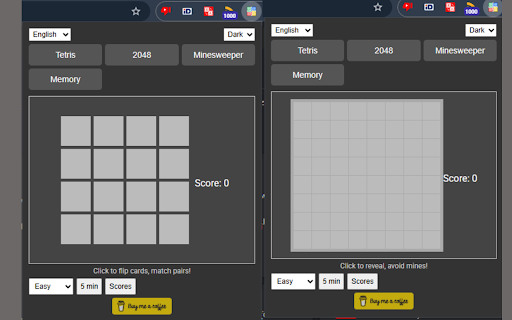
Mini Games Chrome Extension: A lightweight Chrome extension featuring a collection of mini-games accessible via a popup interface. This extension includes Tetris, 2048, Minesweeper, and Memory games, designed to be resource-efficient and playable offline after loading. This extension provides a simple and engaging way to play classic mini-games directly in your Chrome browser. The games are built using HTML5, CSS, and JavaScript, with features like progress saving, theme switching (light/dark mode), and a high score system.

Features:
-  Tetris, 2048, Minesweeper, and Memory.
- Offline Support: Works without an internet connection after initial loading.
- Themes: Switch between light and dark modes.
- Progress Saving: High scores are saved locally using Chrome storage.
- Additional Features: Timer option (5-minute reminder), difficulty levels.

- The extension icon should appear in your Chrome toolbar. Click it to open the popup and start playing!
- Click the extension icon in the Chrome toolbar to open the mini-games interface.
- Choose from Tetris, 2048, Minesweeper, or Memory by clicking the respective buttons.

Controls:
- Tetris: Use ←/→ to move, ↓ to speed up, ↑ to rotate.
- 2048: Use arrows to move tiles.
- Minesweeper: Click to reveal cells, avoid mines.
- Memory: Click to flip cards and match pairs.

Additional Options:
- Theme: Switch between light and dark modes using the theme dropdown.
- Language: Change the language using the language dropdown.
- Difficulty: Select easy, medium, or hard (currently a placeholder feature).
- Timer: Set a 5-minute timer with the "5 min" button.
- Scores: View high scores with the "Scores" button.
Technical
- Version
- 1.0
- Manifest
- V3
- Size
- 22.07KiB
- Min Chrome
- 88
- Languages
- 1
- Featured
- No
Metadata
- ID
- kmhplfeojmgmbnebbbfndifpanlocapm
- Developer ID
- u5285fe57b6156124ad4ca68b3a1c3cb4
- Developer Email
- [email protected]
- Created
- Mar 19, 2025
- Last Updated (Store)
- Mar 19, 2025
- Last Scraped
- May 29, 2026
- Website
- —
- Support URL
- —
- Privacy Policy
- —
Similar extensions
Alternatives to Mini Games Extension, ranked by description similarity.

Offline Games - Sudoku 2048 Linkup Flappy Bird Tetris Minesweeper
Play Offline Games - Sudoku 2048 Linkup Flappy Bird Tetris Minesweeper in Chrome Side Panel
762
★ 5.0

Ultimate Retro Tetris Game - MiniTetris
Retro Tetris Game by Hyphn Studios.
51

Fun Games Collection
8 fun mini-games in one click — Snake, 2048, Memory Match, Tic-tac-toe & more. Play offline with daily streaks. No permissions.
1.0K
★ 4.0
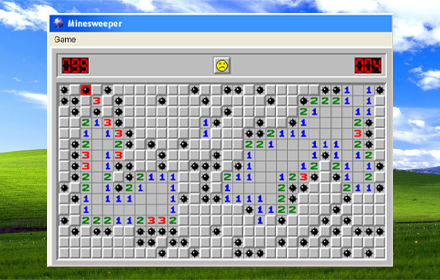
Classic Minesweeper Offline Game
Bring Minesweeper game to your Google Chrome!
4.0K
★ 4.9
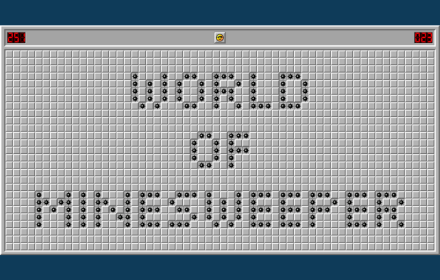
Minesweeper Mania Game
Play Minesweeper Mania Game as a Chrome extension - Also can Play without Internet, try it now!
339
★ 5.0

Game Lord
A free, open-source browser extension that provides offline games, No internet required!
15
Tetris
A Simple Tetris Game
4.0K
★ 4.1

Stacker Game
Stacker is a fun arcade game played in a pop-up window. Stack falling tetra blocks without touching the ceiling! Play offline!
6.0K
★ 4.2
Data sourced from the Chrome Web Store · last verified May 29, 2026.