
Zoom Block
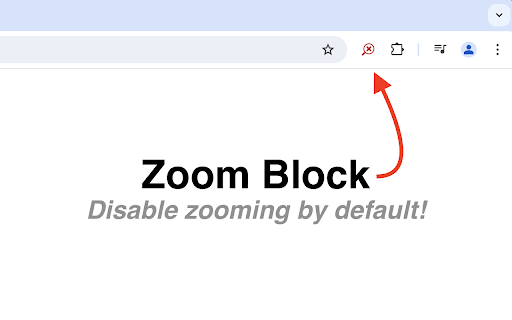
Disable zooming by default. Re-enable zooming on a per-tab basis by clicking the Zoom Block icon.
As of June 2026, Zoom Block has 10,000 users and a 3.89/5 rating from 65 reviews in the Accessibility category.
Usersno change0%
10.0K
10,000
Ratingdown 1.3 percent−1.3%
3.89
65 reviews
Reviewsup 1.6 percent+1.6%
65
Version
2.0.0
Manifest V3
History
1 snapshotsTracking since Apr 23, 2026.
View as table
| Date | Users | Rating | Reviews | Version |
|---|---|---|---|---|
| Apr 23, 2026 | 10.0K | 3.94 | 64 | 2.0.0 |
| Now | 10.0K | 3.89 | 65 | 2.0.0 |
Permissions & access
- Permissions
- storage
- Host access
- None declared
Screenshots
About
Zoom Block disables zooming in Chrome by default preventing unwanted or accidental zooming. Zooming can be re-enable on a per-tab basis by clicking the Zoom Block icon.

FAQ:

Q: What permissions does Zoom Block require?
A: Zoom Block does not require any permissions. Through careful handling of errors, Zoom Block is able to operate without access to any sensitive information.

Q: Does Zoom Block use analytics?
A: No. Zoom Block respects its users' privacy. No network requests of any kind are ever made.

Q: Can Zoom Block "lock" a custom zoom level?
A: The browser extension API does not offer an elegant way to accomplish this. The best option is to change the browser's default zoom level. Chrome's default zoom settings can be found in Settings -> Appearance -> Page Zoom. Zoom Block will then prevent modifications to the set level.

Q: Why does Zoom Block's icon sometimes turn gray?
A: Some browsers do not allow extensions to modify certain pages (typically internal or settings pages). Zoom Block is therefore unable to prevent zooming on those pages, and the icon will turn gray to indicate such a situation.

Q: I found a bug! Where can I submit a report?
A: Please open an issue on GitHub (https://github.com/warnellw/Zoom-Block/issues) with a detailed description. Pull requests welcome!

License:

Zoom Block is licensed under GPLv3. The source code can be found here: https://github.com/warnellw/Zoom-Block
Technical
- Version
- 2.0.0
- Manifest
- V3
- Size
- 36.94KiB
- Min Chrome
- 88
- Languages
- 1
- Featured
- Yes
Metadata
- ID
- jmomepcgehgfoimapeoinphcloinjfpb
- Developer ID
- ueafc28ce8735219e4815b19aa1d99a8a
- Developer Email
- [email protected]
- Created
- May 9, 2018
- Last Updated (Store)
- Aug 11, 2024
- Last Scraped
- Jun 7, 2026
- Website
- —
- Privacy Policy
- —
Similar extensions
Alternatives to Zoom Block, ranked by description similarity.

Scroll Zoom
Zoom web pages with the left or right mouse button and the scroll wheel.
3.0K
★ 4.3
Zoom for Google Chrome
Zoom in or out on web content using the zoom button and mouse scroll wheel for more comfortable reading. That to each percent value.
300.0K
★ 4.2

Smart zoom
Right-click a column of text so zoom, or tap Shift and click, then press +/-/0 to adjust the font size. Esc unzooms.
1.0K
★ 4.3

Command+Scroll Zoom
Smothly zoom in and out web pages using Cmd+Scroll
25
★ 5.0

Disable Ctrl + Scroll Wheel Zoom
Disables the ctrl + scroll wheel zoom shortcut in Chrome.
7.0K
★ 4.2

Video Zoom Pro
Professional video zoom & rotation. Zoom 30%-400%, rotate in 90° steps, move zoomed videos, reset with one click.
254
★ 5.0

Super Zoom + Tab Finder
Super Zoom + Tab Finder allows to zoom in-out the content shared by others in Google Meet and finds your browser tabs
74
★ 5.0

Google Meet Zoom In Zoom Out
Google Meet Zoom In Zoom Out allows to zoom in-out the content shared by others in Google Meet
1.0K
★ 4.9
Data sourced from the Chrome Web Store · last verified Jun 7, 2026.