
Smart zoom
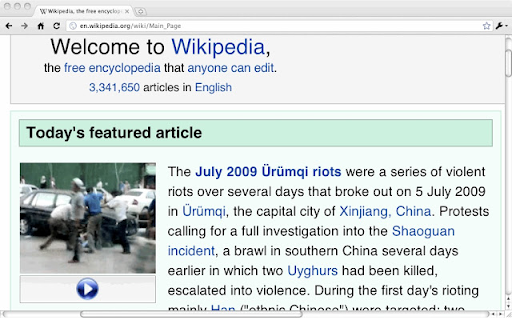
Right-click a column of text so zoom, or tap Shift and click, then press +/-/0 to adjust the font size. Esc unzooms.
As of May 2026, Smart zoom has 1,000 users and a 4.29/5 rating from 17 reviews in the Accessibility category.
Usersno change0%
1.0K
1,000
Ratingno change0%
4.29
17 reviews
Reviewsno change0%
17
Version
0.1.7.3
Manifest V3
History
1 snapshotsTracking since Apr 25, 2026.
View as table
| Date | Users | Rating | Reviews | Version |
|---|---|---|---|---|
| Apr 25, 2026 | 1.0K | 4.29 | 17 | 0.1.7.3 |
| Now | 1.0K | 4.29 | 17 | 0.1.7.3 |
Permissions & access
- Permissions
- contextMenus
- Host access
- None declared
Screenshots

About
Right-click a column of text and pick "Zoom" to make it take up the whole width of the screen just like double tap zooming of the mobile Safari.  Esc unzooms.

Or you can tap Shift then click a column of text to zoom in on it, and/or press +/-/0 to adjust the font size.  If you tap Shift accidentally, cancel zooming by tapping it again (or pressing any other key).

This extension works best for text-heavy sites: news, blogs, and so forth.  It won't zoom all content correctly, and it's disabled for some sites like GMail and Hotmail where it doesn't work.  Like all extensions, it's disabled on this site, too.  And it's experimental: it could cause you problems.

If the keyboard shortcuts interfere with a webpage, you can disable them on a page by pressing ` (the backquote key, underneath Escape on some keyboards).

Note: This extension was originally developed by another author. I loved this extension but it was not maintained any more and it was not worked on recent version of chrome. So I decided to fix it for latest chrome. I really appreciate original authors' efforts.

origin: https://chrome.google.com/webstore/detail/smart-zoom/emfkpabfhchapdbfcmphhcagnkdloanp
Technical
- Version
- 0.1.7.3
- Manifest
- V3
- Size
- 30.24KiB
- Min Chrome
- 88
- Languages
- 1
- Featured
- Yes
Metadata
- ID
- ppinmodbpljedinjhhpabjcbgkfmkmak
- Developer ID
- u01ac13a37cb17b56f34cf81900ef9e80
- Developer Email
- [email protected]
- Created
- May 16, 2018
- Last Updated (Store)
- May 20, 2024
- Last Scraped
- May 21, 2026
- Website
- —
- Support URL
- —
- Privacy Policy
- https://github.com/yukisae/smartzoom/wiki/Privacy-policy
Similar extensions
Alternatives to Smart zoom, ranked by description similarity.
Zoom for Google Chrome
Zoom in or out on web content using the zoom button and mouse scroll wheel for more comfortable reading. That to each percent value.
300.0K
★ 4.2

Scroll Zoom
Zoom web pages with the left or right mouse button and the scroll wheel.
3.0K
★ 4.3

Magnifier Usable Only with Mouse
A tool to zoom in on web pages without using a keyboard. The zoom method can be customized!
213
★ 4.5

Command+Scroll Zoom
Smothly zoom in and out web pages using Cmd+Scroll
25
★ 5.0

Text Zoom & Reader — enlarge text, hide images
Text zoom to 200%, distraction-free reader mode, and one-click hide images - improve readability in your browser now.
70.0K
★ 4.4

SmartZoom
Bring MacOS 2-finger double-tap to Chromium browsers on all OSes. Double right-click to zoom in and out (or ESC to zoom out)
64
★ 4.0

V7 Gmail Zoom
Better reading experience on Gmail
If you having difficulties reading small text in Gmail messages, no need to use browser zoom…
1.0K
★ 4.9

Ctrl Zoom
Ctrl + touchpad scroll to zoom
1.0K
★ 4.9
Data sourced from the Chrome Web Store · last verified May 21, 2026.