
Tab Activate
New tabs open immediately instead of in the background
As of June 2026, Tab Activate has 50,000 users and a 4.05/5 rating from 277 reviews in the Workflow & Planning category.
Usersno change0%
50.0K
50,000
Ratingno change0%
4.05
277 reviews
Reviewsup 1.5 percent+1.5%
277
Version
3.2.1
Manifest V3
History
3 snapshotsTracking since Apr 23, 2026.
View as table
| Date | Users | Rating | Reviews | Version |
|---|---|---|---|---|
| Apr 23, 2026 | 50.0K | 4.05 | 273 | 3.2.1 |
| May 12, 2026 | 50.0K | 4.05 | 274 | 3.2.1 |
| Jun 7, 2026 | 50.0K | 4.05 | 274 | 3.2.1 |
| Now | 50.0K | 4.05 | 277 | 3.2.1 |
Permissions & access
- Permissions
- tabs
- Host access
- None declared
Screenshots
About
Concerns Regarding Required Permissions

Please read the detailed description of required permissions (below) and why they are necessary. Without them, Tab Activate could not work as described. Absolutely no data is changed or collected.

----------------------------------------

Description

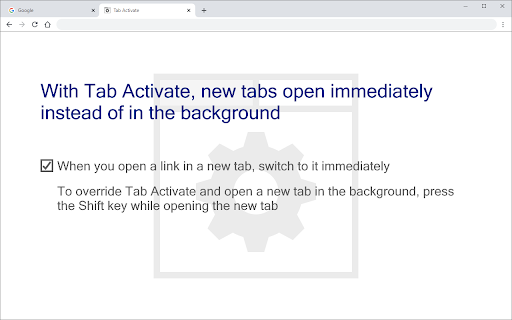
When you open a link in a new tab, Chrome opens the new tab in the background and provides no option to switch to it immediately.

With Tab Activate, new tabs open immediately instead of in the background.

To override Tab Activate and open a new tab in the background, press the Shift key while opening the new tab. Note: Override does not work for bookmarks.

Tab Activate effectively reverses Chrome's new tab focus behavior.

In other browsers, this setting is called: "When you open a link in a new tab, switch to it immediately."

----------------------------------------

Required Permissions

Read and change all your data on the websites you visit:
Required to detect when the Shift key is pressed (no website data is read or changed)

Due to limitations in the Chrome extension API, the only way to detect if the Shift key is being pressed is with the required permissions. Absolutely no data is changed or collected.

----------------------------------------

Changes

Version 3.2
Refactored code.
No longer requires bookmarks permission (bookmarks still work).

Version 3.1
Improved Shift key detection when the window loses focus.
Improved error handling.
Fixed a console error.

Version 3.0
Updated to Chrome Manifest V3.

Version 2.1
New icon.
Fixed issues created by Chrome 79 extension API changes.

Version 2.0
As requested, bookmarks are now supported.

Version 1.2
New tabs open to the right of the previous tab and new background tabs open at the end.

Version 1.1
Shift key overrides Tab Activate and opens new tabs in the background.

Version 1.0
Initial release.
Technical
- Version
- 3.2.1
- Manifest
- V3
- Size
- 6.14KiB
- Min Chrome
- 88
- Languages
- 1
- Featured
- No
Metadata
- ID
- jlmadbnpnnolpaljadgakjilggigioaj
- Developer ID
- uaf9062c5ab63a5f92479725dc7a7cdd0
- Developer Email
- [email protected]
- Created
- Apr 4, 2013
- Last Updated (Store)
- May 20, 2022
- Last Scraped
- Jun 7, 2026
- Website
- —
- Support URL
- —
- Privacy Policy
- —
Similar extensions
Alternatives to Tab Activate, ranked by description similarity.

Tab Position Options Fork
Fork of Tab Position Options - Select the tab opening position, new tab behavior and behavior after closing a tab
4.0K
★ 4.5

Vertical Tabs: compact, float
Vertical Tabs: compact, float - Manage all your browser tabs in a vertical panel
17
Keyboard Shortcuts to Reorder Tabs
Reorder shortcuts using ctrl-shift pgup/pgdn on Windows/Mac just like you can already do in Linux.
3.0K
★ 3.8

Clear Tabs
This extension clears all but the active tab in your browser.
1.0K
★ 4.8

Force Background Tab
Force New Tab Running In Background
30.0K
★ 3.9

New Tab Redirect
Redirect new tabs to any URL. Set your preferred homepage, dashboard, or favorite website automatically.
58

Child Tab Next
Force new/duplicated tabs (but not those opened via links) to open next to their opener, not at the very end.
775
★ 4.0

One Click Auto Tab Group
Auto-group tabs by site, then learn how you organize
455
★ 4.7
Data sourced from the Chrome Web Store · last verified Jun 7, 2026.