
Tab Hopper
Introducing Tab Hopper, a Chrome extension designed to streamline your browsing experience. Are you tired of constantly searching…
As of June 2026, Tab Hopper has 45 users and a 5.00/5 rating from 3 reviews in the Functionality & UI category.
Usersup 12.5 percent+12.5%
45
45
Ratingno change0%
5.00
3 reviews
Reviewsno change0%
3
Version
2.0
Manifest V3
History
3 snapshotsTracking since Apr 23, 2026.
View as table
| Date | Users | Rating | Reviews | Version |
|---|---|---|---|---|
| Apr 23, 2026 | 40 | 5.00 | 3 | 2.0 |
| May 12, 2026 | 44 | 5.00 | 3 | 2.0 |
| Jun 7, 2026 | 40 | 5.00 | 3 | 2.0 |
| Now | 45 | 5.00 | 3 | 2.0 |
Permissions & access
- Permissions
- storage
- Host access
- None declared
Screenshots
About
Introducing Tab Hopper, a Chrome extension designed to streamline your browsing experience.

Are you tired of constantly searching for your most recently used tabs among a sea of open pages? Tab Hopper is here to help. This innovative extension allows you to effortlessly switch between your two most recently accessed tabs, making multitasking a breeze.

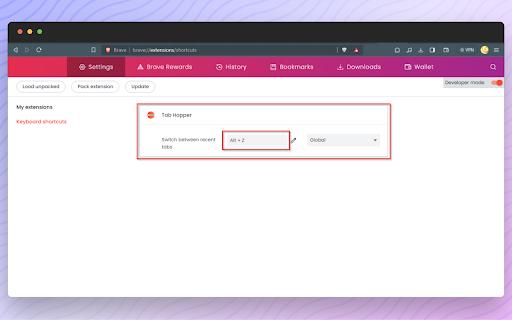
Imagine you have five tabs open. You’re working on a document in tab 2, but need to reference information from a webpage in tab 5. With Tab Hopper, a simple press of the Alt+Z keys will instantly take you from tab 5 back to tab 2. Press Alt+Z again, and you’re back on tab 5. It’s that easy!

Tab Hopper is more than just a tool - it’s your personal assistant for efficient web browsing. Say goodbye to wasted time and hello to increased productivity. Install Tab Hopper today and experience the difference for yourself. Happy hopping!
Technical
- Version
- 2.0
- Manifest
- V3
- Size
- 9.63KiB
- Min Chrome
- 88
- Languages
- 1
- Featured
- Yes
Metadata
- ID
- jllpemffmbceinpgdcdkccobefenibke
- Developer ID
- u0a7e4e3986108b51093ddf7a49e8133b
- Developer Email
- [email protected]
- Created
- Nov 18, 2023
- Last Updated (Store)
- Nov 18, 2023
- Last Scraped
- Jun 7, 2026
- Website
- —
- Support URL
- —
- Privacy Policy
- —
Similar extensions
Alternatives to Tab Hopper, ranked by description similarity.

Tab Switch with Search
Quickly switch between tabs using Ctrl+Q and a search function
4

Tab History Navigator
✅Navigate Your Tabs with Ease – Tab History Navigation Made Simple!
Tired of losing track of your browsing journey? This powerful…
11

BackTab
Cycle back and forward through your last 10 active tabs.
641
★ 4.4

Easy Tab Switcher
Switch between recent tabs with keyboard shortcuts, like browser history but for tabs!
5

Tab Buddy – Open Tabs Next to Current
Opens new tab next to the current one
245
★ 3.0

Tab Duplicator
Duplicate the current tab using customizable keyboard shortcuts
7
★ 5.0

Favorite Tabs
Manage and switch to your favorite tabs easily.
65
★ 5.0

Tab Manager
Tab Manager for Chrome
48
Data sourced from the Chrome Web Store · last verified Jun 7, 2026.