
Charlotte
Making the web more accessible for everyone. Provides screen reading, image captioning, high contrast, cursor changes and more!
As of May 2026, Charlotte has 26 users in the Accessibility category.
Usersdown 7.1 percent−7.1%
26
26
Ratingno change0%
—
— reviews
Reviewsno change0%
—
Version
0.5.0
Manifest V3
History
2 snapshotsTracking since Apr 29, 2026.
View as table
| Date | Users | Rating | Reviews | Version |
|---|---|---|---|---|
| Apr 29, 2026 | 28 | — | — | 0.5.0 |
| May 26, 2026 | 36 | — | — | 0.5.0 |
| Now | 26 | — | — | 0.5.0 |
Permissions & access
- Permissions
- contextMenusactiveTabstoragescripting
- Host access
- None declared
Screenshots


About
Charlotte aims to make the web more accessible by providing a suite of accessibility tools, all in one handy browser extension. Create an account with us, sign in, and you're ready to go!

Features
 • Select from a choice of 6 text-to-speech voices, adjust pitch and reading speed.
 • Highlight text by hovering over them, using our Highlight Elements functionality.
 • Use keyboard shortcuts (Alt+Left, Alt+Right) to navigate the page and highlight portions of text
 • Use Read on Highlight to read highlighted text aloud (integrates with Highlight Elements and keyboard shortcuts)
 • Change font size, on a sliding scale from native to 200%
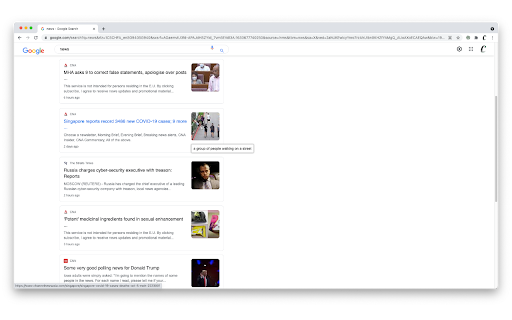
 • Provide image captions on mouse-over, powered by our remote machine learning algorithm
 • Increase cursor size to improve visibility
 • Enable High Contrast mode, for easier browsing
 • Change your font to a host of options, including reader-friendly sans-serif options and OpenDyslexic
 • Focus easier with Focus Ruler

Some functionalities such as Image Captioning is only available to users with an account.

To navigate Charlotte without using a mouse, we also have implemented keyboard shortcuts:
 • Alt+A: Enable accessibility features*
 • Alt+Left: Select the previous text element
 • Alt+Right: Select the next text element

*Please note that for security purposes, accessibility features cannot be enabled before user interaction (either through this shortcut or by clicking on our extension icon).

About Us
We originally developed Charlotte for the Tech 4 Good Festival by Engineering Good, Singapore. We believe the web is for everyone, and continue to maintain Charlotte in that spirit.

Privacy
Our extension is configured with the minimum permissions required for it to function properly.
View our privacy policy here: https://www.charlotteweb.io/privacy-policy

Support
Charlotte is still in beta development. Do reach out to us at [email protected] for feedback, or to find out more!
Technical
- Version
- 0.5.0
- Manifest
- V3
- Size
- 2.65MiB
- Min Chrome
- 88
- Languages
- 1
- Featured
- Yes
Metadata
- ID
- jkdoomkdcioheppgnmpakinhlgjflnem
- Developer ID
- u88e9ee8265116644bfc55a4aad61b272
- Developer Email
- [email protected]
- Created
- Oct 13, 2021
- Last Updated (Store)
- Oct 13, 2021
- Last Scraped
- May 26, 2026
- Website
- —
- Support URL
- —
- Privacy Policy
- https://www.charlotteweb.io/privacy-policy
Similar extensions
Alternatives to Charlotte, ranked by description similarity.

Universal Accessibility Helper
One-click accessibility improvements for any website
2

Website Accessibility Helper by Ensquire
Make websites easier to read and navigate based on your needs. We support Color Blindess, Dyslexia, Vision Impairment, and more.
56
★ 5.0

Accessibility Helper
Helps people with disabilities overcome accessibility barriers on websites
3

Read Aloud: Read webpage using text-to-speech
Use text-to-speech to read aloud the entire webpage or a selected part. TTS engine is fully customizable. Support PC voice packages.
3.0K
★ 1.5

Accessio for Accessibility
Enhance your browsing experience with customizable Accessibility features and a built-in Screen Reader for the current page.
12
★ 2.0

Accessibility Widget
Accessibility tools for everyone. Free, customizable, and easy to use.
29
★ 2.0

Accessibility Screen Reader
A comprehensive screen reader extension for web accessibility with voice navigation and on-screen text display
2.0K
★ 3.0

Sightly
An extension providing accessibility features like text-to-speech, text magnification, and keyboard shortcuts.
—
Data sourced from the Chrome Web Store · last verified May 26, 2026.