
Select to PDF
Select text from any webpage and compile it into a downloadable PDF with URL references
As of June 2026, Select to PDF has — users in the Productivity category.
Usersno change0%
—
—
Ratingno change0%
—
— reviews
Reviewsno change0%
—
Version
2.1.0
Manifest V3
90-day change · In the last 90 days this extension 1 version update, changed permissions.
History
8 snapshotsTracking since Apr 18, 2026.
View as table
| Date | Users | Rating | Reviews | Version |
|---|---|---|---|---|
| Apr 18, 2026 | 6 | — | — | 1.0.0 |
| Apr 25, 2026 | — | — | — | 2.1.0 |
| May 3, 2026 | 278 | — | — | 2.1.0 |
| May 14, 2026 | — | — | — | 2.1.0 |
| May 20, 2026 | 237 | — | — | 2.1.0 |
| May 26, 2026 | — | — | — | 2.1.0 |
| Jun 2, 2026 | 123 | — | — | 2.1.0 |
| Jun 8, 2026 | 59 | — | — | 2.1.0 |
| Now | — | — | — | 2.1.0 |
Changelog
- Apr 18, 2026description
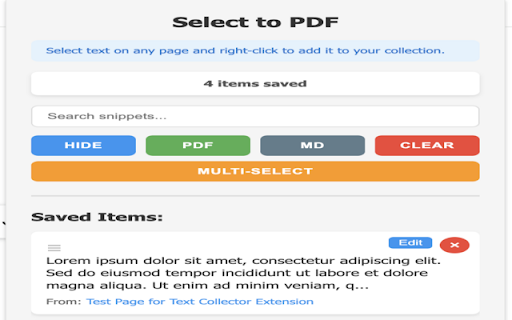
Text to PDF Collector lets you select text snippets from any webpage and save them to a collection. When you're ready, export everything into a single, clean PDF file — complete with source URLs for reference.

Features:
• Right-click selected text to save it instantly
• Collect text from multiple pages and tabs
• View, manage, and delete saved snippets from the popup
• Export all snippets to a single PDF with source references
• Name your PDF or use auto-generated filenames
• Badge counter shows how many snippets you've saved

Perfect for researchers, students, journalists, and anyone who needs to gather text from the web.
Text to PDF Collector lets you select text snippets from any webpage and save them to a collection. When you're ready, export everything into a polished PDF or Markdown file — complete with source URLs, formatting, and more. Features: • Right-click selected text to save it instantly — bold, italic, lists, links, and code blocks are preserved • Capture screenshots of any page element and include them in your collection • Multi-select mode: gather multiple selections from a page without reopening the menu • Tag and annotate snippets for easy organization • Search and filter your collection by tags, notes, or content • Drag and drop to reorder snippets before exporting • Export to PDF with a professional layout — cover page, table of contents, clickable links, and page numbers • Export to Markdown for use in notes, docs, or wikis • Collect from multiple pages and tabs • Badge counter shows how many snippets you've saved Perfect for researchers, students, journalists, and anyone who needs to gather and organize text from the web. - Apr 18, 2026name
Text to PDF Collector
Select to PDF
- Apr 18, 2026permissions
activeTab, storage, contextMenus, notifications
activeTab, storage, contextMenus, notifications, unlimitedStorage
Permissions & access
- Permissions
- activeTabstoragecontextMenusnotificationsunlimitedStorage
- Host access
- <all_urls>
Screenshots



About
Text to PDF Collector lets you select text snippets from any webpage and save them to a collection. When you're ready, export everything into a polished PDF or Markdown file — complete with source URLs, formatting, and more.

  Features:
  • Right-click selected text to save it instantly — bold, italic, lists, links, and code blocks are preserved
  • Capture screenshots of any page element and include them in your collection
  • Multi-select mode: gather multiple selections from a page without reopening the menu
  • Tag and annotate snippets for easy organization
  • Search and filter your collection by tags, notes, or content
  • Drag and drop to reorder snippets before exporting
  • Export to PDF with a professional layout — cover page, table of contents, clickable links, and page numbers
  • Export to Markdown for use in notes, docs, or wikis
  • Collect from multiple pages and tabs
  • Badge counter shows how many snippets you've saved

  Perfect for researchers, students, journalists, and anyone who needs to gather and organize text from the web.
Technical
- Version
- 2.1.0
- Manifest
- V3
- Size
- 139KiB
- Min Chrome
- 88
- Languages
- 1
- Featured
- No
Metadata
- ID
- jkcbdchnfakjopkeeibmnihaphiklfom
- Developer ID
- u54a33288a9a0f813efd92802cbefd630
- Developer Email
- [email protected]
- Created
- Feb 11, 2026
- Last Updated (Store)
- Apr 8, 2026
- Last Scraped
- Jun 8, 2026
- Website
- select-to-pdf.com
- Support URL
- —
- Privacy Policy
- https://select-to-pdf.com/privacy
Similar extensions
Alternatives to Select to PDF, ranked by description similarity.

Text Memo
Store selected text in a memo
13
★ 4.5

ZenMarker
Save text snippets from any website with optional notes and tags.
1

Snipets
Adds a context menu for selected text and stores it in your Snipets account.
1

QR Text Collector
Collect text from any tab and generate QR codes
—

Snippets Pro
Save and manage text snippets from any website with ease.
1
★ 5.0

Text Clipper - Save & organize text fragments
Save, organize and export text fragments from any webpage. Features: tags, search, favorites, dark mode, PDF export.
16
★ 5.0

Snippet
Automatically captures copied content (Text, Images, Video URLs) into a buffer and exports to Word.
3

CleverClip — Snippet Saver & Clipboard Manager
Save any text from the web with one right-click. Tag, search & copy snippets instantly. 100% local — no account, no tracking.
10
★ 5.0
Data sourced from the Chrome Web Store · last verified Jun 8, 2026.