
Context Menu Search
Use the right-click context menu to search selected text with different search engines instantly.
As of May 2026, Context Menu Search has 707 users and a 3.67/5 rating from 3 reviews in the Functionality & UI category.
Usersup 268.2 percent+268.2%
707
707
Ratingno change0%
3.67
3 reviews
Reviewsno change0%
3
Version
1.1.2
Manifest V3
History
2 snapshotsTracking since Apr 29, 2026.
View as table
| Date | Users | Rating | Reviews | Version |
|---|---|---|---|---|
| Apr 29, 2026 | 192 | 3.67 | 3 | 1.1.2 |
| May 26, 2026 | 229 | 3.67 | 3 | 1.1.2 |
| Now | 707 | 3.67 | 3 | 1.1.2 |
Permissions & access
- Permissions
- contextMenusstorage
- Host access
- None declared
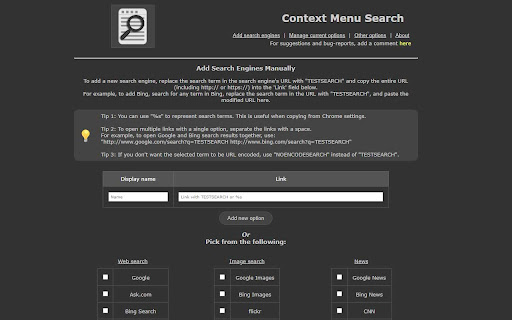
Screenshots

About
Context Menu Search

Enhance your browsing experience with "Context Menu Search", a simple yet powerful extension that lets you search selected text quickly and efficiently using your right-click menu. Add your preferred search engines, easily reorder them, and customize how search results are displayed.

Features:

●   Multiple Search Engines: Add and manage multiple search engines to the right-click context menu.
●   Customizable Search Options: Configure the search results to open in a new tab, either as a focused tab or a background tab.
●   Tab Placement: Set the location of the newly opened tab to be either next to the current tab or at the end of the tab list.
●   Order Management: Arrange the order of the search engines in the context menu according to your preference.
●   Predefined Search Engines: Choose from a list of more than 60 built-in search engine definitions for easy setup -- and customize them to your needs.
●   Custom Search Engines: Add custom search engines that are not included in the predefined list.
●   Handles Foreign-Language Searches: Supports non-english characters in search strings without issues.
●   Chrome Sync Support: One configuration shared across all browsers synced to your Chrome account.

Why install Right-Click Context Menu Search?

●   Saves time and effort by searching directly from the context menu.
●   Customize your search experience to suit your individual needs.

Basic Usage:
1.  Select the text you want to search for.
2.  Right-click to open the context menu.
3.  Choose your desired search engine from the list.
4.  The search results will open in a new tab based on your configured options.

Requires: Tested with Chrome 132 and later, but should work with older versions.

Support: Your feedback is valuable! If you find this extension useful, please leave a review. For support or suggestions, please use the support link.

Known Issues:
●   Search engine icons cannot be displayed in the context menu.
●   Chrome has some restrictions on where custom context menus can be placed.
●   The extension is currently only available in English.
Technical
- Version
- 1.1.2
- Manifest
- V3
- Size
- 210KiB
- Min Chrome
- 88.0.0.0
- Languages
- 1
- Featured
- No
Metadata
- ID
- jiemcgfaaankhcphdbfbilkldedojieb
- Developer ID
- u0c04f1597843d6b8452431c66ea9af26
- Developer Email
- [email protected]
- Created
- Mar 11, 2025
- Last Updated (Store)
- Mar 27, 2025
- Last Scraped
- May 26, 2026
- Website
- rathinosk.com
- Privacy Policy
- https://rathinosk.com/main/cms-privacy
Similar extensions
Alternatives to Context Menu Search, ranked by description similarity.

SearchScout
Search selected text across multiple engines
1

Search Selection
Right-click selected text to search it on your preferred search engine, in a new tab.
15

Search Manager: Change Default Search Engine
Manage search engines. Adds a premium New Tab page with customizable shortcuts and direct search selection.
—
★ 5.0

Custom Multi Search
Create, edit and manage custom search engines. Localized UI.
14

ClickToSearch
Select text and click (outside links) with a custom modifier combination to search using one of your saved search engines.
3

Chrome Quick Find
Instantly find bookmarks, folders, open tabs, and tab groups.
—

One Click Search - Select and search popup
Select any text and click the popup icons to search all of your favourite sites. Bring speed and efficiency to your web navigation.
1.0K
★ 4.2

Search Switch
A simple extension to add 'Search with Google' option in context menu even if you have some other search engine as default.
38
★ 5.0
Data sourced from the Chrome Web Store · last verified May 26, 2026.