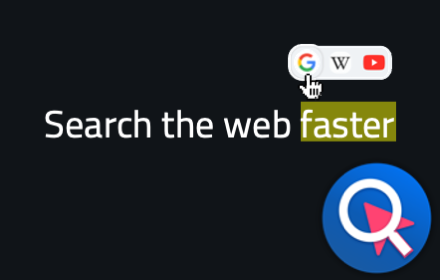
One Click Search - Select and search popup
Select any text and click the popup icons to search all of your favourite sites. Bring speed and efficiency to your web navigation.
As of June 2026, One Click Search - Select and search popup has 1,000 users and a 4.17/5 rating from 12 reviews in the Functionality & UI category.
Usersup 16.3 percent+16.3%
1.0K
1,000
Ratingup 2.0 percent+2.0%
4.17
12 reviews
Reviewsup 9.1 percent+9.1%
12
Version
2.0.30
Manifest V3
90-day change · In the last 90 days this extension 1 version update.
History
9 snapshotsTracking since Apr 1, 2026.
View as table
| Date | Users | Rating | Reviews | Version |
|---|---|---|---|---|
| Apr 1, 2026 | 860 | 4.09 | 11 | 2.0.24 |
| May 3, 2026 | 878 | 4.09 | 11 | 2.0.24 |
| May 8, 2026 | 890 | 4.09 | 11 | 2.0.30 |
| May 11, 2026 | 914 | 4.17 | 12 | 2.0.30 |
| May 15, 2026 | 959 | 4.17 | 12 | 2.0.30 |
| May 19, 2026 | 973 | 4.17 | 12 | 2.0.30 |
| May 24, 2026 | 929 | 4.17 | 12 | 2.0.30 |
| May 28, 2026 | 936 | 4.17 | 12 | 2.0.30 |
| Jun 2, 2026 | 993 | 4.17 | 12 | 2.0.30 |
| Now | 1.0K | 4.17 | 12 | 2.0.30 |
Changelog
- May 3, 2026description
Description:

Search faster and increase your productivity with One Click Search, the select and search popup.

One Click Search puts more power at your fingertips:

✓ Faster than copy and pasting text into a new tab
✓ More convenient than a context menu shortcut
✓ Don't just Google - search your favourite websites directly

How it works:

Simply highlight any text on any webpage and a pop-up will appear, displaying search icons for all of the websites entries you have stored.

One Click Search is highly customisable with an intuitive interface, allowing you to show as many or as few search icons as you like, in whatever order you like.

But that's not all - you can add as many additional websites as you choose, allowing you to customise the extension for your own needs. Most websites that have their own search functionality are compatible and can be added as search providers - and many translation services too!

NEW in Version 2.0:

✓ Updated user interface, logo and color scheme
✓ Easier method of adding search providers from URL string
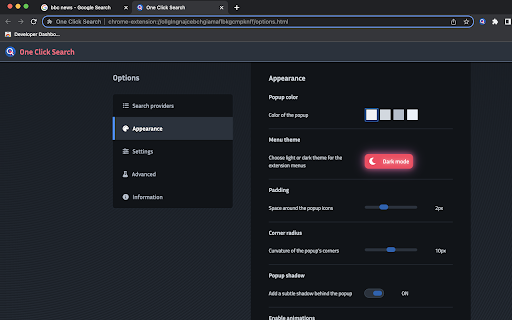
✓ Customisable popup appearance including color, size, shape and animations
✓ Sophisticated alerts, modals and dialogs
✓ Responsive options page design
✓ Dark and light modes
✓ Written in ReactJS for a rich user experience
Description:

Search faster and increase your productivity with One Click Search, the select and search popup.

One Click Search puts more power at your fingertips:

✓ Faster than copy and pasting text into a new tab
✓ More convenient than a context menu shortcut
✓ Don't just Google - search your favourite websites directly

How it works:

Simply highlight any text on any webpage and a pop-up will appear, displaying search icons for all of the websites entries you have stored.

One Click Search is highly customisable with an intuitive interface, allowing you to show as many or as few search icons as you like, in whatever order you like.

But that's not all - you can add as many additional websites as you choose, allowing you to customise the extension for your own needs. Most websites that have their own search functionality are compatible and can be added as search providers - and many translation services too!

NEW in Version 2.0:

✓ Updated user interface, logo and color scheme
✓ Easier method of adding search providers from URL string
✓ Customisable popup appearance including color, size, shape and animations
✓ Sophisticated alerts, modals and dialogs
✓ Responsive options page design
✓ Dark and light modes
✓ Written in ReactJS for a rich user experience

NEW in Version 2.0.3:
✓ Fix suppression of UPPER CASE letters in search URLs
Permissions & access
- Permissions
- storage
- Host access
- None declared
Screenshots



About
Description:

Search faster and increase your productivity with One Click Search, the select and search popup.

One Click Search puts more power at your fingertips:

✓ Faster than copy and pasting text into a new tab
✓ More convenient than a context menu shortcut
✓ Don't just Google - search your favourite websites directly

How it works:

Simply highlight any text on any webpage and a pop-up will appear, displaying search icons for all of the websites entries you have stored.

One Click Search is highly customisable with an intuitive interface, allowing you to show as many or as few search icons as you like, in whatever order you like.

But that's not all - you can add as many additional websites as you choose, allowing you to customise the extension for your own needs. Most websites that have their own search functionality are compatible and can be added as search providers - and many translation services too!

NEW in Version 2.0:

✓ Updated user interface, logo and color scheme
✓ Easier method of adding search providers from URL string
✓ Customisable popup appearance including color, size, shape and animations
✓ Sophisticated alerts, modals and dialogs
✓ Responsive options page design
✓ Dark and light modes
✓ Written in ReactJS for a rich user experience

NEW in Version 2.0.3:
✓ Fix suppression of UPPER CASE letters in search URLs
Technical
- Version
- 2.0.30
- Manifest
- V3
- Size
- 1.35MiB
- Min Chrome
- 88
- Languages
- 6
- Featured
- Yes
Metadata
- ID
- eaafadnjnjkpfeoghedeoadlnebaccbg
- Developer ID
- uee24f775eb61df392489092ede6567d6
- Developer Email
- [email protected]
- Created
- Jul 27, 2021
- Last Updated (Store)
- Apr 13, 2026
- Last Scraped
- Jun 11, 2026
- Website
- —
- Support URL
- —
- Privacy Policy
- —
Similar extensions
Alternatives to One Click Search - Select and search popup, ranked by description similarity.

Context Menu Search
Use the right-click context menu to search selected text with different search engines instantly.
707
★ 3.7

SimpleSearchNewTab
A minimalist browser extension that replaces the default new tab page with a sleek search interface.
9
★ 5.0

Custom Multi Search
Create, edit and manage custom search engines. Localized UI.
14

ClickToSearch
Select text and click (outside links) with a custom modifier combination to search using one of your saved search engines.
3

Search Selection
Right-click selected text to search it on your preferred search engine, in a new tab.
15

Chrome Quick Find
Instantly find bookmarks, folders, open tabs, and tab groups.
—

SearchScout
Search selected text across multiple engines
1

New Tab Plus
Add up to 50 shortcuts to the new tab page and choose your preferred search engine.
1.0K
★ 3.8
Data sourced from the Chrome Web Store · last verified Jun 11, 2026.