
Jumpcut
Navigate YouTube videos through description timestamps and comment chapters.
As of June 2026, Jumpcut has 383 users and a 3.67/5 rating from 12 reviews in the Entertainment category.
Usersdown 5.0 percent−5.0%
383
383
Ratingno change0%
3.67
12 reviews
Reviewsno change0%
12
Version
1.0.6
Manifest V3
90-day change · In the last 90 days this extension 1 version update, changed permissions.
History
11 snapshotsTracking since Apr 29, 2026.
View as table
| Date | Users | Rating | Reviews | Version |
|---|---|---|---|---|
| Apr 29, 2026 | 403 | 3.67 | 12 | 1.0.5.2 |
| May 4, 2026 | 393 | 3.67 | 12 | 1.0.6 |
| May 9, 2026 | 409 | 3.67 | 12 | 1.0.6 |
| May 12, 2026 | 386 | 3.67 | 12 | 1.0.6 |
| May 16, 2026 | 392 | 3.67 | 12 | 1.0.6 |
| May 20, 2026 | 390 | 3.67 | 12 | 1.0.6 |
| May 25, 2026 | 404 | 3.67 | 12 | 1.0.6 |
| May 30, 2026 | 393 | 3.67 | 12 | 1.0.6 |
| Jun 4, 2026 | 392 | 3.67 | 12 | 1.0.6 |
| Jun 8, 2026 | 401 | 3.67 | 12 | 1.0.6 |
| Jun 14, 2026 | 397 | 3.67 | 12 | 1.0.6 |
| Now | 383 | 3.67 | 12 | 1.0.6 |
Changelog
- Apr 29, 2026description
Make YouTube more fun and productive!

• New! Navigate YouTube Creator Timestamps by using the Jumpcut Next (shorcut: 'x') and Back (shortcut: 'z') buttons

• Create clips and cuts of videos and share with others!
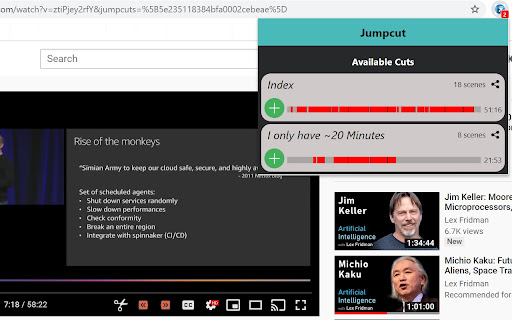
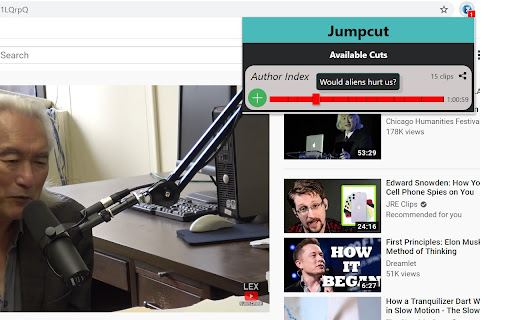
• Jumpcut loads author and comment timestamps to easily navigate the video
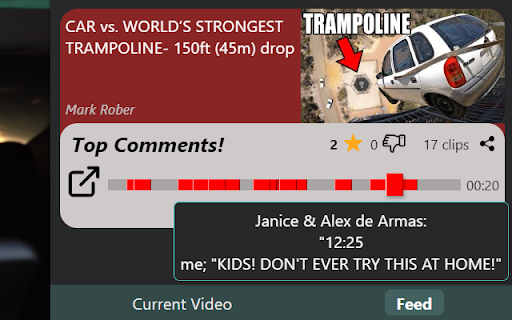
• Watch only the parts people are talking about in the comments section!
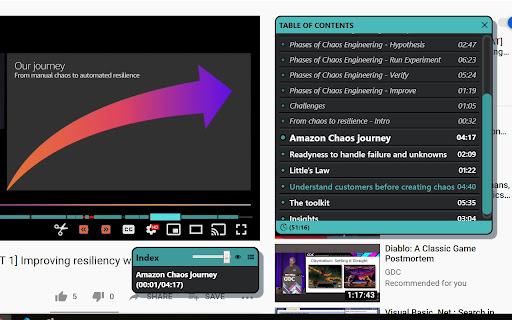
• An easy to use "Table of Contents" to quickly see if the video interests you
• Play shorter Jumpcuts of videos that skip over the boring parts
• Easily navigate by pressing 'x' to jump to the next clip and 'z' to jump back
• A new feed that allows you to discover videos that have the best comments and Jumpcuts
• Skip annoying sponsor segments and introductions
• Skip non-music parts in music videos
• Add commentary on your clips, it will show up while your friends watch the video

So why are you wasting time? Skip the boring parts, make time for more content!


Here are some example videos that will load Jumpcuts once you add the extension:
https://www.youtube.com/watch?v=uynBcLr8fEc&jumpcuts=5e44d815bdeac70002240503
https://www.youtube.com/watch?v=9Vmwsg8Eabo&jumpcuts=5e9d8edb6e29b90002fa30b2
https://www.youtube.com/watch?v=TqTXhKVtQbU&jumpcuts=5e945eae4a232d9d4652f469
Make YouTube more fun and productive!

• New! Navigate YouTube Creator Timestamps by using the Jumpcut Next (shorcut: 'x') and Back (shortcut: 'z') buttons


• Jumpcut loads author and comment timestamps to easily navigate the video
• Watch only the parts people are talking about in the comments section!
• An easy to use "Table of Contents" to quickly see if the video interests you
• Play shorter Jumpcuts of videos that skip over the boring parts
• Easily navigate by pressing 'x' to jump to the next clip and 'z' to jump back
• Skip annoying sponsor segments and introductions
• Skip non-music parts in music videos

So why are you wasting time? Skip the boring parts, make time for more content!


Edit: This will likely be the last release of Jumpcut.
Jumpcut will only use local data to show the cuts, either Channel description cut, or comments.
It was fun while it lasted, I hope you enjoyed it too!
- Apr 29, 2026short_description
Navigate videos through YouTube comments, or make your own personal edit of the video and share it!
Navigate YouTube videos through description timestamps and comment chapters.
- Apr 29, 2026host_permissions
https://us-central1-jumpcutbackend.cloudfunctions.net/*
(empty)
- Apr 29, 2026permissions
storage, clipboardWrite, tabs, identity
storage, clipboardWrite, tabs
Permissions & access
- Permissions
- storageclipboardWritetabs
- Host access
- None declared
Screenshots

About
Make YouTube more fun and productive!

• New! Navigate YouTube Creator Timestamps by using the Jumpcut Next (shorcut: 'x') and Back (shortcut: 'z') buttons


• Jumpcut loads author and comment timestamps to easily navigate the video
• Watch only the parts people are talking about in the comments section!
• An easy to use "Table of Contents" to quickly see if the video interests you
• Play shorter Jumpcuts of videos that skip over the boring parts
• Easily navigate by pressing 'x' to jump to the next clip and 'z' to jump back
• Skip annoying sponsor segments and introductions
• Skip non-music parts in music videos

So why are you wasting time? Skip the boring parts, make time for more content!


Edit: This will likely be the last release of Jumpcut.
Jumpcut will only use local data to show the cuts, either Channel description cut, or comments.
It was fun while it lasted, I hope you enjoyed it too!
Technical
- Version
- 1.0.6
- Manifest
- V3
- Size
- 157KiB
- Min Chrome
- 88
- Languages
- 1
- Featured
- Yes
Metadata
- ID
- jicbaeklgoninplhmenhndnidnbfaohm
- Developer ID
- ubd383dd9ef9e6198b6006d94f42dba85
- Developer Email
- [email protected]
- Created
- Jan 16, 2020
- Last Updated (Store)
- Apr 3, 2026
- Last Scraped
- Jun 14, 2026
- Website
- jumpcut.app
- Support URL
- —
- Privacy Policy
- https://www.jumpcut.app/privacy.html
Similar extensions
Alternatives to Jumpcut, ranked by description similarity.

SkipCut - YouTube Ad Blocker
Add SkipCut buttons to YouTube videos for ad-free viewing in one click
639
★ 5.0

YouTube Timestamp Extractor
Extract and display timestamped comments from YouTube videos.
11

Youtube Fast forward & Rewind Light
Use it on Youtube. Click built in buttons a few times. This extension can skip seconds and minutes.
1
CommentSync - Real-time YouTube Comments
Sync YouTube comments with video playback. See reactions and timestamps appear automatically as you watch.
1.0K
★ 4.6

Auto Skip YouTube Intros
Automatically skips the first 10 seconds of YouTube videos and provides a manual skip button for easy sponsor bypass.
—

Controls for YouTube
Add configurable keyboard shortcuts and customizations to the YouTube player.
115

Video Speed Booster & Ad Skipper
Boost video speed and skip ads on any website.
61

YouTube Shorts Auto Scroller
YouTube Shortsの再生終了時に自動で次の動画へ移動します(ON/OFF機能付き)。
17
Data sourced from the Chrome Web Store · last verified Jun 14, 2026.