
ChatGPT & Gemini Markdown Copy
Add Markdown copy button to ChatGPT and Gemini responses
As of June 2026, ChatGPT & Gemini Markdown Copy has 545 users and a 5.00/5 rating from 2 reviews in the Productivity category.
Usersdown 8.4 percent−8.4%
545
545
Ratingno change0%
5.00
2 reviews
Reviewsup 100.0 percent+100.0%
2
Version
2.1.3
Manifest V3
90-day change · In the last 90 days this extension 2 version updates.
History
10 snapshotsTracking since Apr 5, 2026.
View as table
| Date | Users | Rating | Reviews | Version |
|---|---|---|---|---|
| Apr 5, 2026 | 595 | 5.00 | 1 | 2.0.5 |
| Apr 18, 2026 | 423 | 5.00 | 1 | 2.0.5 |
| Apr 25, 2026 | 269 | 5.00 | 1 | 2.0.5 |
| May 2, 2026 | 301 | 5.00 | 1 | 2.1.1 |
| May 9, 2026 | 320 | 5.00 | 1 | 2.1.1 |
| May 14, 2026 | 374 | 5.00 | 1 | 2.1.1 |
| May 20, 2026 | 399 | 5.00 | 1 | 2.1.1 |
| May 26, 2026 | 425 | 5.00 | 1 | 2.1.1 |
| Jun 2, 2026 | 468 | 5.00 | 2 | 2.1.3 |
| Jun 8, 2026 | 496 | 5.00 | 2 | 2.1.3 |
| Now | 545 | 5.00 | 2 | 2.1.3 |
Permissions & access
- Permissions
- clipboardWritestorage
- Host access
- None declared
Screenshots

About
ChatGPT & Gemini Markdown Copy - Export AI Conversations in Perfect Markdown

Seamlessly copy AI responses from ChatGPT and Google Gemini in clean, properly formatted Markdown. Perfect for documentation, note-taking, and content creation.

✨ KEY FEATURES

• One-Click Markdown Copy - Add a convenient "M" button next to the native copy button
• Dual Platform Support - Works on both ChatGPT (chatgpt.com, chat.openai.com) and Google Gemini (gemini.google.com)
• Perfect Formatting - Preserves all formatting elements:
  - Code blocks with syntax highlighting
  - Mathematical formulas (KaTeX and Gemini math)
  - Headings, lists, and blockquotes
  - Links, bold, italic, and inline code
• Clean Output - Converts HTML responses to clean, readable Markdown
• Native Integration - Blends seamlessly with the original UI
• Privacy-First - All processing happens locally in your browser, no data collection

🎯 PERFECT FOR

• Developers documenting code solutions
• Technical writers creating tutorials
• Researchers organizing AI conversations
• Students taking notes
• Content creators repurposing AI responses
• Anyone who prefers Markdown format

🚀 HOW IT WORKS

1. Install the extension
2. Visit ChatGPT or Google Gemini
3. Generate a response from the AI
4. Click the "M" button to copy in Markdown format
5. Paste anywhere - your editor, notes, documentation

📋 SUPPORTED MARKDOWN FEATURES

• Headings (H1-H6)
• Bold and italic text
• Code blocks with language detection
• Inline code
• Links and images
• Ordered and unordered lists (with nesting)
• Blockquotes
• Horizontal rules
• Mathematical formulas (inline and block)

🔒 PRIVACY & PERMISSIONS

This extension only requires clipboard write permission to copy text. No data is collected, stored, or transmitted. All processing is done locally in your browser.

💡 OPEN SOURCE

This extension is open source and MIT licensed. Contributions are welcome!

Compatible with Chrome, Edge, Brave, and other Chromium-based browsers.
Technical
- Version
- 2.1.3
- Manifest
- V3
- Size
- 60.57KiB
- Min Chrome
- 88
- Languages
- 6
- Featured
- No
Metadata
- ID
- jhjeaknfkncejbnhdobkgcbfpebkbfcn
- Developer ID
- u8217b3c43e880de32a8415a72e1473f5
- Developer Email
- [email protected]
- Created
- Nov 19, 2025
- Last Updated (Store)
- May 24, 2026
- Last Scraped
- Jun 8, 2026
- Website
- https://www.0x1f0c.dev/
Similar extensions
Alternatives to ChatGPT & Gemini Markdown Copy, ranked by description similarity.

AI Markdown Download
Copy AI chat content (Gemini, ChatGPT, Perplexity) as Markdown to clipboard.
50
★ 5.0

Gemini to Markdown
Convert Gemini AI responses & Deep Research reports to Markdown. Copy or download as .md file with one click.
885
★ 3.7

AI Chat Exporter
Export Gemini and ChatGPT chats to Markdown with perfect LaTeX math, code, and formatting.
703
★ 5.0

Gemini Chat Exporter
Export your Gemini AI chat conversations as Markdown or directly to Notion
69
★ 5.0

ChatGPT Copy as Markdown
One-click copy from ChatGPT to Markdown. Preserves formatting, code, tables, and math.
55
★ 5.0

Gemini Chat Exporter
Export Gemini chats to HTML/Markdown. Batch delete conversations
42
★ 5.0

Chat Exporter for ChatGPT, Gemini & Claude
Export AI chats and sync to IdeaPi for workflow processing. Supports ChatGPT, Claude, Gemini, and more.
24
★ 5.0
ChatGPT to MarkDown plus
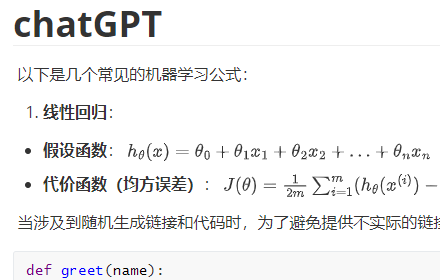
Export chat history from ChatGPT and Grok websites to normal format as Markdown, which can be opened via typora exactly.
3.0K
★ 4.8
Data sourced from the Chrome Web Store · last verified Jun 8, 2026.