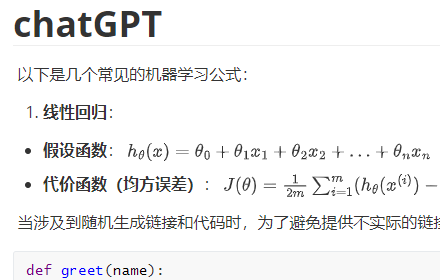
ChatGPT to MarkDown plus
Export chat history from ChatGPT and Grok websites to normal format as Markdown, which can be opened via typora exactly.
As of May 2026, ChatGPT to MarkDown plus has 3,000 users and a 4.76/5 rating from 38 reviews in the Productivity category.
Usersno change0%
3.0K
3,000
Ratingup 0.2 percent+0.2%
4.76
38 reviews
Reviewsup 5.6 percent+5.6%
38
Version
5.5
Manifest V3
History
3 snapshotsTracking since Apr 21, 2026.
View as table
| Date | Users | Rating | Reviews | Version |
|---|---|---|---|---|
| Apr 21, 2026 | 3.0K | 4.75 | 36 | 5.5 |
| May 6, 2026 | 3.0K | 4.76 | 37 | 5.5 |
| May 18, 2026 | 2.0K | 4.76 | 37 | 5.5 |
| Now | 3.0K | 4.76 | 38 | 5.5 |
Permissions & access
- Permissions
- None declared
- Host access
- None declared
Screenshots

About
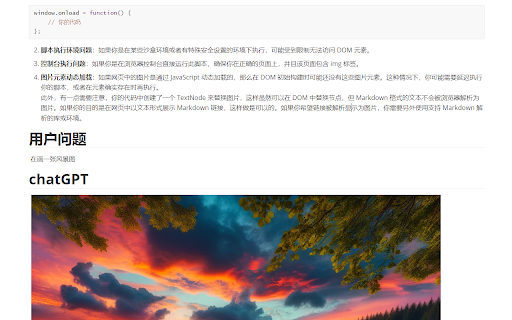
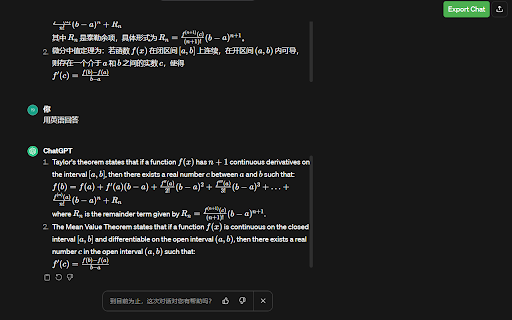
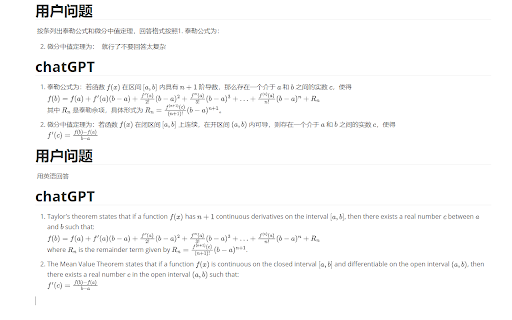
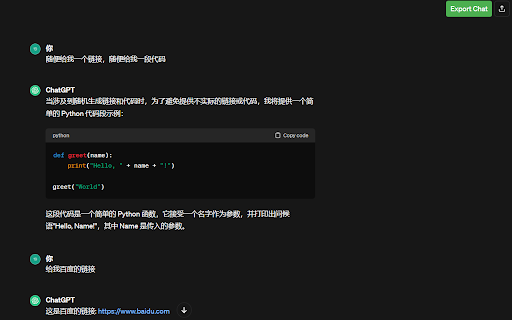
# 🚀 AI对话导出工具 (AI Chat Exporter) <div align="center"> <h3>轻松将AI对话导出为标准Markdown格式</h3> <p>支持 ChatGPT, Grok 和 Gemini 平台</p>    </div> ## ✨ 功能特点 - 🔄 **多平台支持**:同时支持 **ChatGPT**, **Grok** 和 **Gemini** 三大AI平台 - 📝 **完整内容保留**:精确导出所有对话内容,包括**代码块**、**数学公式**、**链接**和**格式化文本** - 🎨 **标准Markdown格式**:输出符合标准的Markdown格式,确保最佳兼容性 - 💾 **双重导出选项**:支持直接下载.md文件或复制到剪贴板 - 🖼️ **Typora完美兼容**:特别优化以确保在Typora等Markdown编辑器中正确显示 - 🔘 **界面控制**:可以通过弹窗开关控制页面上导出按钮的显示 - 🛠️ **对应Google插件**:提供[Chrome插件](https://chromewebstore.google.com/detail/chatgpt-to-markdown-plus/gcocgmkjaagjcijfmocbjghbpinamnhp?hl=zh-CN&utm_source=ext_sidebar)版本,方便在Google平台上使用,插件市场搜索 **ChatGPT to MarkDown plus** ## 🛠️ 安装步骤 ### 步骤 1: 下载代码库 克隆或下载本仓库到本地电脑。 ### 步骤 2: 加载插件  1. 打开Chrome浏览器,进入扩展程序页面(chrome://extensions/) 2. 开启右上角的"开发者模式" 3. 点击"加载已解压的扩展程序" 4. 选择下载的仓库文件夹,点击确认 ### 步骤 3: 使用插件  当您打开支持的AI平台网站时(ChatGPT, Grok或Gemini),您将在页面上看到绿色的"Export Chat"按钮。 使用方法: 1. 浏览您想要导出的对话 2. 点击绿色的"Export Chat"按钮直接下载Markdown文件 3. 或者点击插件图标,选择"Copy to Clipboard"将内容复制到剪贴板 ## 📋 导出效果 导出的.md文件可以完美在Typora等Markdown编辑器中打开:   ## 🌐 支持的平台 | 平台 | 状态 | 支持的功能 | |------|------|------------| | ChatGPT | ✅ 完全支持 | 代码块、数学公式、链接、列表、表格等 | | Grok | ✅ 完全支持 | 代码块、数学公式、链接、格式化文本等 | | Gemini | ✅ 支持 | 代码块、链接、列表、表格等 | ## 📜 许可证 本项目采用MIT许可证。详情请参阅LICENSE文件。 --- # 🚀 AI Chat Exporter <div align="center"> <h3>Easily Export AI Conversations to Standard Markdown Format</h3> <p>Support for ChatGPT, Grok, and Gemini platforms</p>    </div> ## ✨ Features - 🔄 **Multi-platform Support**: Works with **ChatGPT**, **Grok**, and **Gemini** - 📝 **Complete Content Preservation**: Accurately exports all conversation content, including **code blocks**, **mathematical formulas**, **links**, and **formatted text** - 🎨 **Standard Markdown Format**: Outputs compliant Markdown format for optimal compatibility - 💾 **Dual Export Options**: Download .md files directly or copy to clipboard - 🖼️ **Typora Compatibility**: Specially optimized for correct display in Typora and other Markdown editors - 🔘 **Interface Control**: Toggle the export button visibility through popup settings ## 🛠️ Installation ### Step 1: Download Repository Clone or download this repository to your local computer. ### Step 2: Load Extension  1. Open Chrome browser and go to the extensions page (chrome://extensions/) 2. Enable "Developer mode" in the top right corner 3. Click "Load unpacked" 4. Select the downloaded repository folder and confirm ### Step 3: Use Extension  When you open a supported AI platform (ChatGPT, Grok, or Gemini), you'll see the green "Export Chat" button on the page. Usage: 1. Browse the conversation you want to export 2. Click the green "Export Chat" button to download the Markdown file directly 3. Or click the extension icon and choose "Copy to Clipboard" to copy the content ## 📋 Export Results The exported .md files can be perfectly opened in Markdown editors like Typora:   ## 🌐 Supported Platforms | Platform | Status | Supported Features | |----------|--------|-------------------| | ChatGPT | ✅ Full Support | Code blocks, math formulas, links, lists, tables, etc. | | Grok | ✅ Full Support | Code blocks, math formulas, links, formatted text, etc. | | Gemini | ✅ Supported | Code blocks, links, lists, tables, etc. | ## 📜 License This project is licensed under the MIT License. See the LICENSE file for details.
Technical
- Version
- 5.5
- Manifest
- V3
- Size
- 42.32KiB
- Min Chrome
- 88
- Languages
- 1
- Featured
- Yes
Metadata
- ID
- gcocgmkjaagjcijfmocbjghbpinamnhp
- Developer ID
- ua82b5efa48015d1569aff38589c814fd
- Developer Email
- [email protected]
- Created
- Feb 9, 2024
- Last Updated (Store)
- Jun 25, 2025
- Last Scraped
- May 31, 2026
- Website
- —
- Support URL
- —
- Privacy Policy
- —
Similar extensions
Alternatives to ChatGPT to MarkDown plus, ranked by description similarity.

AI Chat Exporter
Export conversations from AI platforms (Gemini, Claude, ChatGPT). Download chats as JSON, Markdown, or PDF with media preserved.
470
★ 5.0

AI Chat Exporter
Export Gemini and ChatGPT chats to Markdown with perfect LaTeX math, code, and formatting.
703
★ 5.0

ChatGPT & Gemini Markdown Copy
Add Markdown copy button to ChatGPT and Gemini responses
545
★ 5.0

AI Chat Exporter – PDF, DOCX & Sheets
Save and export ChatGPT conversations instantly
43
★ 5.0

Chat Exporter for ChatGPT, Gemini & Claude
Export AI chats and sync to IdeaPi for workflow processing. Supports ChatGPT, Claude, Gemini, and more.
24
★ 5.0

AI Chat Exporter
Export AI chat conversations to Markdown format. Supports popular AI platforms.
407
★ 4.0

AI Chat Exporter
AIチャット(Gemini, ChatGPT, Claude, Grok, GenSpark)の履歴をワンクリックでコピー
73

AI Chat Exporter Pro
AIChatExporterPro — The Ultimate Multi-Platform AI Chat Export Tool
Export ChatGPT to PDF • Save Claude Conversations • Download…
517
★ 4.1
Data sourced from the Chrome Web Store · last verified May 31, 2026.