Browser Board
Turn your browser screen into a whiteboard
As of May 2026, Browser Board has 36 users and a 1.00/5 rating from 1 reviews in the Workflow & Planning category.
Usersup 56.5 percent+56.5%
36
36
Ratingno change0%
1.00
1 reviews
Reviewsno change0%
1
Version
1.0.0.2
Manifest V3
History
2 snapshotsTracking since Apr 29, 2026.
View as table
| Date | Users | Rating | Reviews | Version |
|---|---|---|---|---|
| Apr 29, 2026 | 23 | 1.00 | 1 | 1.0.0.2 |
| May 26, 2026 | 31 | 1.00 | 1 | 1.0.0.2 |
| Now | 36 | 1.00 | 1 | 1.0.0.2 |
Permissions & access
- Permissions
- storagewebNavigationscripting
- Host access
- http://*/, https://*/, file://*/
Screenshots
About
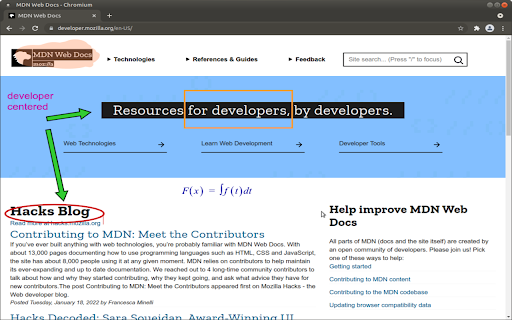
Have you ever needed to annotate a webpage for a meeting, a class, or a presentation? BrowserBoard makes it possible to do that. BrowserBoard allows you to do the following on virtually any webpage:

-draw
-highlight
-write text
-write equations
-draw arrows
-draw circles
-draw rectangles

all of the above, in a color and size of your choice.

BrowserBoard can be easily hidden, or disabled from the extension icon, it scrolls with most pages, and you can still use the webpage underneath even with the annotations. Best of all, it's totally free! Add it to Chrome and try it today.
Technical
- Version
- 1.0.0.2
- Manifest
- V3
- Size
- 2.85MiB
- Min Chrome
- 88
- Languages
- 1
- Featured
- No
Metadata
- ID
- jhccnpdblhpafjkhkfmnljcokkbkdkla
- Developer ID
- ud7d928f8c9a7a605f7edfdc320f3c1cc
- Developer Email
- [email protected]
- Created
- Oct 23, 2021
- Last Updated (Store)
- Jan 28, 2022
- Last Scraped
- May 26, 2026
- Website
- —
- Support URL
- —
- Privacy Policy
- —
Similar extensions
Alternatives to Browser Board, ranked by description similarity.

Web Paint - Page Marker & Editor
Draw shapes, paint lines, paint curves, add text on pages in real time. Take screenshot or print it. Paint Online.
400.0K
★ 4.6

Page Marker Pro - Draw on Web Pages
Draw on web page, annotate, and mark up any webpage with a floating toolbar. Add text, shapes, highlights, and freehand drawings.
106
Paint Tool for Chrome
Paint tool to draw anything and anywhere in real-time, paint online. Take a screenshot of your drawing use screenshot tool.
70.0K
★ 4.5

Screen Canvas - Draw on any Web page
Draw on any web page, highlight text blocks, and annotate them with notes and colours, all for FREE.
3.0K
★ 4.3
MathsUniverse.com Whiteboard
Annotate on a whiteboard canvas over any website. Supports gestures to change pen colour and complete other common actions.
261
★ 2.3

DMAS - Draw, Mark and Share
Smart web annotations extension. Make marks, highlight important and draw directly on web pages. Share and collaborate with others.
31
★ 5.0

Scribble Pad - Paint On Web
Scribble Pad turns any website into your personal canvas. Draw, sketch, write notes, capture screenshots and annotate in real time.
300
★ 5.0

The Blackboard - Lightning-Fast Real-time Collaborative Drawing tool
Lightning-fast, real-time collaborative drawing tool for seamless creativity and teamwork.
554
★ 5.0
Data sourced from the Chrome Web Store · last verified May 26, 2026.