
Screen Canvas - Draw on any Web page
Draw on any web page, highlight text blocks, and annotate them with notes and colours, all for FREE.
As of May 2026, Screen Canvas - Draw on any Web page has 3,000 users and a 4.33/5 rating from 21 reviews in the Workflow & Planning category.
Usersno change0%
3.0K
3,000
Ratingdown 0.7 percent−0.7%
4.33
21 reviews
Reviewsdown 4.5 percent−4.5%
21
Version
1.6.1
Manifest V3
History
1 snapshotsTracking since Apr 25, 2026.
View as table
| Date | Users | Rating | Reviews | Version |
|---|---|---|---|---|
| Apr 25, 2026 | 3.0K | 4.36 | 22 | 1.6.1 |
| Now | 3.0K | 4.33 | 21 | 1.6.1 |
Permissions & access
- Permissions
- storagescriptingactiveTabunlimitedStorage
- Host access
- None declared
Screenshots


About
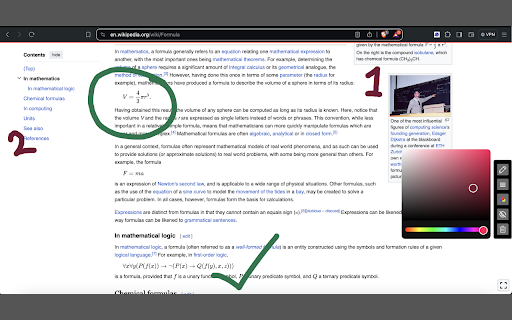
With Screen Canvas, you can draw on any web page, or annotate them.
You can highlight texts and add notes to them, so you remember why you highlighted them. You can drag your drawings from one area on the page to the other. Finally, you can take a screenshot of the page when you're done or create a share link that you can easily copy and paste.

Features:

⭐ You can draw on any web page with any colour
⭐ You can highlight texts and add notes to them for easy recollection
⭐ You can drag around your drawings
⭐ You can save your work and re-store it when a website reloads (Paid feature)
⭐ You can take full page screenshots that actually work 📸
⭐ You can hide and show drawings at any point
⭐ You can easily delete each drawing with your keyboard
⭐ You can easily share your annotations by converting it into a link that you can copy-page to your friends and colleagues
Technical
- Version
- 1.6.1
- Manifest
- V3
- Size
- 223KiB
- Min Chrome
- 88
- Languages
- 1
- Featured
- Yes
Metadata
- ID
- hkheabjfgcabjmgbdajcmkaokaeimhnc
- Developer ID
- ua24a88c289febee83ce29ce5ad3f42f2
- Developer Email
- [email protected]
- Created
- Jun 13, 2024
- Last Updated (Store)
- Feb 15, 2025
- Last Scraped
- May 21, 2026
- Website
- screencanvas.co
- Support URL
- —
- Privacy Policy
- https://screencanvas.co/privacy
Similar extensions
Alternatives to Screen Canvas - Draw on any Web page, ranked by description similarity.
Paint Tool for Chrome
Paint tool to draw anything and anywhere in real-time, paint online. Take a screenshot of your drawing use screenshot tool.
70.0K
★ 4.5

Easy Draw - Screenshot & Drawing Tool
Draw, annotate, and edit screenshots directly on any webpage. Perfect for collaboration and visual communication.
386
★ 5.0

Web Paint - Page Marker & Editor
Draw shapes, paint lines, paint curves, add text on pages in real time. Take screenshot or print it. Paint Online.
400.0K
★ 4.6

Scribble Pad - Paint On Web
Scribble Pad turns any website into your personal canvas. Draw, sketch, write notes, capture screenshots and annotate in real time.
300
★ 5.0

ScreenDoods
Take a website screenshot, doodle on it and download!
2

Paint Tool by Slash Mark
Draw, highlight, and annotate any webpage instantly using powerful on-page drawing tools.
—

Page Marker Pro - Draw on Web Pages
Draw on web page, annotate, and mark up any webpage with a floating toolbar. Add text, shapes, highlights, and freehand drawings.
106

Browser Board
Turn your browser screen into a whiteboard
36
★ 1.0
Data sourced from the Chrome Web Store · last verified May 21, 2026.