EmoGuard - Keyword Blocker
cross-platform 🤝 keyword blocker
As of May 2026, EmoGuard - Keyword Blocker has 3,000 users and a 4.73/5 rating from 60 reviews in the Productivity category.
Usersno change0%
3.0K
3,000
Ratingdown 0.4 percent−0.4%
4.73
60 reviews
Reviewsup 7.1 percent+7.1%
60
Version
1.3.2
Manifest V3
History
3 snapshotsTracking since Apr 1, 2026.
View as table
| Date | Users | Rating | Reviews | Version |
|---|---|---|---|---|
| Apr 1, 2026 | 3.0K | 4.75 | 56 | 1.3.2 |
| Apr 30, 2026 | 3.0K | 4.75 | 57 | 1.3.2 |
| May 28, 2026 | 3.0K | 4.73 | 59 | 1.3.2 |
| Now | 3.0K | 4.73 | 60 | 1.3.2 |
Permissions & access
- Permissions
- storagetabsactiveTabalarmscontextMenus
- Host access
- None declared
Screenshots




About
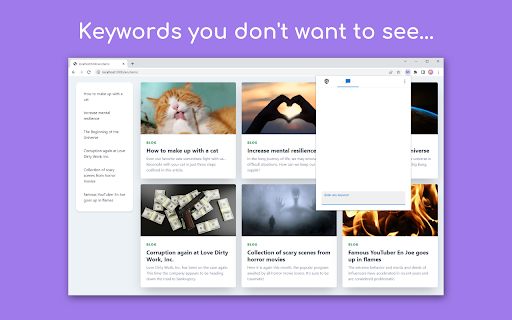
EmoGuard is a browser extension that allows you to block text or elements you don't want to see on any website.

➤ KEY FEATURES

• Keyword blocking:
Block keywords you don't want to see

• Customizing CSS selectors:
Pursue your own way of blocking

• Sync feature:
Sync data across all your devices using Dropbox

• Cross platform:
Supports desktop and some mobile browsers

➤ Why use EmoGuard?

• Get over the slander:
There are all kinds of people in the world. You can't change them, but you can control the information on the web pages you view with EmoGuard.

• Avoid any spoilers:
Spoilers sneak up on you like assassins and suddenly appear. Don't worry anymore, you can prevent it by adding the relevant words to EmoGuard.

• Focus on what matters:
Once people feel bad, they spend their time on distractions. So save your emotions with EmoGuard and use your precious time for what matters.

➤ More

For more information on how to use the extension, please visit the official website.
https://emoguard.app/

It's time to bring back the fun web.
Happy Internet Life!

➤ Release Notes

1.3.2
• Now supports Spanish, French, German, Italian, Dutch, Russian, Ukrainian, Chinese (Simplified), Chinese (Traditional), and Korean.

1.3.1
• Added feature to register keywords to the blocklist by right-clicking.
• Added option to always show whitelist.
• Updated default CSS selectors.
• Updated popup design.
• Fixed issue where the enable/disable of CSS selectors could not be overridden on each website.
• Fixed CSS selectors to be registered without converting letter case.

1.3.0
• Added whitelist feature.
• Added reset feature.
• Keyword detection sensitivity can now be adjusted.
• The popup icon now reflects the on/off status of the extension.
• Updated default CSS selectors.
• Fixed the popup screen design.
• Fixed an issue where keywords were not blocked in certain situations.
• Improved performance by skipping some processing when possible.

1.2.4
• Improved accuracy of keyword blocking.
• Fixed a sync bug.

1.2.3
• Improved stability and quality of keyword blocking.
• Fixed an issue that caused an error in Cloud Integration.

1.2.2
• Improved performance of keyword blocking.
• Fixed some bugs.

1.2.1
• Significantly improved performance of keyword blocking.

1.2.0
• Added CSS selector sorting feature.
• Added keyword sorting feature.

1.1.0
• Simplified the design of the extension's popup.
• Added customization mode for power users. Customization can be enabled from "⋮" in the top right of the popup.

1.0.0
• Released EmoGuard.

➤ Attribution

Twemoji graphics made by Twitter, Inc and other contributors are licensed under CC-BY 4.0:
https://creativecommons.org/licenses/by/4.0/
Technical
- Version
- 1.3.2
- Manifest
- V3
- Size
- 3.32MiB
- Min Chrome
- 88
- Languages
- 12
- Featured
- Yes
Metadata
- ID
- jgjkefnbeaoejcbpfggcggicconjfldd
- Developer ID
- u3a711e3ce9a1842ac2c577c018eac8db
- Developer Email
- [email protected]
- Created
- Oct 17, 2022
- Last Updated (Store)
- Jan 28, 2025
- Last Scraped
- May 28, 2026
- Website
- —
- Support URL
- —
- Privacy Policy
- https://emoguard.app/docs/privacy-policy
Similar extensions
Alternatives to EmoGuard - Keyword Blocker, ranked by description similarity.

Dewemoji - Emojis Made Effortless
Find and copy emojis instantly. Connect your account to use private keywords across web and extension.
8

EmojiClick - Emoji Keyboard
A simple emoji keyboard for Chrome.
82
★ 5.0

FocusGuard - Micro Task Manager
Capture & complete 1-5 minute micro-tasks with focus mode website blocking.
8
★ 5.0

FocusGuard - Block Distracting Websites
Stay focused during work hours by blocking distracting websites automatically.
4
★ 5.0
Emoji Remover
Clean AI-generated text by removing emojis. Right-click selected text or use the popup.
30
★ 5.0

Element Modifier Pro
Modify HTML element attributes, styles, and properties on any website
9

Defense against Distractions
Allows you to block websites based on the text that appears on their pages.
41

Clean View Filter - Take Control of What You See
Take control of what you see.
28
★ 5.0
Data sourced from the Chrome Web Store · last verified May 28, 2026.