
Page Marker - Draw on Web
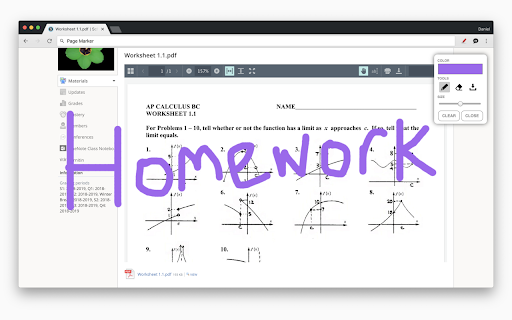
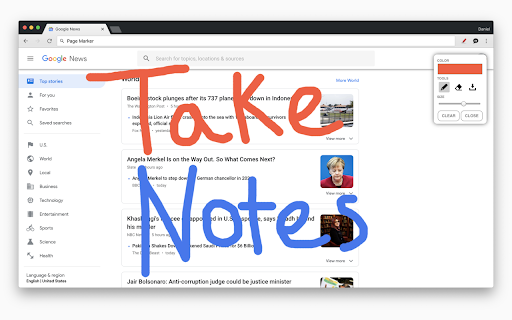
Draw or highlight on any website in real time. Add text, lines, and shapes. Move, undo, or redo anything you draw.
As of May 2026, Page Marker - Draw on Web has 900,000 users and a 4.09/5 rating from 615 reviews in the Workflow & Planning category.
Usersdown 10.0 percent−10.0%
900.0K
900,000
Ratingup 0.5 percent+0.5%
4.09
615 reviews
Reviewsup 2.3 percent+2.3%
615
Version
5.7
Manifest V3
90-day change · In the last 90 days this extension lost 100.0K users.
History
2 snapshotsTracking since Apr 30, 2026.
View as table
| Date | Users | Rating | Reviews | Version |
|---|---|---|---|---|
| Apr 30, 2026 | 1.0M | 4.07 | 601 | 5.7 |
| May 28, 2026 | 1.0M | 4.08 | 603 | 5.7 |
| Now | 900.0K | 4.09 | 615 | 5.7 |
Permissions & access
- Permissions
- activeTabstoragescripting
- Host access
- None declared
Screenshots



About
Draw on any website, add text, add lines, and highlight! With Page Marker, you can use your mouse or touchscreen to draw on the web or on PDFs and save it to your computer. Paint, draw, and mark on any webpage or website.

Instructions:
1. Click the puzzle piece-shaped extensions icon in the top right corner of your browser. Pin the Page Marker red marker icon for ease of access.

2. Begin drawing on any webpage with your mouse or touchscreen.

3. To change the color of the marker, click on the color selecting box.

4. To change thickness, use the size slider.

5. Use the highlighter tool to highlight lines of text.

6. Use the eraser tool to erase parts of your drawing.

7. Use the text tool to add text to the website.

8. Use the line tool to draw straight lines.

9. To undo or redo, click the corresponding undo/redo buttons.

10. Change the default color or thickness in the options menu when you right click the Page Marker icon.

Shortcuts:
Marker - "Shift" + "D"
Highlighter - "Shift" + "H"
Eraser - "Shift" + "E"
Pointer - "Shift" + "P"
Text - "Shift" + "T"
Move - "Shift" + "M"
Undo - "Shift" + "U"
Redo - "Shift" + "R"
Clear - "Shift" + "X"
Exit - "ESC"
Technical
- Version
- 5.7
- Manifest
- V3
- Size
- 133KiB
- Min Chrome
- 88
- Languages
- 1
- Featured
- Yes
Metadata
- ID
- jfiihjeimjpkpoaekpdpllpaeichkiod
- Developer ID
- u1f2ff54a0603ff2f69d7ed8cb0884214
- Developer Email
- [email protected]
- Created
- Sep 20, 2014
- Last Updated (Store)
- Dec 21, 2023
- Last Scraped
- May 28, 2026
- Website
- pagemarker.org
- Support URL
- —
- Privacy Policy
- https://pagemarker.org/privacy
Similar extensions
Alternatives to Page Marker - Draw on Web, ranked by description similarity.

Snap Marker
Mark, capture, download!
37
★ 5.0
Paint Tool for Chrome
Paint tool to draw anything and anywhere in real-time, paint online. Take a screenshot of your drawing use screenshot tool.
70.0K
★ 4.5

Page Marker - Web Annotation Tool
Advanced web page annotation tool with drawing, highlighting, and marking capabilities
127
★ 5.0

Web Paint - Page Marker & Editor
Draw shapes, paint lines, paint curves, add text on pages in real time. Take screenshot or print it. Paint Online.
400.0K
★ 4.6

Scribble Pad - Paint On Web
Scribble Pad turns any website into your personal canvas. Draw, sketch, write notes, capture screenshots and annotate in real time.
300
★ 5.0

Screen Canvas - Draw on any Web page
Draw on any web page, highlight text blocks, and annotate them with notes and colours, all for FREE.
3.0K
★ 4.3

Page Marker Pro - Draw on Web Pages
Draw on web page, annotate, and mark up any webpage with a floating toolbar. Add text, shapes, highlights, and freehand drawings.
106

Web Marker - Draw on Websites
Draw on any webpage in real time! Draw, highlight, add shapes & more. Easy to use, perfect for studying & teaching.
5.0K
★ 4.6
Data sourced from the Chrome Web Store · last verified May 28, 2026.