
Glyph to Clipboard
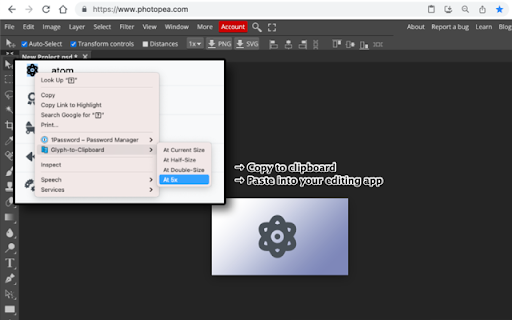
Convert any selected text to a transparent image and copy it to your clipboard.
As of May 2026, Glyph to Clipboard has 24 users and a 5.00/5 rating from 1 reviews in the Workflow & Planning category.
Usersdown 7.7 percent−7.7%
24
24
Ratingno change0%
5.00
1 reviews
Reviewsno change0%
1
Version
0.2.0
Manifest V3
History
2 snapshotsTracking since Apr 30, 2026.
View as table
| Date | Users | Rating | Reviews | Version |
|---|---|---|---|---|
| Apr 30, 2026 | 26 | 5.00 | 1 | 0.2.0 |
| May 28, 2026 | 25 | 5.00 | 1 | 0.2.0 |
| Now | 24 | 5.00 | 1 | 0.2.0 |
Permissions & access
- Permissions
- contextMenusactiveTab
- Host access
- None declared
Screenshots

About
Convert any selected webpage text to a transparent image and copy it to your clipboard.

This Chrome extension adds a context menu item using a content script.

Use it to:

* Easily convert icon fonts to images
* When you want to preserve the exact appearance of selected text

--

Extension Icon / Logo: Clone icons created by itim2101 - Flaticon (https://www.flaticon.com/free-icons/clone)

This Chrome extension is provided under the MIT License.
Technical
- Version
- 0.2.0
- Manifest
- V3
- Size
- 15.35KiB
- Min Chrome
- 88
- Languages
- 1
- Featured
- No
Metadata
- ID
- jekkangejnhdpipbmohlfmijeknidjgm
- Developer ID
- u1a15801ed493f31ec7642289424d9583
- Developer Email
- [email protected]
- Created
- Jan 25, 2022
- Last Updated (Store)
- Jan 25, 2022
- Last Scraped
- May 28, 2026
- Website
- —
- Privacy Policy
- —
Similar extensions
Alternatives to Glyph to Clipboard, ranked by description similarity.

ChatGPT Remove Background Color on Copy
A simple Chrome extension to remove the background color from copied text.
762
★ 3.4

Activate Enable Right Click & Copy
Allow Right Click, Enable Copy and Paste in Every Site. Simple Allow Copy, Activate Enable Right Click, Copy Text Easily.
50.0K
★ 4.3

URL Gathering Tool
An extension that gathers all URLs currently open in the browser, allowing them to be easily copied in multiple formats.
35

Image to Text (OCR)
A Fast and simple document scanner app with high quality text output.
100.0K
★ 2.3

Copy for FontAwesome
Add a copy button for FontAwesome search list
33

Obfuscate texts
With this extension you can make any texts inside a web page untradable, by selecting texts and using context menu or toolbar…
99
★ 4.0

Link to Text Fragment
Browser extension that allows for linking to arbitrary text on a page.
90.0K
★ 3.7

Converter App Image Converter Extension
Connects your Chrome browser with the converter API and allows you to convert web images to another format from the context menu.
1.0K
★ 4.6
Data sourced from the Chrome Web Store · last verified May 28, 2026.