
Aspen Attendance & Email Tweaks
Extract email addresses from Aspen reports & tweaks to the addendance capabilities
As of May 2026, Aspen Attendance & Email Tweaks has 148 users in the Education category.
Usersdown 1.3 percent−1.3%
148
148
Ratingno change0%
—
— reviews
Reviewsno change0%
—
Version
0.3.0
Manifest V3
History
3 snapshotsTracking since Apr 1, 2026.
View as table
| Date | Users | Rating | Reviews | Version |
|---|---|---|---|---|
| Apr 1, 2026 | 150 | — | — | 0.3.0 |
| Apr 30, 2026 | 152 | — | — | 0.3.0 |
| May 28, 2026 | 150 | — | — | 0.3.0 |
| Now | 148 | — | — | 0.3.0 |
Permissions & access
- Permissions
- storage
- Host access
- None declared
Screenshots


About
This extension tweaks and/or adds some functionality in the Follett Apsen Gradebook and Attendance reports.  It also allows you to record `transgressions` relating to the OCDSB/provincial cell phone usage restrictions

🆕 v0.3.0 extends the tracking and reporting capabilities introduced in v0.2.0.
 Specifically, a new tracking option for washroom breaks has been added.  You can now also generate a report of all incidents for a specific student and also for the entire class.

 v0.2.0 added the ability to record `transgressions` relating to the new provincial cell phone usage restrictions --> see attached screenshot below.

As well, it
a) allows you to copy some or all of the email addresses from the Gradebook --> Roster report as well as the Students-->Student List report, and new in version 0.0.7, from the Attendance reports as well
b) better enables/disables the absent/present button in the Attendance reports, adds a count of the number present/absent students at the top of the report, and, last but not least, auto-selects the TimeIn field in the Lates dialog so all you have to do is enter the time.
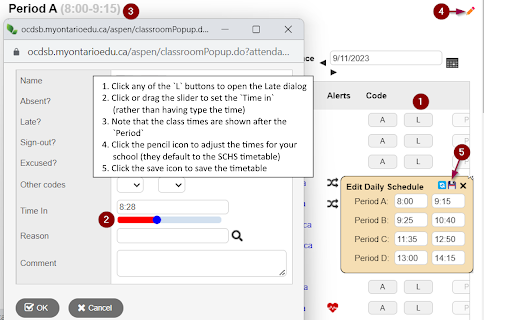
c) Adds a clickable slider to the Lates dialog that makes it easier to record the entry time for students who are late.

NB - this extension is currently setup to only work with the Aspen SIS for the Ottawa Carleton District School Board (OCDSB).  Contact me directly if you are interested in it for your board

To see things in action, simply open Aspen and change to the Gradebook or the Attendance tab
Select one of your classes
If necessary, change to a `field set` which includes one or more email addresses
Then select one or more rows in the table
Click the copy emails icon (which'll appear on the left side of the screen... right above the table)
The email addresses will be auto-magically copied to the clipboard so you can paste them into your email tool (NB: use the BCC option!)

Also, go to the Attendance report for a class
Click `A` to mark a student absent (and the button will be disabled); click `P` to mark them present (and the absent button will be re-enabled)
Click `L` to mark a student late and the Time In field will be auto-selected... no not a magical feature but it'll save you several clicks per day

Last but not least, in the 'Late` dialog appears when you click `L`, there's a slider below the `Time in` input field that allows you to simply click to enter the entry time.  Again, not earth shattering but it makes it easier for me.
NB - the daily schedule defaults to the timetable at South Carleton but you can adjust it for another school.

Change History:
v0.1.2 - fixed the slider so that it actually slides now... see the image below
v0.1.1 - fixed an attendance issue for split classes
v0.1.0 - the following somewhat significant changes
    - Attendance: added the class time after the Period entry in the top left corner of the page.  By default, the extension uses the time table at SCHS... but you can tweak if for another school by clicking the `✏️` icon to the right of the Period.  That opens a dialog where you can edit the start end end times for your day.  Click `💾` to save the changes or `🗙` to leave without save or `🔄` to reset to the default SCHS schedule.
    - Late dialog:  this dialog appears when you click `L` beside of the of the students on the attendance page.  I've added a slider below the `Time in` input field that allows you to simply click to enter the time.

v0.0.7  - the following minor changes:
    - Attendance: added checkboxes which replicate the functionality previously available the Student and Gradebook tabs - specifically, you can now copy email addresses from the addendance tab

v0.0.6  - the following minor changes:
    - Attendance: fixed an oops error in CountAbs()... doh!
v0.0.5  - the following minor changes:
    - modified the name to reflect that the extension tweaks both attendance and email capabilities
    - Attendance: tweaked the code to calculate the present/absent
    - Attendance: added code to auto-select the timeIn field in the Late pop-up dialog
    - Email:  clicking anywhere in a row (as long as it is not already hyperlinked), selects or deselects the checkbox
v0.0.4  - the following minor changes:
    - Attendance: tweaked the code to calculate the present/absent
    - Attendance: added code to auto-select the timeIn field in the Late pop-up dialog
    - Email:  clicking anywhere in a row (as long as it is not already hyperlinked), selects or deselects the checkbox
v0.0.3 - added present/absent counts to the top of the attendance page; added get email functionality to the School View-->Students page(s)
v0.0.2 - fixed HTML & CSS for extension pop-up window; expanded the `matches` URL to include the students page (as well as the gradebook page)
v0.0.1 - initial public release

The extension used the `Storage` feature to retain the school timetable from one session to the next.  It does not record/transmit/collect or share any student information at all.
Technical
- Version
- 0.3.0
- Manifest
- V3
- Size
- 224KiB
- Min Chrome
- 88
- Languages
- 1
- Featured
- No
Metadata
- ID
- jdpkknekklopkbmdeidolkcgijhpfcig
- Developer ID
- u1bc69604ff5781b2b90327d36a65fd22
- Developer Email
- [email protected]
- Created
- Sep 13, 2022
- Last Updated (Store)
- Dec 6, 2024
- Last Scraped
- May 28, 2026
- Website
- —
- Support URL
- —
- Privacy Policy
- —
Similar extensions
Alternatives to Aspen Attendance & Email Tweaks, ranked by description similarity.

SAS - Student Attendance System
Student attendance tracking with CSV import, session time tracking, behavior logging, and Excel export
21
★ 5.0

Enhanced Canvas LMS To Do (Ungraded List)
Enhanced Canvas LMS To Do list with ungraded submissions, missing work tracking, bulk messaging, and Excel export.
120
★ 5.0

Tasks for Canvas – now supporting Blackboard, D2L Brightspace
A better to-do list sidebar for Canvas, Blackboard, and D2L Brightspace.
800.0K
★ 4.7

GOLD Additions
Quality of life implementations into UCSB's course registration system GOLD
10
★ 5.0

Classroom Tweaks
Quality-of-life modifications for Google Classroom™
—

USC Schedule Helper
A tool to help you find classes at USC
20.0K
★ 4.9

Infinite Campus Insight
Weighted average, grade trends, what‑if grades, local cache, automatic grades refresh, and goal GPA probability for Infinite Campus.
167
★ 4.8

Infinite Campus Grades++
Alternative Version of FUSD Infinite Campus (with grade simulation)
1.0K
★ 4.7
Data sourced from the Chrome Web Store · last verified May 28, 2026.