
Infinite Campus Grades++
Alternative Version of FUSD Infinite Campus (with grade simulation)
As of May 2026, Infinite Campus Grades++ has 1,000 users and a 4.71/5 rating from 7 reviews in the Education category.
Usersno change0%
1.0K
1,000
Ratingno change0%
4.71
7 reviews
Reviewsno change0%
7
Version
2.6
Manifest V3
Permissions & access
- Permissions
- storage
- Host access
- https://fremontunifiedca.infinitecampus.org/*
Screenshots

About
Tired of the confusing Infinite Campus grades UI and having to manually calculate the lowest grade you can get on an assignment?

Worry no longer! This handy extension aims to address 2 crucial oversights of Infinite Campus, a confusing UI and the inability to simulate your grade.

Features:
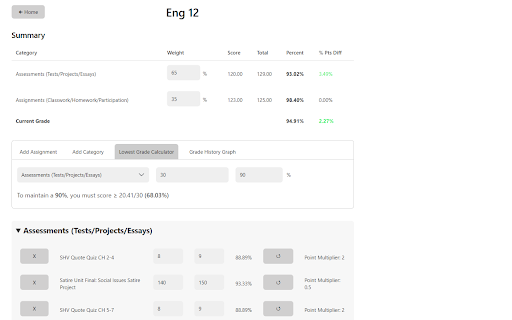
● Assignments for each class are sorted neatly by grading category with your current grade and category grades at the top of the page
● Simulate your grade by changing your score for past assignments, adding new assignments, or deleting past ones
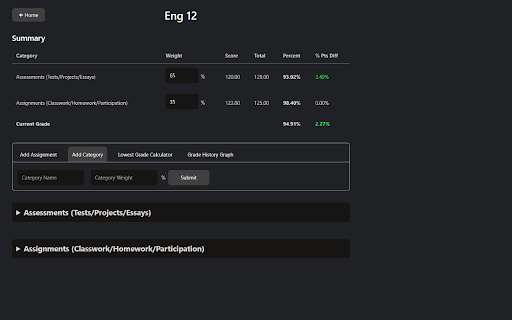
● Create new categories and change the weightage of existing ones
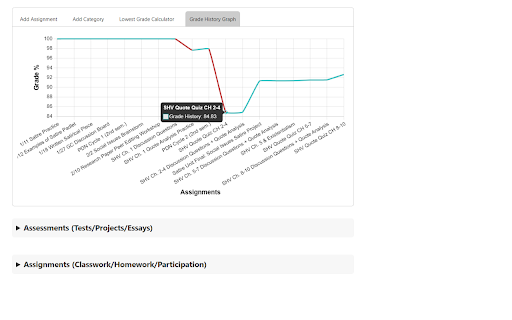
● Graph of how your grade has been changing throughout the semester
● Calculate the lowest grade you can get on an assignment to maintain a certain grade
● Light and Dark Mode

Usage:
1. Make sure you are signed in to FUSD Infinite Campus
2. After installing, click on the green Infinite Campus icon on the toolbar to open the home page
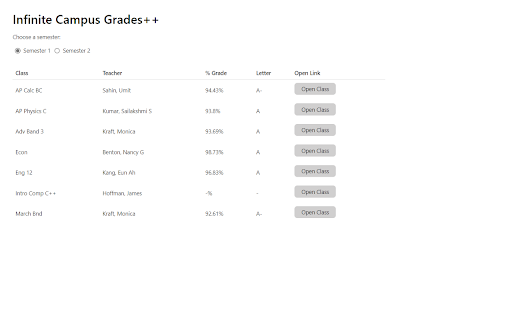
3. Here, you can see a list of your current classes and grades
     ● You can change the semester you are viewing by clicking the radio buttons below the title
4. If you click on the "Open Class" button next to each class entry, you will be brought to the class page
5. Here, you can see all your assignments and grades for the class. You can:
     ● Create new assignments and categories
     ● Update assignment scores using the input boxes next to each assignment
     ● Delete assignments
     ● Reset assignments to their original score
     ● Update category weightages using the input boxes in the summary table
6. The "Lowest Grade Calculator" tab allows you to calculate the lowest grade you can get on an assignment in order to maintain a certain grade
7. The "Grade History Graph" tab shows a graph of how your grade has changed during the semester
8. Enjoy!

Note: Calculated grades may be off by at most 0.01% due to rounding errors

To report any bugs, email [email protected] or open an issue on GitHub (https://github.com/jonathanjma/Infinite-Campus) with a detailed description of the issue.
Technical
- Version
- 2.6
- Manifest
- V3
- Size
- 92.33KiB
- Min Chrome
- 88
- Languages
- 1
- Featured
- No
Metadata
- ID
- kfanojpgbklafmhammpnbajkkdpehign
- Developer ID
- udf0e63c77ece73ebb9d76ede5d7f4926
- Developer Email
- [email protected]
- Created
- Dec 23, 2021
- Last Updated (Store)
- Jan 16, 2024
- Last Scraped
- May 21, 2026
- Website
- —
- Support URL
- —
- Privacy Policy
- —
Similar extensions
Alternatives to Infinite Campus Grades++, ranked by description similarity.

Infinite Campus Insight
Weighted average, grade trends, what‑if grades, local cache, automatic grades refresh, and goal GPA probability for Infinite Campus.
167
★ 4.8

Google Classroom Grade Calculator | GCGC
Change assignment scores to see how they affect your overall grade.
—
★ 5.0

Focus What-If Grade Calculator
Plan your grades before they happen. Simulate assignments, edit scores, and instantly see your what-if grade in Focus.
27

Focus Grade Calculator
Secure floating grade calculator for Focus gradebook with enhanced privacy protection.
642
★ 4.4

PowerSchool Grade Calculator
Redesign PowerSchool with modern themes, track GPA, calculate what-if grades, and see all your assignments beautifully organized.
353
★ 5.0

Canvas Analytics
Analytical features for your grades that would skyrocket your school performance.
887
★ 5.0
Easy Grader
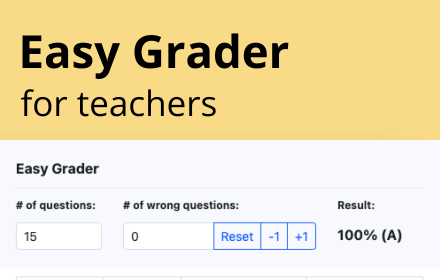
Easy Grader – A Chrome Extension calculator to help you grade your students' assignments.
166

Focus Grade Calculator
Add a hypothetical grade calculator to the FOCUS portal
58
★ 3.9
Data sourced from the Chrome Web Store · last verified May 21, 2026.